Need Expert Camera Advice! Do I Buy Photoshop?-11/13/12

my camera will be here TOMORROW! :banana: :dance: i am SOOOOOO happy!

i am a TRUE gadget ho-nothing makes me happier than a new "toy"! lol
 

WELL?!?!?!? :lmao:

well, the camera came yesterday, and it's awesome! BUT, the memory cards won't be here until tomorrow at the earliest (and probably not until saturday), so i can't use the camera until i get them! :headache:

i was hoping i'd get to try it out at the football game tomorrow night, but it's not looking good right now. i sent my old camera in to canon today via ups, and i wasn't the least bit sorry to see it go! :thumbsup2
 
Jesus woman! Go to your local BB or Target and buy a $10 card and start playing! It ain't like it's going to waste! :rotfl2:
 
:lmao::rotfl:
you sound like my husband! he said the same thing! LOL

i'm trying to be patient... :angel:

I might be missing something, but it seems the memory card from your old camera may be compatible...might not be fast enough to support burst shooting, but may be better than nothing.
 
I might be missing something, but it seems the memory card from your old camera may be compatible...might not be fast enough to support burst shooting, but may be better than nothing.

i'm not sure the old one would work - it's a 512mb card, and it has LOTS of pics on it, lol. didn't want to risk losing anything, so, this morning, when i found out my new cards wouldn't be coming today (per my local post office, amazon sent them fedex smartpost), i went to wal-mart and bought a new, 8Gb, class 10 card.

took a few pics outside with both lenses, and it was AWESOME! :cool1::thumbsup2

i'm ready for tonight's football game! last away game of the season, so it's my last chance to get decent pics!
 
i'm not sure the old one would work - it's a 512mb card, and it has LOTS of pics on it, lol. didn't want to risk losing anything, so, this morning, when i found out my new cards wouldn't be coming today (per my local post office, amazon sent them fedex smartpost), i went to wal-mart and bought a new, 8Gb, class 10 card.

took a few pics outside with both lenses, and it was AWESOME! :cool1::thumbsup2

i'm ready for tonight's football game! last away game of the season, so it's my last chance to get decent pics!

OK, Just as well, the new 8GB card is a lot better :)

I hope you have more of a backup system than just the card. A card can fail or get lost. Flikr is better than nothing, but it does not retain the exact image quality.
 
OK, Just as well, the new 8GB card is a lot better :)

I hope you have more of a backup system than just the card. A card can fail or get lost. Flikr is better than nothing, but it does not retain the exact image quality.

Actually, while it may not display a true image, I *believe* that Flickr does store the full image.
 
Actually, while it may not display a true image, I *believe* that Flickr does store the full image.

Fickr pro does offer the original resolution, but the site will still optimize the file and that usually alters colors, contrast, etc. Sometimes only slightly, but it will not be the original image when you download the file later.
 
Fickr pro does offer the original resolution, but the site will still optimize the file and that usually alters colors, contrast, etc. Sometimes only slightly, but it will not be the original image when you download the file later.

Ahhh, thank you for the clarification.
 
thanks, everyone! backing up my card is a great idea! i'll make sure to either upload to my computer, a flash drive, or flickr when i get home!

oh, and guess what came in the mail today?! :headache: the memory cards my post office said weren't here yet!
 
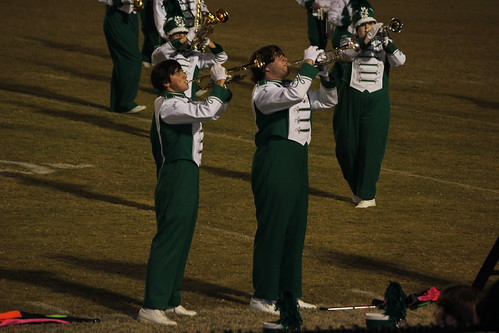
The blur looks an awful lot like motion blur which is from a too slow shutter speed. Remember the 1/focal length rule as your starting point. You want to use your focal length then add a stop or two to stop the movement of the band members. Some people who are particularly unstable with a lens will have to add another stop or two. Make sure you're adding whole stops, not halves or thirds.
 
Could be those moving focal points too. Try setting your focal point to the center one and focus on shooting some non-moving objects and see what that gets you. Those variable focal points drove me crazy until I finally understood them.

Do you have software that tells you what the focus point was? If not, you can put them back on a card and back in the camera and it will tell you.
 
I went back and looked at the EXIF data now that I had time. IMG 0037 has a focal length of 163mm with a shutter speed of 1/60. THat shutter speed needs to be a lot faster than that. At that focal length shooting band I'd probably be using at least 1/250 just to be sure I'm going to freeze the action and to counter me moving as I shoot. THe aperture was wide open so there's no room to go there, but the ISO was only set at 400 so there was plenty of room to bump that up and get a faster shutter speed. The IS on your lens helps some here. If you look at the last one you posted, the shutter speed and focal length are the same as 0037. But it looks like the subjects were still and you must have held really steady when shooting it.

Also, kill the flash when shooting like this. It's not doing you any good and just draining your battery more.

As far as the focus point, on 0037 it looks like it's on the girl on the left.
 
I went back and looked at the EXIF data now that I had time. IMG 0037 has a focal length of 163mm with a shutter speed of 1/60. THat shutter speed needs to be a lot faster than that. At that focal length shooting band I'd probably be using at least 1/250 just to be sure I'm going to freeze the action and to counter me moving as I shoot. THe aperture was wide open so there's no room to go there, but the ISO was only set at 400 so there was plenty of room to bump that up and get a faster shutter speed. The IS on your lens helps some here. If you look at the last one you posted, the shutter speed and focal length are the same as 0037. But it looks like the subjects were still and you must have held really steady when shooting it.

Also, kill the flash when shooting like this. It's not doing you any good and just draining your battery more.

As far as the focus point, on 0037 it looks like it's on the girl on the left.

yep, that's what happens when you use full auto mode...lol. i didn't get my memory cards until late friday morning, so there was no time to really practice with the camera. in the shot of the two boys playing trumpet, they were still, and i was holding very still as well. unfortunately, in the case of DD15, she's NEVER still, so it's almost impossible to catch her. every time i thought i could get her, she took a step to the left or right, lol. i was also using the zoom lens when i took the pics of the boys; i was using the kit lens to start with, in the pics of DD15.
i've been reading "understanding exposure", but i'm probably going to need a class too. my plan is to call the local community college tomorrow morning, and find out if their winter CE classes include photography.
 
okay, guys, i have a question.

DD15 wants to go to disney on ice this weekend, and DH agreed. so, what is the best way for me to capture this?

it will be indoors, at a civic center, and i've found, so far, that the best way to get shots indoors is on full auto (when i try to do it manually by setting the ISO, aperture and shutter speed, the shutter always stays open too long, even when the camera says i have it set correctly, and the photo is blurry and overexposed).

is there a better way? should i just use my zoom lens on full auto?


Disney Vacation Planning. Free. Done for You.
Our Authorized Disney Vacation Planners are here to provide personalized, expert advice, answer every question, and uncover the best discounts. Let Dreams Unlimited Travel take care of all the details, so you can sit back, relax, and enjoy a stress-free vacation.
Start Your Disney Vacation
Disney EarMarked Producer


DIS Facebook DIS youtube DIS Instagram DIS Pinterest DIS Tiktok DIS Twitter

Add as a preferred source on Google

Back
Top Bottom