Filters

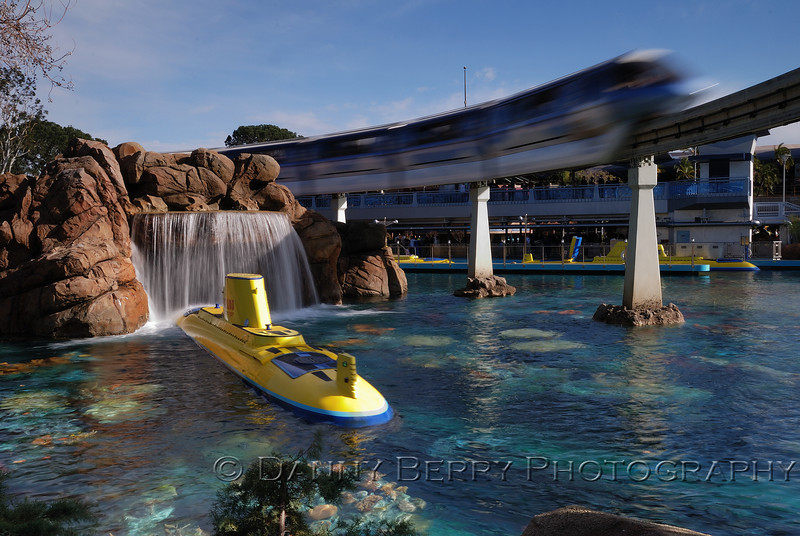
In this shot, I wanted motion blur but it was about 3pm and about as bright as it gets outside. To achieve a shutter speed of 1/5 and without overexposing everything, I set the aperture at f/22 and ISO at 100 while using a .6 GND 4x5" filter in my Cokin Z-Pro filter holder.

If you want to get some strange looks in the park, throw one of these contraptions on the end of your lens. :thumbsup2


255495579_zhfXU-L.jpg
 
I use polarizers, close-up filterss, neutral density (ND) filters, and graduated neutral density (GND) filters. These all do things for me that cannot be done in post production. You can sometimes work around the lack of a GND using HDR, but not always.

I do not use photoshop to simulate filters, actually I do not use photoshop at all. If there are effects that you are intending at the time that you shot, I think that you are better to use filters instead of post-processing.
I feel otherwise. I find that for many types of filters (color filters, soft focus and diffusion filters, spot filters, and some other special effects filters) you can get better results with more control in post production. You aren't limited to the exact colors, powers, etc of the filters you have on hand. You can preview the effects better on a computer screen than on a viewfinder.

Quote:
Originally Posted by alan
I frequently use a polariser. Pictures like this one from our holiday last week just wouldn't look the same without it!
/alan


actually they can look the same using Photoshop plug-ins such as Redynamix and other HDR filters. I've tried it! If you want that deep blue sky you can get it without filters but if you don't know about post processing sometimes it's just easier to use a filter

You can often replicate the deepening of a blue sky in post production (though it is often more work than just using the filter), but you can't do many of the other things that a polarizer does in Photoshop. If you have glare on water, a polarizer can eliminate the glare and reveal items below the surface of the water. If you didn't use the polarizer, you didn't capture what was below the water so you can't do much about it in Photoshop. The same is true for other forms of glare.

There are also lots of cases where a polarizer eliminates lots of little glare, like on the surface of leaves on a tree in your picture. With the polarizer, you capture rich natural tones on the leaves. You can't really add those back in later.
 
Oh, and I don't use a UV filter because I'm either a smart, with-it kind of guy or a totally crazy lunatic. It all depends on your UV filter religious views.
 
There are also lots of cases where a polarizer eliminates lots of little glare, like on the surface of leaves on a tree in your picture. With the polarizer, you capture rich natural tones on the leaves. You can't really add those back in later.

Are there any rules of thumb as to when or when not to use a polarizer? Since I'm fairly new to the DSLR world I'm still in the experimental phase.

Oh, and I don't use a UV filter because I'm either a smart, with-it kind of guy or a totally crazy lunatic. It all depends on your UV filter religious views.

I only use a U/V filter for lense protection. I haven't noticed any real quality differences so far when I've removed it.
 

Are there any rules of thumb as to when or when not to use a polarizer? Since I'm fairly new to the DSLR world I'm still in the experimental phase.

Polarizers filter light to a specific polarity. I imagine that's a particularly unilluminating sentence, so I'll try to be more clear. It would benefit you to read some articles about polarized light to get a better feel for what I'm babbling about.

Polarizers generally do two things for you - darken blue skies and remove glare.

They darken blue skies by removing a lot of the light from the sky that isn't blue. The blue light happens to mostly all be coming with the same polarity. There is a lot of other light coming from the sky that has all kinds of different polarity. When you use your polarizer and twist it right to the right angle, you filter out a lot of the other light but leave almost all of the blue light. The result is that your sky looks bluer.

This trick only works for certain angles. If you are looking directly towards or directly away from the sun, it doesn't work very well and the polarizer has little effect. If you use a really wide angle lens, you can have parts of the sky that the polarizer works well for and parts that it doesn't in the same picture. This can sometimes look goofy because the color and brightness of the sky shifts in the picture for no apparent reason to the viewer.

Reflected light is often polarized. By twisting your polarizer, you can often filter out most or all of the light being reflected from some surfaces. The classic example is light being reflected from lake. With the polarizer off, you see a reflection on the surface of the water. With the polarizer on, there is no reflection and you see what is under the water.

Sometimes, there are lots of small reflections on things that make things look less saturated. Lots of flat or shiny surfaces (leaves are a good example) look better through a polarizer. The best way to learn where it helps and where it doesn't is to use one. Look through your camera and turn the polarizer to see what effect it has.

The downside to polarizers is that, because they filter out some light, they make your image darker. Your camera will compensate for that, but it has to do that by either increasing the ISO, opening the aperture wider, or using a longer shutter speed. It'll do the work for you, so don't worry about it being complicated. It just means that polarizers make it harder to take pictures when there isn't a lot of light.

I only use a U/V filter for lense protection. I haven't noticed any real quality differences so far when I've removed it.

I don't want to get into the whole religious debate on UV filters, but I'll summarize it for anyone unfamiliar. UV filters don't do anything useful for your picture (assuming that you aren't using film). They do provide a layer of glass between the world and your lens. That can protect your lens from scratches or impacts. Except for really crummy ones, they don't usually have much of an affect on your pictures at all. The exception is that they significantly increase the chance that you'll have flare problems or reflections of light sources in your picture. More expensive ones (multi-coated) are designed to minimize (but can't eliminate) this problem. If you're worried about protecting your lens, a lens hood will help more than a UV filter. If you want to be extra safe, there is no reason why you can't use both.
 
One would be a neutral density filter; the other a circular polarizing filter. (Camera body is a Nikon D80)
Looked at B&H to see what that had: Holy Moley! What a selection! I would have no idea what to chose (especially for the ND filter--I'm assuming the different numbers are for different depths of "shading")
I am inspired by the skies in the photography on this guy's site: I am assuming he is using a filter to get those. ('Course it helps when you live where he lives, instead of middle-America suburbia, where I live)
http://www.pbase.com/birsay
So what the heck should I be looking for to get shots like that (other than moving to England).
Thanks, you guys
 
It looks like the gallery you are looking at had quite a bit of PP done to them. High saturation, vinetting, tone separation, etc.

But, you are right. A CP looks like it was used and probably a ND filter on some.

I use only a CP and love it. I use it more than most people on this forum, 1) cuase it's new; 2) as a lens protector; 3) for the great skies we're having this summer. The CP really helps minimize blown highlights on bright days when you can't shoot at a decent hour.

I also bought the lens to help with water reflection, which I have yet to take advantage of (but allergy season is almost over for me, so watch out).

Others may have info on ND filters.
 
I have a suggestion for you . The 72 mm of the 18-200 is what is considered an off size. I purchased a step up ring from 72-77 mm and then purchased filters from there. I use a standard ND filter as a protector and spent good money for the cp.
 
Thanks...

I have a suggestion for you . The 72 mm of the 18-200 is what is considered an off size. I purchased a step up ring from 72-77 mm and then purchased filters from there. I use a standard ND filter as a protector and spent good money for the cp.
 
If you are going to limit yourself to two then you picked the right ones, and the step up ring is a very good point.

If you wanted to venture out into the old school of filters before everything was done in the computer check out the Cokin filter system.

This web sight have pics and info of just about all the ones they offer and how they effect the picture.
http://www.geocities.com/COKINFILTERSYSTEM/gradual_blue.htm

Here is a graduated blue filter

22440d30.jpg


222da2c0.jpg
 
Some of the skies in those galleries are well done in terms of saturation for the overall effect, but some are just blatant overuse of HDR. I always feel the need to point out that blue skies on bright sunny days with nothing but wispy clouds in the sky do not have dark grey/black in them. Also the halo effect between the ground and sky just drives me nuts!!!

OK I feel better :rolleyes: Sorry to jump on the soapbox in your thread...
 
I second the post for Cokin filters. I just got started in the system and it is great. One filter for all my lenses, I just have to buy rings, which are cheap.

http://www.cokin.fr/ official site

I used a cokin ND4 filter on this image, and did very little post work.
2678669648_d642c6b69a.jpg


BTW, this is not an HDR...... I used about 3 steps in Scott Kelby's 7 point system. Since the sky was already a nice shade of blue from the filter, and the ground was almost perfect on exposure...I just made a new layer and brightened it up a bit, and painted out the rocks. Whole process took me about 5 min.
 
I just bought a circular polorizing filter for my Nikon 70-300mm VR and now the lens cap won't clip on. My kit lens (18-70mm) will support a filter and a lens cap, so I assumed this one would too. WRONG! :)

Anyone else who has this lens...do you have any filters for it? Can you still attach your lens cap? Thanks, Amy

ETA: I do like the filter. Here's a shot from last weekend with the filter on. I just wish I could use it and the lens cap at the same time.
That's Cedar Point in Sandusky, Ohio in the distance.

p386104157-4.jpg
 
Did you buy a "slim" filter? Filters marketed as slim don't have threads in front so you can't add any other filters on top of them, and lens caps don't have anything to grab onto.
 
Thats strange. I have 2 Tiffen filters- one circular polarizer and 1 UV- for mine and the lens cap snaps on no problem:confused3 Must be the brand of filter. Cool photo, btw! Love the rides in the background!!
 
Just checked mine and I have the CP & cap on now with no problem. Its a Quantray.
 
I brought a Promaster....like my other one. I'm guessing that I, without intent, bought a "slim" one. Oh, well...live and learn. :)
 
I just checked mine. I have a Quantaray 67mm CP filter. I put it on my 70-300mm VR and the lens cap fit fine.
 

New Posts


Disney Vacation Planning. Free. Done for You.
Our Authorized Disney Vacation Planners are here to provide personalized, expert advice, answer every question, and uncover the best discounts. Let Dreams Unlimited Travel take care of all the details, so you can sit back, relax, and enjoy a stress-free vacation.
Start Your Disney Vacation
Disney EarMarked Producer


DIS Facebook DIS youtube DIS Instagram DIS Pinterest DIS Tiktok DIS Twitter

Add as a preferred source on Google

Back
Top Bottom