Canon S5

there are some solutions, Canons (including the S5) can shoot in RAW mode, see the CHDK programs - www.chdk.wikia.com/wiki/CHDK if you own a Canon camera you should definitely look at the CHDK programs, also a
tripod (or resting the camera on a surface) will help with indoor pics without a flash.

I forget that it's available. I have tried several times with the various instructions, but it hasn't worked for me yet. Something is missing, either in the instructions (mostly for the S3) or in my brain, or both.

 
Thanks - I've been out of "real" photography for a while now, so I've probably lost the lingo... What I meant was that with my P&S I wasn't able to focus on the focal point (i.e., portrait) and have the rest be more blurry.

That cannot be done with a p&s, unless the subject is very close to the camera. That pretty much leaves out any portraits. On the bright side, it is easier to do a macro shot on a p&s.

I saw on the "How to take Fireworks" post that many people have the Cannon Rebel, and the pictures seemed to turn out pretty well - is the Rebel better than the S5?

(I'll have to do some more research at lunch...) ;)

Just like any DSLR, the Rebels will give you better results than any p&s. The problem for you sounds like size. I doubt you are going to find one that meets your size requirements. If you do go with a DSLR, I personally would not go with a Rebel. They just do not feel right in my hands and seem a little to "plasticy". I do like the next step up in Canon's line (40D), but I believe you would find them way too big. I have a Pentax K100D and have been very happy with it. Their current entry level model is the K200D. Depending on your budget, they make a pancake lens that would make it a little smaller, but there would be no zooming with that lens. It is an excellent lens optically though.
 
I forget that it's available. I have tried several times with the various instructions, but it hasn't worked for me yet. Something is missing, either in the instructions (mostly for the S3) or in my brain, or both.

it's simply determining the firmware version of your camera and downloading the software ... but there are some counterintuitive quirks, e.g. the SD card needs to be locked. The CHDK programs for Canon are very useful even if you never plan on using a 1/33,000 shutter speed or smaller aperture. I use the battery function and time-lapse feature. Visit the S5users.com/forum or the Canon group www.photography-on-the.net/forum
 
Hi guys! I recently purchased a new Canon Powershot S5 IS and I'm still learning how to use it. Yesterday I took some photos that I wanted to print right away so I took them to a 1 hr photo shop. In my prints I notice that several of the heads are cut off, but looking in my viewfinder they are not. I tried printing one at home to see what the deal is. When I print a 4x6 the heads are chopped off but when I print with a border around (and picture is more like 3 3/4 x (almost) 5 the picture is like I see it in the viewfinder.

Is there a way to make all my 4x6 photos print like I see in the viewfinder?

Sorry if this is a stupid newbie question!

When printing there should be a box to "Scale to print" Just click the box prior to printing.
 

I recently bought a Canon S5 IS for my son-in-law as a graduation gift from college. He loves it but like others have said the low light photos are pretty grainy. The use of something like Noise Ninja can help but will not eliminate all of the effects.
 
I have read a little about the CDHK - but I'm still a little confused - I'm not incredibly tech-savvy - so bear with me and my silly questions.

My dh, who is more tech-savvy than I (but is pretty clueless about cameras), thinks it's a very bad idea to download it (or whatever you do to get it) because it could null our warranty or mess up the camera somehow. So he isn't the one to ask to read up on it and see if we should do it.

I really like the feature where you can see the battery life - that is one of my very biggest pet peeves for the S5 - everything looks great - then boom - black screen and "change the batteries" - I always carry extra, but I'd much rather know how much juice I have left - so I can have the option of keeping it on and letting it run down so I can recharge them completely (I always understood that it was not good to throw half used batteries on a charger).

So can you explain - in very simple terms - how it works? Will it mess up my camera? if I don't like it, can I remove it? What are the advantages/disadvantages?

thanks!
Carol
 
Having no idea what the term meant I looked it up and found this place.

1. What is CHDK?

CHDK is not just one thing! The term CHDK refers to free software – currently available for many (but not all) Canon PowerShot compact digital cameras – that you can load onto your camera's memory card to give your camera greatly enhanced capabilities.

http://chdk.wikia.com/wiki/CHDK_in_Brief
 
There's a lot of CHDK posts on dpreview but I've never got around to trying it myself with either my S3 or A710. I haven't read up on it lately but I don't recall reading anything negative about it, people seemed to be very happy with CHDK.
 
I have a Canon S5 and if you don't know about CHDK you are missing a lot

CHDK is a separate program that resides on the SD card. It is for Canon P&S type cameras (not dSLR) it extends the camera's functionality such as

1/33,000 shutter speed to over 1 minute,
smaller aperture to f16 , RAW image mode,
unlimited time-lapse interval (intervalometer)
remote controlled shutter with battery,
unlimited AEB exposure bracketing
open source scripts for using the camera as a motion detector
and yes, a real functioning battery level indicator

it's not a "hack" as it doesn't actually change the firmware on the camera
here is a link to get some infor on CHDK in general
http://chdk.wikia.com/wiki/CHDK_in_Brief

but you should go to a S5 users group such as
www.flickr.com/groups/canonpowershots5is or www.s5users.com

because there are some quirks to running the program such as the SD card needs to be locked. The menu was created by Russians (! but in English) so it's not the must intuitive layout but if you want to go beyond the auto and scenic mode especially processing the RAW file for more photoshop effects it's a must
 
...My dh, who is more tech-savvy than I (but is pretty clueless about cameras), thinks it's a very bad idea to download it (or whatever you do to get it) because it could null our warranty or mess up the camera somehow...
So can you explain - in very simple terms - how it works?

The CHDK is merely software that runs off of your memory card and does not modify any factory programing or software on the camera.

Will it mess up my camera?
I haven't had any troubles, and have seen many others on these and other forums running the chdk as well without issue.

if I don't like it, can I remove it?
Absolutely, CHDK is not a permanent modification. To remove it simply reformat your memory card, or even easier unlock your memory card and chdk will not start.

What are the advantages/disadvantages?
Advantages... faster shutter speeds, the ability to record larger videos, scripting of actions, shooting in RAW format

Disadvantages.... learning curve, uses a very slight amount of space on your memory card, slightly decreased battery life (until you figure out the menus), there's a quirk where the camera does not go directly into record mode, but instead starts in 'review' mode (not sure if that's the proper term, but easy to deal with either just hold the toggle to record for a couple of seconds or push it to record twice)

It looks like the links to the wiki site has already been provided above, in the end it'll be up to you.
 
Hi Everyone!

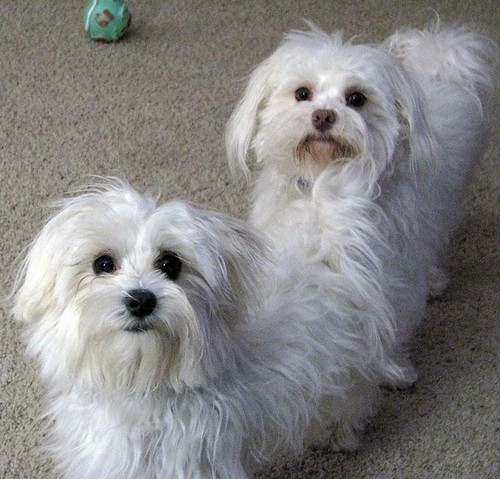
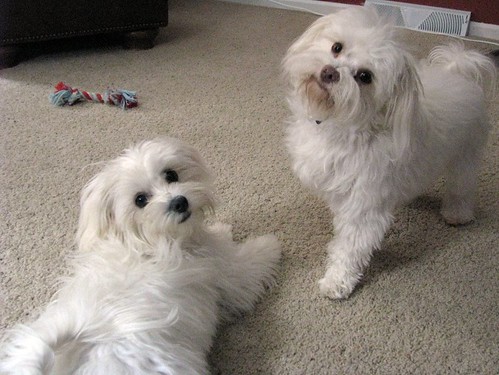
I was so excited to take my new camera out of the box, I just had to snap a couple pics of my babies!!! Haven't had a chance to take any of DD17 yet!!

2724152888_67cfbd9c76.jpg


2723329311_48915672d1.jpg


I know these aren't the best pictures around, but hey, I'm just getting started :goodvibes
 
Awwwww - they are cute!!!!! I have the S3 - I'm sure you will love the S5!!
 
How do I use macro on this camera? It lists macro in the index of the instruction book but when I turn to that page there's nothing about it. I've gone through several settings playing with buttons, but I can't figure it out. Could someone help me??
 
I don't have my camera in front of me, and I just recently got it, however if I recall correctly, there's just a button on the lense portion of the camera that either says Macro or has a picture of a flower. When you press that button, you get a "note" on your screen that says "Macro". If you hold it down you get the choice for "Super Macro".

Someone please correct me if I'm wrong!


Disney Vacation Planning. Free. Done for You.
Our Authorized Disney Vacation Planners are here to provide personalized, expert advice, answer every question, and uncover the best discounts. Let Dreams Unlimited Travel take care of all the details, so you can sit back, relax, and enjoy a stress-free vacation.
Start Your Disney Vacation
Disney EarMarked Producer


DIS Facebook DIS youtube DIS Instagram DIS Pinterest DIS Tiktok DIS Twitter

Add as a preferred source on Google

Back
Top Bottom