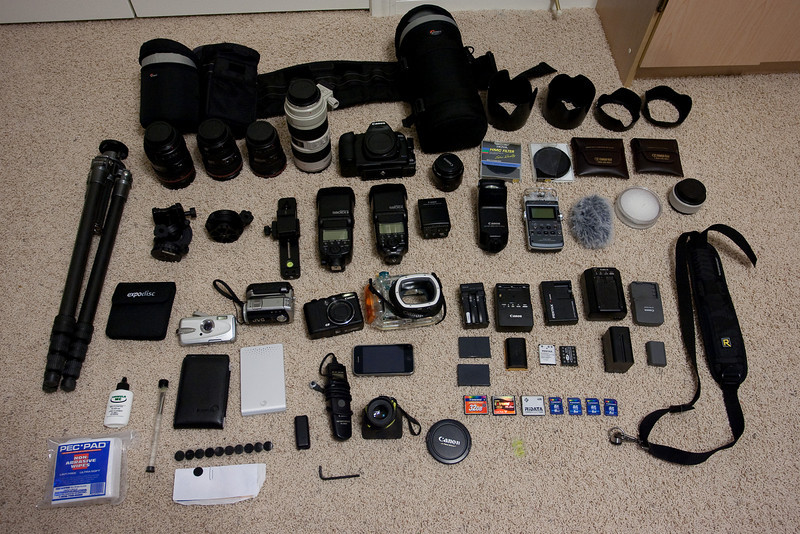
The only thing missing is the straitjacket that they'll put you in when they see you lugging all that!

I remain surprised that you have so much invested yet your only prime is the absolute cheapest one that money can buy. Different strokes, I guess.
I wont' be lugging most of that into the park - certainly not all at one time. I'll just pick and chose different bits to use on different days.
I do have other primes, but they are staying at home. For the shooting I plan to do at WDW, I find that good zooms meet my needs better. I rarely find myself wishing for an aperture wider than f/2.8 and often find myself wishing for more range without having to switch lenses. Like you said, different strokes. I only through in the 50mm because it is so cheap and because I think I might use it for a few video segments.
Mark, do you have any details on the Car PC setup or did I miss that thread?
I'll try to do a thread about the Car PC when I get back. Then I can give you details on how it worked. For the basics, I started with a bare box from Logic Supply, consisting of a Voom PC case, an Epia CN13000G motherboard, 1 gig of RAM, a 500 gig 2.5" drive, and an M2-ATX powersupply. I loaded a copy of Windows XP on it. I loaded Meedio (an old HTPC menu package) and several hundred movies, TV shows, and shorts (Bugs Bunny, Mickey Mouse, etc). I use Zoom Player for playing back the video. The video is all encoded in iPod compatible MP4 files. I also loaded it with MP3 files and put iTunes on it so that the kids can sync it with their iPod Touches.
In the van, I wired the M2-ATX powersupply into the accessory power. I need to work on it so that it gets both accessory power and unswitched power so that it can shut itself down gracefully. Right now, it just drops dead when you shut off the car. I know very little about car wiring, so I haven't figured out where to tap into the unswitched power. The audio and video (component) are output to our 4x4 switch, which routes the audio to the car's head unit and the video to the kid's headrest monitors.
I also loaded a VNC server (I can't recall if I used UltraVNC or TightVNC) and Jaadu Connect on the box. I put Jaadu's Touchpad app on our iPhones and iPod Touches. For connectivity between the iPods and the Car PC, I also included a wireless router. It connects to the PC via an ethernet cable. It gets power from our DC inverter (which is also used to charge the DSes, Kindles, iPods, and iPhones). If the network CarNet shows up as available, that's us.
In our tests during the last week, it works well. It takes about 35 seconds to completely boot up. The iPhones connect easily and the control is seemless. On my iPhone, I also installed the full blown Jaadu package that allows me to see the full res screen on my phone. It's useful when I need to change settings because reading normal text on a 7" screen fed an 800x600 signal via component is challenging. The only issue so far is that if the kids don't exit a movie before we shut off the car, it doesn't remember their place in the movie. That should be fixed when I wire the power supply up properly.
While I have a high level of expertise with software, I'm not much of a hardware guy and not at all a car guy. I was really surprised that everything worked so well. For the future, I'm looking to replace the headrest monitors with a set capable of displaying 1024x768 computer video. I want to add internet connectivity. I also want to add a second car PC. With all that, the kids can watch their movies, play computer games, surf the net, talk to friends back home, etc. For now, it's basically just a movie player. It allows us to take our entire video and music collection on the road and it lets the kids control it without needing parental help switch discs around. Oh, I also want to make the power connections modular so that I can create a similar setup in my car so that we can use that for trips. I might also lend it out to friends that have video capable vehicles and want a source of movies.