Adding DCL borders/designs/wording to my own pic...??

SeaSpray

Disney World fan since 1976
Joined
Jan 11, 2001
Messages
15,143
I have a nice pic of DH, DS21, and I from our cruise this past summer. It was taken in Palo by our waiter. We had wanted a professional picture taken of us that night, but the photographer wasn't in the restaurant that night.

We have a great pic of DH, DS24, and I from a previous cruise which was taken by a DCL photographer.

So.... now I'm trying to figure out how I can decorate the newer pic with the Palo logo, or DCL logo, or something. I just went to the PhotoPass web site, but there I realized two problems: they only have WDW or DLR borders (nothing for DCL) and they will only print out an uploaded pic in size 4X6. I want an 8X10, to match the first pic.

Any ideas, suggestions, etc ?? Thanks!

P.S. Here is the pic:
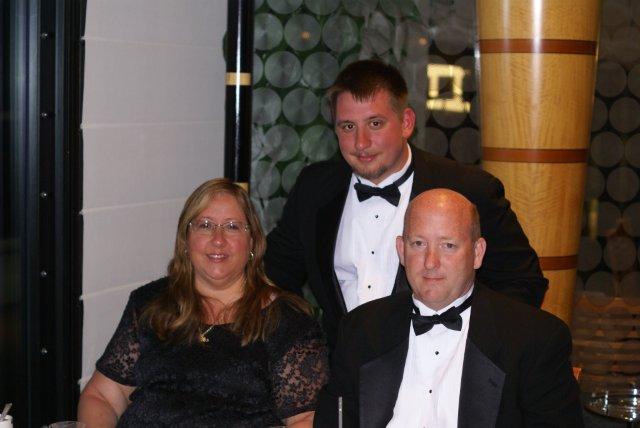
DSC06545.jpg
 
If you want it to look professional quality, you'll need a program like Adobe Photoshop. And then you'll need clear DCL graphics, and I do not think there are a lot of graphics specifically for Palo past just the logo name.

Honestly, IMHO, you really don't need graphics on a nice formal photo like that. I would just get, perhaps, a nice engraved silver frame from Things Remembered with the text you'd like added to the photo. It'd be a lot classier.
 
I second the photoshop sentiment, personally I get by with Photoshop Elements, and for text work I use a program called Art Text (from the Mac App Store) and import it into photoshop. That allows me to get a little fancier with the text without going to the expense of full version Photoshop.
 

I always use software like InkScape. Best of all its FREE! You need to be sure to use quality images and it'll turn out fine
 
Honestly, IMHO, you really don't need graphics on a nice formal photo like that. I would just get, perhaps, a nice engraved silver frame from Things Remembered with the text you'd like added to the photo. It'd be a lot classier.

I agree.
 
Very nice picture. Here is something I did pretty quick using Photoshop Elements. Didn't know the date so just used Summer 2012. You can use any colors or images.

8278334871_508ecfc45a_z.jpg
 
valbob89 said:

Very nice picture. Here is something I did pretty quick using Photoshop Elements. Didn't know the date so just used Summer 2012. You can use any colors or images.

That's really cool
 
Careful when sending these out for printing. If it has a logo, they'll ask you for the release form. Then you'll have to convince them...
 
Careful when sending these out for printing. If it has a logo, they'll ask you for the release form. Then you'll have to convince them...

I don't think there will be a problem printing one picture I've done this through Walgreens. But if there is a problem, you could print it with photo paper from a home printer.
 
Thanks everyone, for the ideas. :)


Thanks so much, valbob, that looks great, and it's exactly what I had in mind for the picture!! ::yes:: :sunny:

Is there any way that you can replace the word "summer" with "Disney Magic", and leave "2012" in there? Then I can just print it out here with photopaper.

Very nice picture. Here is something I did pretty quick using Photoshop Elements. Didn't know the date so just used Summer 2012. You can use any colors or images.

8278334871_508ecfc45a_z.jpg
 
I have printed up our DCL pictures from the CD using snapfish.com and have never been asked for the release.
 

GET UP TO A $1000 SHIPBOARD CREDIT AND AN EXCLUSIVE GIFT!

If you make your Disney Cruise Line reservation with Dreams Unlimited Travel you’ll receive these incredible shipboard credits to spend on your cruise!


DIS Facebook DIS youtube DIS Instagram DIS Pinterest DIS Tiktok DIS Twitter

Add as a preferred source on Google

Back
Top Bottom