Why would I lock the mirror?

NateNLogansDad

Still Wish'n
Joined
Jan 30, 2009
Messages
2,759
Other than for cleaning purposes, why would I want to lock my mirror when shooting? I've heard several people doing this for long exposures and a tripod is usually involved. If I was to take a 30 second exposure, wouldn't the mirror stay still the whole time anyway? Is there an actual advantage to doing it?


Thanks,
-Rob
 
I've been told the same thing, and from what I can figure it is to help reduce any other possible motion/shake in the camera. I THINK that when you take the picture, even at a 30 second exposure, you are right the aperture stays open and there is no movement THERE. However, the mirror still flips at the beginning/end of the shot so there is the potential of getting the slightest bit of movement that would degrade the sharpness of the picture. Now let's wait and see what the SMART people say; mine is all guessing. :lmao:
 
Any time I'm using a tripod I'll always use mirror lockup. When the mirror flips up some minimal camera vibration will occur. It may not be so noticable at 30 seconds but can affect the image sharpness at faster shutter speeds. Is it necessary? Maybe not but it is more habit now for me whenever i use the tripod.


And I only started using it because the smart people said so :)
 
My mom still uses disposable cameras......sometimes I think she's onto something. This camera baffles me sometimes.
 

Oooh! I know, I know.... I think.... :confused3

Number 1: for cleaning your sensor using the patented Barbieri tongue method. This is best done while Actually shooting, as we all know....
Number 2: aren't there specialty lenses that protrude into that area? say Invasive fisheyes??

What did I win, What did I win!!! :banana::banana::banana:
Marlton Mom
 
Yay! My 300th post!

Mirror lock-up is important when you're using relatively slower shutter speeds, like between 1/60 - 1/2 second, but I believe that even slower shutter speeds can benefit from mirror lock-up. So even that 30-second exposure can benefit from mirror lock-up, although I think the benefit might be a little less.

When you press the shutter button, there's a mirror inside your dSLR that needs to move up before the camera takes the picture. This mirror movement can cause tiny vibrations in the camera that will affect the sharpness of your photo, especially if you're using slower shutter speeds and/or if you're using a less-sturdy tripod. A less-than-sturdy tripod can actually make those vibrations worse! :eek:

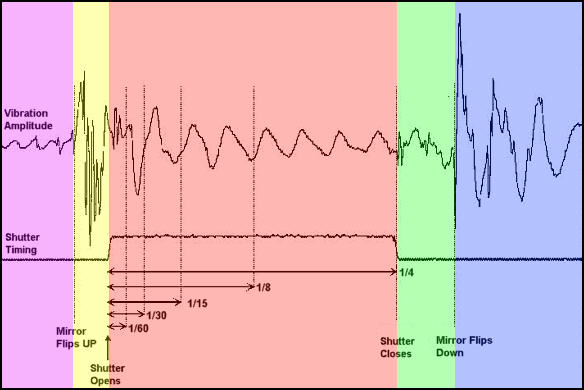
Here's a graphic from BobAtkins.com that shows the duration of the vibrations when the mirror goes up. It takes a little time to understand this graph, but it's well worth it.

mlu.jpg

The yellow area is where the mirror goes up, and the red area is where the camera is taking a 1/4-second exposure.

The graph shows that there's very minimal vibration in the first 1/60 second. However, there's a whole lot of vibration going on between 1/60 and 1/4 seconds.

When you use mirror lock-up, (1) the mirror goes up first and stays up, (2) the camera pauses to let the vibrations settle down while the mirror is still in the up position, and then (3) you hit the remote shutter again to take the photo without vibrations. After that, the mirror comes back down, and any vibrations from the mirror coming down will not affect the exposure cuz the exposure is already finished.

So, the mirror lock-up feature is very useful for taking sharper photos using slower shutter speeds and a tripod, such as low-light photography and macro photography. Also, be sure to use a remote shutter, too.

Oh, it's also useful for cleaning your sensor using your tongue, too. :)

For more information about mirror lock-up:
 
Mirror vibration is a fairly insignificant part of a 30 second exposure but pretty significant in a 1 second exposure. It depends a lot on the settling time of the full system: camera, lens, ballhead, tripod... Some systems settle quickly while some can vibrate for a time. One thing that can increase settling time is rubber in the system, such as a rubber pad between the quick-release and the camera.

If anyone is really interested all it takes to check this is a laser pen and a spot on which to project the beam about 20+ feet away. This makes it easy to see the movement due to mirror vibration.
 
I have some playing around to do tonight I hope!

Guys, thanks for another one of those Ahhhh moments!
 
Thanks to the OP for posting the question. I learned something as well :thumbsup2
 
Hmmm....no one has mentioned using a cable release as well :rolleyes1

One more thing to think about :rotfl:


Woo Hoo my 500th post!!
 
If anyone is really interested all it takes to check this is a laser pen and a spot on which to project the beam about 20+ feet away. This makes it easy to see the movement due to mirror vibration.

I really like this laser pen idea! :thumbsup2
 
I really wanted to do the laser pointer outside but I ran out of the house without the tripod when I left for work.

At one of my stops, I had some downtime to play with the settings on the D5000 and couldn't for the life of me find anything to lock the mirror. When I hopped back online I found out that there is no mirror lock on the D5000, instead there is a new option called "Exposure Delay." I'm going to play around with it for a little bit, but it's supposed to move the mirror and take the shot after the vibration has stopped. I don't know if it was because I had it hand held or not, but it really adds a nice sized delay. I guess if you are only taking pictures of stationary objects, it would be good but if it's the kids you want to shoot, leave it off:confused3
 
Mirror lockup is probably best used with a tripod. I'm not sure if it will have any benefits when the camera is hand held, at least not in my shaky hands :rolleyes1
 
Mirror lockup is probably best used with a tripod. I'm not sure if it will have any benefits when the camera is hand held, at least not in my shaky hands :rolleyes1

Same here 110%! What I'm curious to know is does my shaky hands make the delay even longer because it's waiting for the shakyness to stop.
 
OK, so I've been performing some highly technical and extremely advanced scientific experiments in our truck drivers break room:lmao: and this is what I've come to so far. Hand held or securely resting on my clipboard :rotfl2: the delay is still right around a second with both the shutter release button or a wireless remote.. My vibrating hands make no difference (that I can tell) as far as the delay time goes. I did the laser pointer test from around 15ft away against a white-ish wall and at first glance, there really wasn't much of a difference if I had Exposure Delay on or off. However, when I zoomed in as much as I could on each picture and compared the two, I did see a difference in the reflection of the laser. The ED does seem to make for a better shot. I have so much going on this week but I'm hoping to take some close ups with the 55-200 for comparison and I'll post the results later on.
 
At one of my stops, I had some downtime to play with the settings on the D5000 and couldn't for the life of me find anything to lock the mirror. When I hopped back online I found out that there is no mirror lock on the D5000, instead there is a new option called "Exposure Delay." I'm going to play around with it for a little bit, but it's supposed to move the mirror and take the shot after the vibration has stopped. I don't know if it was because I had it hand held or not, but it really adds a nice sized delay. I guess if you are only taking pictures of stationary objects, it would be good but if it's the kids you want to shoot, leave it off:confused3

I checked out the Nikon D5000 manual (http://www.nikonusa.com/pdf/manuals/dslr/D5000_en.pdf), and yes, "Exposure Delay" is your camera's version of the mirror lock-up. On page 159, the manual says that the camera delays the shutter release for about 1 second, which is what you already found out.

I know you were only playing around with the feature, but I wanted clarify to everyone else that the mirror lock-up feature works best (1) on a sturdy tripod, (2) when taking pictures of non-moving, stationary objects / subjects, and (3) using a remote or cable release. Overall, the goal of doing this mirror lock-up thing is to get the sharpest photo of stationary objects. Typically, you'd do this for landscape photography, night photography, or macro photography.

So, if you were really trying to take a photo, then hand-holding the camera and/or taking pictures of kids (or other people) would defeat the whole purpose of the mirror lock-up feature.

Glad you found the feature. Now, go out and see if it makes a difference in your photos! :)
 
If only there were a miracle button..... :rotfl2:

There is a miracle button.... it's the one we hit when we browse the Dis Photography Boards!

It's like having a room full of professors, ready for any question, ~ and ~ willing to go in the direction that ~ you ~ want with your knowledge base.

I can't thank enough all of you who ask these types of questions and those that take the time to answer them! :worship: :worship: :worship:

I think that reading and researching all of this even further will help me to achieve my goals with my photography.

Thank you!
:grouphug:
Marlton Mom
 
There is a miracle button.... it's the one we hit when we browse the Dis Photography Boards!

It's like having a room full of professors, ready for any question, ~ and ~ willing to go in the direction that ~ you ~ want with your knowledge base.

I can't thank enough all of you who ask these types of questions and those that take the time to answer them! :worship: :worship: :worship:

I think that reading and researching all of this even further will help me to achieve my goals with my photography.

Thank you!
:grouphug:
Marlton Mom

Very well said! And DITTO here!


Disney Vacation Planning. Free. Done for You.
Our Authorized Disney Vacation Planners are here to provide personalized, expert advice, answer every question, and uncover the best discounts. Let Dreams Unlimited Travel take care of all the details, so you can sit back, relax, and enjoy a stress-free vacation.
Start Your Disney Vacation
Disney EarMarked Producer


DIS Facebook DIS youtube DIS Instagram DIS Pinterest DIS Tiktok DIS Twitter

Add as a preferred source on Google

Back
Top Bottom