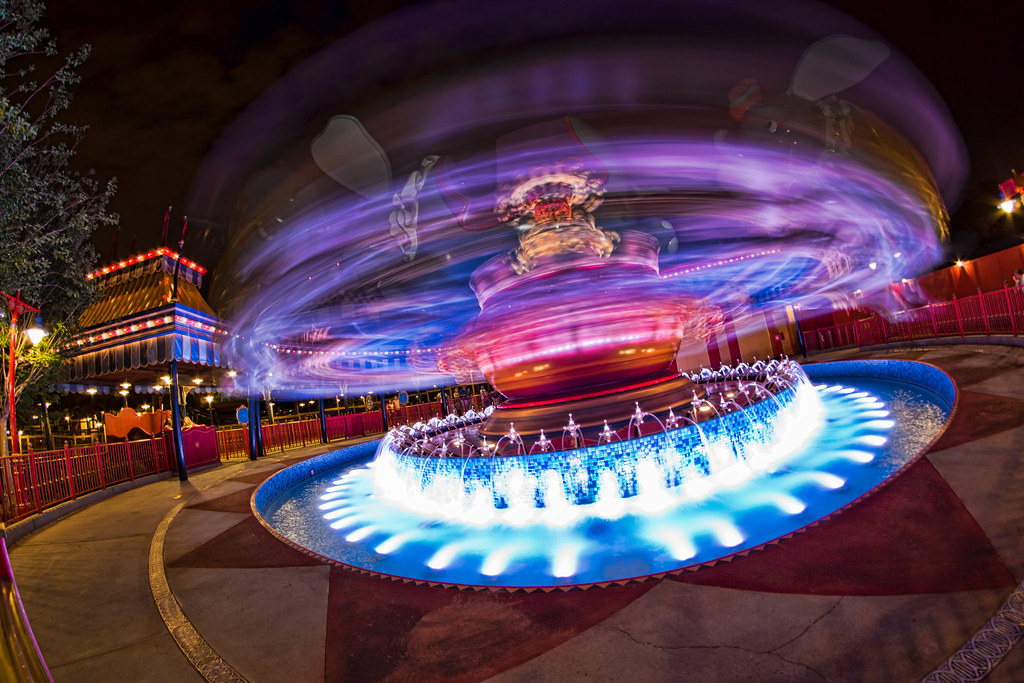
Long exposure with flash

DoleWhipDVC

Mouseketeer
Joined
Jul 17, 2010
Messages
210
While checking out the wide angle thread, I saw the fantastic shot of the new Dumbo with fireworks in the background. The poster said they shot it with a flash but the exif data reads that the exposure was 5 and the flash did not fire. The motion of the ride was frozen quite well, and the exposure time is obviously longer than a flash would take, so it seems the flash did go off to freeze the ride motion, but the apeture stayed open for an extended exposure.

How does one set this type of shot up? Do you simply go to the TV mode (or manual I suppose) but also turn the flash on as well? Or is there more to it? Also, why wouldn't the exif data indicate a flash fire in this type of shooting situation? By the way, if you haven't seen this capture, go to the wide angle thread and check it out; it's really cool.
 
While checking out the wide angle thread, I saw the fantastic shot of the new Dumbo with fireworks in the background. The poster said they shot it with a flash but the exif data reads that the exposure was 5 and the flash did not fire. The motion of the ride was frozen quite well, and the exposure time is obviously longer than a flash would take, so it seems the flash did go off to freeze the ride motion, but the apeture stayed open for an extended exposure.

How does one set this type of shot up? Do you simply go to the TV mode (or manual I suppose) but also turn the flash on as well? Or is there more to it? Also, why wouldn't the exif data indicate a flash fire in this type of shooting situation? By the way, if you haven't seen this capture, go to the wide angle thread and check it out; it's really cool.


If the flash was off camera fired with triggers such as pocket wizards the exif may not show the flash being fired.

You would also want to set the flash on rear or second curtain synch so it fires at the end of the exposure.
 
The flash makes the exposure for everything it hits so that exposure is quick and freezes that action. The longer shutter speed makes the exposure for the fireworks in the background. You'll get a little blur in the area the flash hits sometimes from the long exposure, it looks like a double exposure, but if that shows up or not depends on how long the shutter is open.
 
I shot this with a long exposure and rear sync flash. I wanted Dumbo to look ghostly so I used a manual flash at around 1/8-1/4 power in rear sync mode.


Spinning Dumbo by Harry Shields, on Flickr
 

Rear Curtain synch is the setting on Nikon. Use a tripod and set your shutter speed to as long as you want then right before the shutter closes the flash fires.

I've used it for stop action at night for example. I had a cousin run and jump into the pool, I used a long shutter to get his image blurred as he was running then the flash fired as he was in mid air so it froze his image there.

I also used it to take this picture of my DS and her hubby:
296786614_jm3LC-L.jpg


1/20 for shutter speed to capture the colors of the castle then the flash fired to light them and freeze any motion from the longer shutter.
 
HPS3 I really like that shot. Long exposures like that are almost like time travel in a single frame.
 
Thanks for the info everyone. And your picture examples are really cool too! I'll have to try this effect out prior to going to the world in July. I'm shooting with a Canon 40D but have an external speed light that will allow second curtain sync. It should be interesting to see what it will do. Thanks again :goodvibes
 

New Posts


Disney Vacation Planning. Free. Done for You.
Our Authorized Disney Vacation Planners are here to provide personalized, expert advice, answer every question, and uncover the best discounts. Let Dreams Unlimited Travel take care of all the details, so you can sit back, relax, and enjoy a stress-free vacation.
Start Your Disney Vacation
Disney EarMarked Producer


DIS Facebook DIS youtube DIS Instagram DIS Pinterest DIS Tiktok DIS Twitter
Add as a preferred source on Google

Back
Top Bottom