wide angle lenses

I recently purchased a Nikon D300 and am now looking to add a wide angle to my collection of lenses. When I bought the D300 I knew I wanted to get a flash unit, wide angle lens and a monopod to finish my photo related shopping for the time being. I didnt think I would be doing the shopping quite this soon but since the coins I sold covered the cost of the camera and then some I am fortunate enough to be able the get them right away. I pretty much have decided on an SB-600 speedlight for the flash unit. Last week at auction I got a Slik monopod for $7.00 (I had to order a quick release plate but cant complain having a $60 monopod for under $20) :thumbsup2 Which leaves me with choosing a wide angle lens. I have narrowed the choices to the following:

Nikkor 10.5mm f2.8 fisheye
Nikkor 16mm f2.8
Nikkor 12-24mm f4-5.6
Sigma 10-20mm F4-5.6

I'm not sure if I want to go with a prime or a zoom. I like the fastness of the primes but also am wondering if I would be happy with a fixed focal length. If you have experience with any of the above lenses or opinions, likes or dislikes I would greatly appreciate any and all input.

My current lenses are
Nikkor 18-55mm f4-5.6 (the kit lens that came with my D40)
Nikkor 50mm f1.4
Nikkor 55-200 f4-5.6 VR

thanks in advance
Karyl
 
Not to gum up the works, but have you considered the Tokina 12-24 f/4 or the Tokina 11-16 f/2.8? I've used the 12-24 a couple of times and was pretty impressed with it. In fact, IIRC the picture in my avatar was taken with it.

n1518672859_30071983_6036.jpg


And the 11-16 is as fast as the primes you're considering. Other than that, I don't have much advice to offer, as I've not used any of the lenses on your list. I have seen a lot of great pictures taken with that Sigma though. It seems to be a very popular lens.

Wish I had a coin collection to sell!

Enjoy your new stuff!
 
Not to gum up the works, but have you considered the Tokina 12-24 f/4 or the Tokina 11-16 f/2.8? I've used the 12-24 a couple of times and was pretty impressed with it. In fact, IIRC the picture in my avatar was taken with it.

n1518672859_30071983_6036.jpg


And the 11-16 is as fast as the primes you're considering. Other than that, I don't have much advice to offer, as I've not used any of the lenses on your list. I have seen a lot of great pictures taken with that Sigma though. It seems to be a very popular lens.

Wish I had a coin collection to sell!

Enjoy your new stuff!

LOL I hadnt considered the Tokinas before I guess bc I hadnt really done alot of looking at wide angles until now. Thank you for throwing them into the mix for me LOL .. I have seen some pictures from the Sigma also and from what I have seen it looks like its a very nice lens. As for the coins ... I have had them for about 18 years just sitting around doing nothing. My grandmother gave them to me shortly before she passed away in 1991. At the time she gave them to me she told me to do something someday with them that I would enjoy. It took me this long to decide now was the time. I just wish she were here that I could photograph her.
 
I don't have one but the guy that works at our local Ritz is an architectural photographer- he uses the Sigma 10-20mm on his D300. He recommended it to me. Its on my 'someday' list.
 

Tokina 11-16 was nice- I had it when I was shooting a D300. Here is one at 11mm at f2.8.

330577370_UeKcV-X2-2.jpg
 
I recently purchased a Nikon D300 and am now looking to add a wide angle to my collection of lenses. When I bought the D300 I knew I wanted to get a flash unit, wide angle lens and a monopod to finish my photo related shopping for the time being. I didnt think I would be doing the shopping quite this soon but since the coins I sold covered the cost of the camera and then some I am fortunate enough to be able the get them right away. I pretty much have decided on an SB-600 speedlight for the flash unit. Last week at auction I got a Slik monopod for $7.00 (I had to order a quick release plate but cant complain having a $60 monopod for under $20) :thumbsup2 Which leaves me with choosing a wide angle lens. I have narrowed the choices to the following:

Nikkor 10.5mm f2.8 fisheye
Nikkor 16mm f2.8
Nikkor 12-24mm f4-5.6
Sigma 10-20mm F4-5.6

I'm not sure if I want to go with a prime or a zoom. I like the fastness of the primes but also am wondering if I would be happy with a fixed focal length. If you have experience with any of the above lenses or opinions, likes or dislikes I would greatly appreciate any and all input.

My current lenses are
Nikkor 18-55mm f4-5.6 (the kit lens that came with my D40)
Nikkor 50mm f1.4
Nikkor 55-200 f4-5.6 VR

thanks in advance
Karyl

From the lenses you have listed, I might go with the 12mm-24mm. I realize the 16mm f2.8 is a faster lense but I kind of feel like you that the fixed focal length limits use and lends to changing lenses more often. I also have the 50mm f1.4 and even though it is a pretty fast lens, I end up using my 18-200mmVR most of time just because I'm too laxy to keep changing the lens.

Have you looked at dpreview.com? They have a great Nikon forum section, camera and lens reviews etc.
 
From the lenses you have listed, I might go with the 12mm-24mm. I realize the 16mm f2.8 is a faster lense but I kind of feel like you that the fixed focal length limits use and lends to changing lenses more often. I also have the 50mm f1.4 and even though it is a pretty fast lens, I end up using my 18-200mmVR most of time just because I'm too laxy to keep changing the lens.

Have you looked at dpreview.com? They have a great Nikon forum section, camera and lens reviews etc.

I do go to the dpreview site frequently and so far I have not seen a review on any of the lenses I am considering.

edit: with a little searching around I was able to come up with some reviews on dpreview :) thankyou!
 
I've been very happy with my Sigma 10-20. That little sucker is built like a tank!
 
my son in law wants a wide angle lens for his Kodak point and shoot. he's a carpenter and wants it for before and after shots of his cabinetry, so it has to be decent in lower light. his camera is about 5 yrs old he said but couldn't remember the name( might be a z something) he says it takes photos fine inside but not wide enough. he thinks it has treads inside the lens barrel though. so wondering if any one has one of the attachable wide angle lenses ( i think optech makes one, sure others as well) and if so would they recommend it or is it a waste of money.also what brand, i notice a big difference in prices.
thanks
 
they recommend it or is it a waste of money.also what brand, i notice a big difference in prices.
thanks

that's the problem with add-on lens for P&S cameras, the acceptable ones that don't significantly degrade the pic cost > $150 It might be better just to buy a newer camera with wide angle (and probably better low light capability)
 
that's kind of what i was thinking . he only wants them for snapshot size to put in a portfolio type book but if they are bad, they could do more harm than good:)
 
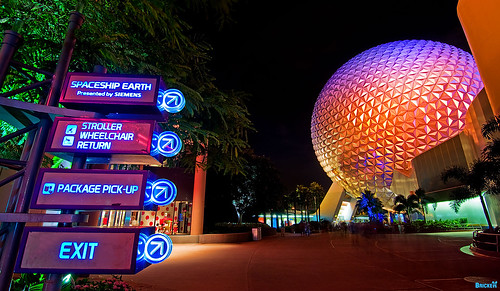
I have attempted to remove distortion before by going to Filter>Distort>Lens Correction>Remove Distortion, but that doesn't seem to do a whole lot, and requires a substantial crop. After posting this image:


Code commented that it could use having the distortion removed. He's obviously correct, and I almost messaged him individually regarding a suggested method, but I figured multiple responses (assuming I get them) would be better than just one response, so I pose the question to you all.

I already searched Google, and found several tutorials that I can fall back on, but I've found that finding a good tutorial often requires sifting through a few bad ones. Any ideas? If you'd rather not take the time typing up an explanation, I am fine with just a link to a tutorial for the method you use (I suppose all of this assumes there is a method besides the one I already cited...and I hope there is, as that method isn't so great).

Thanks in advance for the help!
 
I have attempted to remove distortion before by going to Filter>Distort>Lens Correction>Remove Distortion, but that doesn't seem to do a whole lot, and requires a substantial crop. After posting this image:


Code commented that it could use having the distortion removed. He's obviously correct, and I almost messaged him individually regarding a suggested method, but I figured multiple responses (assuming I get them) would be better than just one response, so I pose the question to you all.

I already searched Google, and found several tutorials that I can fall back on, but I've found that finding a good tutorial often requires sifting through a few bad ones. Any ideas? If you'd rather not take the time typing up an explanation, I am fine with just a link to a tutorial for the method you use (I suppose all of this assumes there is a method besides the one I already cited...and I hope there is, as that method isn't so great).

Thanks in advance for the help!

It's not distortion...its just overemphasis of depth. The Tokina lens hardly distorts the image at all in fact. This is why its generally recommended to keep your subject near shooting height and straight ahead unless the emphasis of depth works for the picture.

See here:

http://www.photozone.de/canon-eos/379-tokina_1116_28_canon?start=1

The over-emphasis of depth comes from showing a image on a flat pieces of paper that was shot over a much wide area. It's akin to taking the world and showing it on a map. So, I don't believe you'll get very far with trying to correct it.

Personally I think the image still works. The only minor issue is shooting SSE with the side of a wide angle lens removes its roundness, but I like everything else.
 
A rectilinear wide angle lens does not really distort but when it is not kept perfectly level the resulting image can appear distorted. One way to correct this is in Photoshop with the "edit/transform/perspective" menu, where we can "pull" the image back into showing proper vertical lines. This may introduce other distortions, so it is a give and take sort of thing where we compromise to get the best appearance.

In this case it may be best to use the "skew" command to straighten the signs on the left and to roundify (a new word) Spaceship Earth on the right.
 
Hi, Tom. I'm a long-time fan of your posts & photos, but first-time poster. Congratulations on your engagement months ago and on your upcoming wedding! :)

You've got a lot of vertical distortion on your photo, so you'd need to use Filter > Distort > Lens Correction. But instead of using the "Remove Distortion" slider, you should use the "Vertical Perspective" slider. (I'm using Photoshop CS4, so I'm not sure if the menus are exactly the same in earlier versions)

I tried it on your photo, and I can get the signs on the left to look much less distorted. However, Spaceship Earth then looks very oblong. I tried changing the "Horizontal Perspective" slider, too, but it didn't seem to make Spaceship Earth look any better. Not sure how to correct it from there, but at least it's a first step. Yes, you'll have to do some cropping of the corrected image once you're done.

The other program you can try is a Photoshop plug-in called PTLens, from ePaperPress. It basically does the exact same thing that Photoshop's Lens Correction dialog does, but it's seems a little easier to use (less confusing user interface).

Hope that helps...at least a little.

Charlie


637981674_QU9SJ-M.jpg

 
It's not distortion...its just overemphasis of depth. The Tokina lens hardly distorts the image at all in fact. This is why its generally recommended to keep your subject near shooting height and straight ahead unless the emphasis of depth works for the picture.

See here:

http://www.photozone.de/canon-eos/379-tokina_1116_28_canon?start=1

The over-emphasis of depth comes from showing a image on a flat pieces of paper that was shot over a much wide area. It's akin to taking the world and showing it on a map. So, I don't believe you'll get very far with trying to correct it.

Personally I think the image still works. The only minor issue is shooting SSE with the side of a wide angle lens removes its roundness, but I like everything else.

Thanks for the link and explanation. I think the reason I am having a recurrent problem is that I attempt to compose shots that have an item close in the foreground (5" - 2' from the camera) one in the 'middle' and one in the background. This really only has a middle and a background (although I was hoping more people would pass so I'd have some ghosting towards the exit, but whatever. By virtue of the nature of that type of shot, I often have to approach the shot from a lower or higher angle to get the perspective I want. I suppose the slight distortion is a compromise I have to accept for this type of shooting. :confused3

I am not really a fan of static UWA shots that just allow you to 'get more into the shot' because I don't really think that requires as much thought about composition. I do those shots sometimes, but not too often.

A rectilinear wide angle lens does not really distort but when it is not kept perfectly level the resulting image can appear distorted. One way to correct this is in Photoshop with the "edit/transform/perspective" menu, where we can "pull" the image back into showing proper vertical lines. This may introduce other distortions, so it is a give and take sort of thing where we compromise to get the best appearance.

In this case it may be best to use the "skew" command to straighten the signs on the left and to roundify (a new word) Spaceship Earth on the right.

I will play around with this. Would it essentially 'move' the distortion to the middle of the shot (where it doesn't really matter)? My concern is that it seems the distortion must 'go' somewhere, and I just don't want to spend time in post processing to move it from one focal point to another.

Hi, Tom. I'm a long-time fan of your posts & photos, but first-time poster. Congratulations on your engagement months ago and on your upcoming wedding! :)

You've got a lot of vertical distortion on your photo, so you'd need to use Filter > Distort > Lens Correction. But instead of using the "Remove Distortion" slider, you should use the "Vertical Perspective" slider. (I'm using Photoshop CS4, so I'm not sure if the menus are exactly the same in earlier versions)

I tried it on your photo, and I can get the signs on the left to look much less distorted. However, Spaceship Earth then looks very oblong. I tried changing the "Horizontal Perspective" slider, too, but it didn't seem to make Spaceship Earth look any better. Not sure how to correct it from there, but at least it's a first step. Yes, you'll have to do some cropping of the corrected image once you're done.

The other program you can try is a Photoshop plug-in called PTLens, from ePaperPress. It basically does the exact same thing that Photoshop's Lens Correction dialog does, but it's seems a little easier to use (less confusing user interface).

Hope that helps...at least a little.

Charlie


637981674_QU9SJ-M.jpg


Thanks for playing with it. The signs definitely look better. Even assuming SSE could still be corrected, the crop I would have to do here would make it not worth it. I guess I am fine with there being some distortion in the signs--the distortion points them towards SSE more and they are pointing towards it directionally, so it's not's that bad. I guess I will play with it from here.

Thanks all for the help!
 
There's enough neutral space in the frame between the signs on the left and SSE on the right that you could easily combine two images.

I would use the sign from disneyboy2003's image and combine it with SSE form your original image (the distotion of SSE is not as objectionable in the original).

637981674_QU9SJ-M.jpg


3882706414_cd48ea8054.jpg
 
Tom, sorry I should have said a bit more in my flickr comment. I was mainly talking about the distortion of perspective, causing SSE to be an oval, rather than lens distortion that causes straight lines to curve (as others pointed out, the Tokina is excellent in that regard). I always notice when SSE isn't round, it's a bit jarring to me. (It's worth noting that if you view a very large print of an ultra-wide shot like this straight-on at the appropriate distance, you won't see it.)

The two ways I know of to bring it back to round are in the Lens Correction filter using perspective correction or intentionally introducing barrel distortion.. both have tradeoffs, though, as perspective correction will increase the perspective distortion of the sign and requires a significant crop, and barrel distortion will obviously curve straight lines.

There's probably a better way, those are the two I've found in my fiddling.

perspective correction (didn't use enough,still not quite a circle)
637998243_vCS27-L.jpg


barrel distortion:
637998227_N3v7u-L.jpg
 
Here's a quick 2-minute fix using the process I described in my previous post.
I didn't correct any distortion on SSE; I just used the original. All I have is an old version of PSE on the machine I'm working on from the office.

3.jpg
 
Here's my quick two minute correction.

DSC_3494copy.jpg


I corrected both sides (although SSE not as much) and 'pushed' the distortion to the black sky in the middle. I think this is a rare shot with which I will be able to do that, but I guess I should make the correction when I can. I have a straight on shot of SSE that I think looks 'compressed' (or the opposite of this shot). If I add barrel distortion to this, it gets better, but then it gives the shot an almost fisheye look at the front of the fountain.

Here is the unedited shot:
08142009002410-1.jpg

Fine as-is, or should I go with the barrel distortion?
 

New Posts


Disney Vacation Planning. Free. Done for You.
Our Authorized Disney Vacation Planners are here to provide personalized, expert advice, answer every question, and uncover the best discounts. Let Dreams Unlimited Travel take care of all the details, so you can sit back, relax, and enjoy a stress-free vacation.
Start Your Disney Vacation
Disney EarMarked Producer


DIS Facebook DIS youtube DIS Instagram DIS Pinterest DIS Tiktok DIS Twitter

Add as a preferred source on Google

Back
Top Bottom