Newbie question

EeyoreEma

DIS Veteran
Joined
Sep 15, 2009
Messages
1,171
I just got my 1st dslr (Rebel XSi) and love it! I was hoping someone could help me out with what is probably a dumb question. Is there any way you can blur what is in the foreground and keep what's in the back in sharp focus? Of course, I could "cheat" and just move around things around some so the statue I'm trying to get blurry is behind the flowers, but it just seems like it would be neat to have the statue blurry in the front. Does that even make sense!?
 
I just got my 1st dslr (Rebel XSi) and love it! I was hoping someone could help me out with what is probably a dumb question. Is there any way you can blur what is in the foreground and keep what's in the back in sharp focus? Of course, I could "cheat" and just move around things around some so the statue I'm trying to get blurry is behind the flowers, but it just seems like it would be neat to have the statue blurry in the front. Does that even make sense!?

Choose the focus point and place it over what you want in focus(in this case the background)...press the shutter button down halfway and it will focus. Once it is focused, recompose the image if you have to and take the shot.
 
How are you focusing? One option is to go to manual focus and turn the focus ring until you get the look you desire. Another option is to set the camera to focus on whatever's in the center of the frame, point the camera where you want the focus then recompose the picture while still holding the shutter button halfway down. A third option would be to set the focal point manually to the point closest to where you want the focus to be, then autofocus. There's a few ways to do it, just comes down to your preference.
 
If I'm following correctly what you are looking to do is called selective focus, it is easiest to do with a fast lens, suchg as a 2.8 or 1.7

you open the aperture as wide as you can, which gives you a shallow depth of field, then focus on your flowers, the statue will then be blurry if there is enough seperation between the 2
 

Your question inspired the Monthly Assignment thread this month. :) (Hope you don't mind.)

I posted a response and some examples on that thread.
 
I just got my 1st dslr (Rebel XSi) and love it! I was hoping someone could help me out with what is probably a dumb question. Is there any way you can blur what is in the foreground and keep what's in the back in sharp focus? Of course, I could "cheat" and just move around things around some so the statue I'm trying to get blurry is behind the flowers, but it just seems like it would be neat to have the statue blurry in the front. Does that even make sense!?

as said, it's easier with a "fast" lens to selectively blur the background/foreground or you can do it with Photoshop -
http://www.republicofcode.com/tutorials/photoshop/video/gradient_mask_blur.php
 
Thank you all so much! I'm excited to try it out tomorrow, if the rain has stopped. It's so nice to have a place to come to with my questions!
 
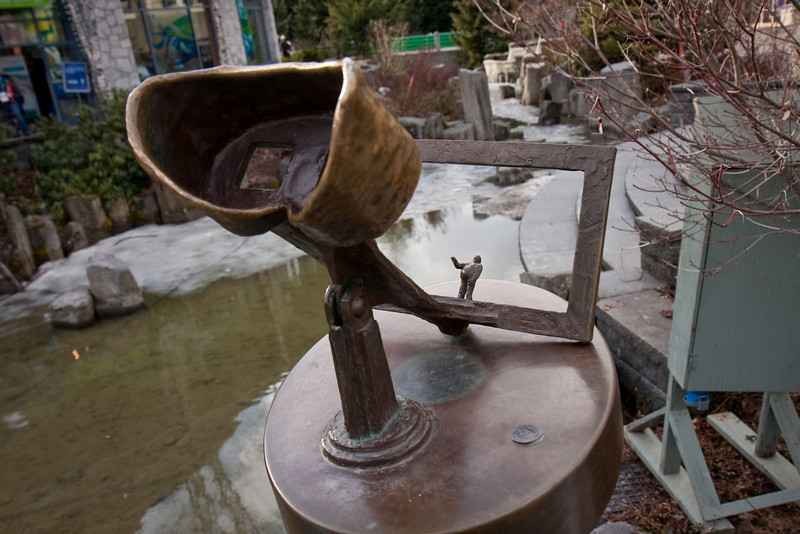
I was walking around and noticed this mini-statue of a stereoscope. So I tried the selective focusing technique to show that it really is possible to do it.

Before:
802350559_KBVa9-L.jpg

Selective focusing:
802351166_Q75kQ-L.jpg


Here's another photo I took while in Venice on the "Bridge of Sighs" that also shows selective focusing:

509948758_HcR5S-L.jpg

Hope that helps! :)
 
Those are great pictures!! Mine haven't turned out quite that well, but I'm working on it. I've sort of gotten it to work with the manual focus, but something still seems a little off. I'd post it to ask opinions, but I still haven't figured out how to share pics off this new camera - it takes SO much longer than it did with my old p&s. I can get the pics from the camera to the computer, but after that I'm lost. :rolleyes:
 
Those are great pictures!! Mine haven't turned out quite that well, but I'm working on it. I've sort of gotten it to work with the manual focus, but something still seems a little off. I'd post it to ask opinions, but I still haven't figured out how to share pics off this new camera - it takes SO much longer than it did with my old p&s. I can get the pics from the camera to the computer, but after that I'm lost. :rolleyes:

Thanks so much for your compliments. However, just to clarify, I wasn't doing any manual focusing. I simply selected the center focus point, and used that focus point to focus specifically on my subject. It's still autofocus.

There should be 9 focus points to choose from. I selected the center one. You'll have to check your manual for instructions on how to do this (page 61: Selecting the AF Point).

If you don't do this, then you're depending on the camera to guess where your subject is and "randomly" select one of the 9 focus points.

Hope that helps. :)
 
As Mickey88 pointed out you need to open up your ap as much as you can. If you are using a zoom, zoom out (in? I never know the proper term, extend it as far as it will go) and select your focus point. Even if your ap is only f/5.6 zoomed all the way out you should be able to get a pretty blurred back round if you get your focus point right. Another thing is you need stuff behind or in front (usually by several feet) of your subject and not on the same plane. If you have a plain white wall right behind your subject it's not going to have as nice of an effect as say trees with light coming through them.


Disney Vacation Planning. Free. Done for You.

Our Authorized Disney Vacation Planners are here to provide personalized, expert advice, answer every question, and uncover the best discounts. Let Dreams Unlimited Travel take care of all the details, so you can sit back, relax, and enjoy a stress-free vacation.
Start Your Disney Vacation
Disney EarMarked Producer


DIS Facebook DIS youtube DIS Instagram DIS Pinterest DIS Tiktok DIS Twitter

Add as a preferred source on Google

Back
Top Bottom