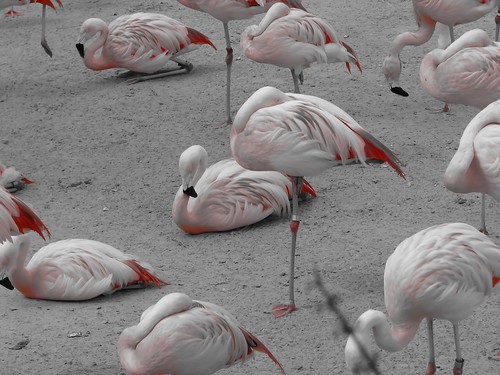
Love this photo-how do you do this?

Mom2Christina

Earning My Ears
Joined
Jul 19, 2009
Messages
72
Scroll down, she took a photo at Rancho Zocala in black and white and showed only the reds...
http://www.disboards.com/showthread.php?t=2459566

Taken with a Canon Powershot SD780, has options for Vivid, Vivid Blue, Vivid Green, Vivid Red, Neutral, Sepia, Black & White, Positive Film, Lighter Skin Tone, Darker Skin Tone, Custom. Apparently the setting must have been set to Vivid Red?

I have a Canon Powershot A1000is. Only have options in My Colors for
Vivid, Neutral, Sepia, Black & White, Custom. Cant seem to find any setting on custom, it changes contrast, sharpness and saturation.

Is there another way to do this on my camera or do I need a better camera? LOL.

Thank you!
 
Scroll down, she took a photo at Rancho Zocala in black and white and showed only the reds...
http://www.disboards.com/showthread.php?t=2459566

Taken with a Canon Powershot SD780, has options for Vivid, Vivid Blue, Vivid Green, Vivid Red, Neutral, Sepia, Black & White, Positive Film, Lighter Skin Tone, Darker Skin Tone, Custom. Apparently the setting must have been set to Vivid Red?

I have a Canon Powershot A1000is. Only have options in My Colors for
Vivid, Neutral, Sepia, Black & White, Custom. Cant seem to find any setting on custom, it changes contrast, sharpness and saturation.

Is there another way to do this on my camera or do I need a better camera? LOL.

Thank you!


doing it in camera might be the easy way, but what if you want the pic in full color.

rather than buying a new camera, I would learn how to do it in post processing, the technique is known as selective coloring, you take a full color pic and turn it to black and white leaving only the colors, or sections you want in color..

I use corels paint shop photo pro x3 and it's easy to do,

Im sure others who use other software will join in here..
 
You can do it with photoshop too. Search on youtube for tutorials.
 
With the Canon Powershot S3 IS, i think the option is called Color Accent. I don't have the camera anymore, so I can't give any more specifics. Maybe take a browse through your manual and see if you have that option too. :confused3
 

I prefer to do work like this in editing. You have a lot more control over things that way and You'll always have a full color image if you want it.

Many different photo editing programs can do it and it's not difficult.
 
I agree with photo chick , sorry but I don't know your real name . Nowadays in market many type of editing software available and easily utilise also . Through software we can spare our time and not miss movement .
 
According to your manual, it doesn't look like you have that feature.

It is simple to use when you do. You select Color Accent and then snap the color you want to highlight. While in that mode, only that color is highlighted in your pictures.

2345847665_35ca714698.jpg
 
Yep, on a Canon it's color accent, you can also set it to take two versions of the pic, color accent and full color.

An easy way to do this is take your full color pic, make a copy and turn it black and white. Put it in a layer above your full color photo then use a mask (in PSP you don't have to use a mask) and then carefully erase the parts you want in color on the b/w then merge the pics together. This can be done in any program that has the ability to work in layers.

There was a green screen and powder blue walls so Santa and the kiddos got lost. If I had used a color accent function it would have chosen the red or green or blue and frankly would have been awful.
3220580184_4e6069c55f.jpg
 
I found a tool on Photobucket that lets me edit them. Too bad I just found it recently after I printed up some pics. One of the problems with using the in body editing (On my Kx) is you can select what colour but not what area you want that colour left in. I take the altered image to PB use there B&W wand to remove the colour from the unwanted areas.
I know a lot of people dont like the colour selecting, but This pic will be hanging in my Pool room.

Here I only used Photobuckets editing.
Original

IMGP2452.jpg


B&W wand

IMGP2452-1-1.jpg
 
Thank you all for your replies. I really appreciate it!

I actually do know a bit about photo editing, have worked with layers, etc, but I have not done so in a while. Time to start practicing!

But I really did want the option to change to B&W and choose color accents in person so that the creative side of me can see all the natural colors and possibilities on the spot. I was hoping the color accent would be an option and would really pull all the natural colors right out of the scene. I had hoped my camera had another setting. Thanks for taking the time Frantasmic for looking at the manual.

Love your Santa photo wenrob! Daisy I might check into photobucket for some quick fixes, thanks!


Disney Vacation Planning. Free. Done for You.
Our Authorized Disney Vacation Planners are here to provide personalized, expert advice, answer every question, and uncover the best discounts. Let Dreams Unlimited Travel take care of all the details, so you can sit back, relax, and enjoy a stress-free vacation.
Start Your Disney Vacation
Disney EarMarked Producer


DIS Facebook DIS youtube DIS Instagram DIS Pinterest DIS Tiktok DIS Twitter

Add as a preferred source on Google

Back
Top Bottom