I am still a little confused!

tazdev3225

<font color=darkorchid>I sucked my thumb up with t
Joined
Apr 2, 2008
Messages
5,191
I tried taking pictures of the moon last week as it was a full moon and seemed enormous. It really was a beautiful picture in my mind. I took my camera out on the tripod and wound up with giant white balls. I tried opening up the shutter and shooting with a longer exposure. I am assuming because the moon was so bright that the sensor only saw the light and overexposed it. To get a clear shot do I need to go with a short exposure time and faster shutter speed? I tried this with my DSLR instead of the PNS because I really want to get a better understanding of the camera. It really is different than my old film SLR for me to use. I became frustrated and stopped trying after I played around a little bit and couldn't get the shot.

 
I tried taking pictures of the moon last week as it was a full moon and seemed enormous. It really was a beautiful picture in my mind. I took my camera out on the tripod and wound up with giant white balls. I tried opening up the shutter and shooting with a longer exposure. I am assuming because the moon was so bright that the sensor only saw the light and overexposed it. To get a clear shot do I need to go with a short exposure time and faster shutter speed? I tried this with my DSLR instead of the PNS because I really want to get a better understanding of the camera. It really is different than my old film SLR for me to use. I became frustrated and stopped trying after I played around a little bit and couldn't get the shot.

I'll tell you the same thing that everyone told me when I had the EXACT same problem; you're right. We see the night as really dark so we try to slow down the shutter speed and open up the aperture for moon shots, but actually we need to do the opposite. Since the moon is actually reflecting the sun's light off of it, try shooting in your daytime settings. Maybe stop the aperture down to around f/12 or so and not quite so long on the shutter speed. I'm sure several people on here will come along with a better (more acurate) technical explanation but that's my .02! :thumbsup2
 
This is one of those rare occasions when we really need manual exposure settings. With any lens most of us can afford the moon is such a small part of the frame that the meter can not accurately set the exposure (spot meters may work better).

Since the moon is lit by the sun, and since the basic sunny day exposure is 1/ISO at f/16, and since the reflectivity (albedo) of the moon is about 0.12 (not far from 18%), a good basic start would be 1/ISO at f/11. This would make the moon middle gray so opening up a stop or two might be close to correct.

The moon also moves (ok, the Earth rotates) faster than it appears so long shutter speeds will result in blur.
 
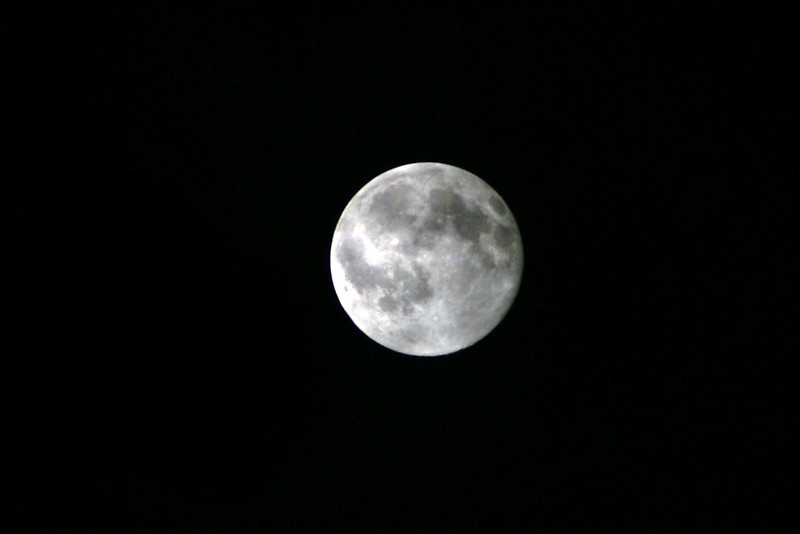
Here are two shots I took of the full moon in August with EXIF info

ISO 400, 70-300mm @ 300mm, f10, 1/2 sec.
682488537_z4ak7-M.jpg


ISO 400, 70-300mm @ 300mm, f10, 1/60th sec.
682488565_cGBXS-M.jpg


and one daytime shot taken last week a few days after the full moon when it was setting in the morning.

ISO 200, 70-300mm @ 300mm, f11, 1/400th sec.
682496158_EhcAz-M.jpg


Not the best shots of the moon I ever saw but the first reasonably successful shots I took of the moon. First two the camera was on a tripod. Last one was handheld.
 

You need to base your exposure on the moon itself, not the darkness around it.
 
Instead of just guessing at settings...
If your camera has the capability, you can spot meter directly for the brightest part of the moon. That should give you a fairly accurate setting right there.
 
Like Chikabowa said - spot metering is your friend here. Anything else will try to bring out some detail in the rest of the photo, which will almost certainly cause massive overexposure of the moon, because it's so much brighter than everything else.

If spot metering still doesn't get you the results you're after, you can try exposure compensation but manual mode will probably be easier. Spot metering should get the job done, though.
 
I tried taking pictures of the moon last week as it was a full moon and seemed enormous. It really was a beautiful picture in my mind. I took my camera out on the tripod and wound up with giant white balls. I tried opening up the shutter and shooting with a longer exposure. I am assuming because the moon was so bright that the sensor only saw the light and overexposed it. To get a clear shot do I need to go with a short exposure time and faster shutter speed? I tried this with my DSLR instead of the PNS because I really want to get a better understanding of the camera. It really is different than my old film SLR for me to use. I became frustrated and stopped trying after I played around a little bit and couldn't get the shot.

That's totally right. I'm no camera expert,but a couple of years ago I took a picture of a Lunar eclipse. And allt he first shots I took looked like a burned white circle on a black background. What I realized is that it's reflecting sunlight, I put it on a fast shutter speed and got some decent results. Not amazing ( like I said, no pro ) but you do get some details, and some of the cool redness from the eclipse

IMG_1007.jpg
 
Thanks everyone. I can get great shots during the day. I think I overcompensated for the dark forgetting I was focusing on the light. I bought the DSLR because I want to have some of the better features but then I always reach for the advanced PNS because I have used it for so long. I just have to play with it more and remember the basics. This board has been very helpful with that. Again thanks all. You can keep the suggestions coming though i appreciate them all.
 
As others have mentioned...shooting the moon is pretty much like shooting in the middle of the afternoon.

The key would be using the manual mode, or using a spot meter (if you've got a decent telephoto). Set the ISO as low as possible - you don't need it, so might as well avoid any unnecessary noise. You should be able to snag shutter speeds of 1/125 to 1/250 even at F8-11 or so...plenty fast enough for even handheld results, though a tripod does make life a little easier.

Here's a 1/125 shutter, F10, at IS0100 with a 750mm equivalent lens:

original.jpg


If it's a lower moon, or darker (like yellow moons, or through light haze), you may need to open the aperture a bit more.

Spot metering can be quite effective, as long as you have a lens long enough so that the spot is firmly on the moon's circle. This one was with a P&S ultrazoom using spot meter - because of the clouds, it was opened up a bit to F3.5 (on a P&S with a minimum of F8) and a slower 1/25 shutter speed - tripod mounted:

65059162.jpg
 
I'm gonna jump on the bandwagon and agree with what everyone else said for tips on shootin' the moon. :)

I used a tripod and used spot metering. I used the 100-400mm lens + 2x teleconverter on the Canon 40D, so with the 1.6x crop factor, it ended up being an equivalent of 1280mm (!!!). (here's the math: 400mm x 2 x 1.6)

At 400mm, the maximum aperture of the lens was f/5.6. However, adding the 2x teleconverter decreased my maximum aperture by 2 stops, so the widest I could do was f/11.

Also, the autofocus on my camera doesn't work with max apertures less than f/5.6, so I had to manually focus the moon on my camera.

I also had to turn OFF the image stabilizer (IS) on my lens since it was was on a tripod. The funny thing was, when the IS was on, the image of the moon seemed to slowly creep away in the viewfinder! That's when I realized I had to turn the IS off.

Because the whole set-up was very sensitive to motion (even the click of the shutter button caused a lot of motion blur), I used a remote shutter and I used mirror lock-up to make sure I minimized any vibrations before taking the actual picture.

It was quite an ordeal, and my wife was shaking her head the whole time, laughing at me and how ridiculous the whole thing looked just to take a picture of the moon. :) Next time, though, I think I'm gonna try adding BOTH the 1.4x AND the 2x teleconverters to the setup to get ~1800mm, although my maximum aperture would then be f/16.

ISO 400, 1/320 sec, f/11, 800mm
671888184_5jsaC-XL.jpg
 
Just jumping in to totally compliment the last two posts. I am (still) considering buying a DSLR camera (it's a lot of $ so taking the decision slow).

Your photos are breathtaking. What a great art form! You have both inspired me to look for a photography class in my area. I hope you got those framed!

Thanks for sharing. I have no idea what 80% of what you're talking about is, but maybe in 6 months I hope to.
 
moon1.jpg


shoot the moon if you were taking a picture in daylight on earth!

Nikon D200 w/ Nikon 300mm 2.8 ISO 200 and 1/125 at 5.6
 
When shooting the moon, I usually start at about f8 1/125 sec. I go from there to tweak the exposure. I find spot metering to work fairly well but usually end up with more of a white ball than a moon and have to tweak it a bit more. I can't seem to find the exif info on this shot but I am assuming it is somewhere around these settings. I will repost when I figure it out.

IMG_9200-2.jpg


Seems this shot was taken at 1/200 and f7.1 not sure what made these settings but as I said I tweak it from 1/125 and f8 usually. That is not very far from 1/200 f7.1 I shoot them all at ISO 100 and use a tripod and shutter release as well.
 
To summarize,

You don't need to worry about focus for distant subjects; just set the camera to infinity or infinity lock.

You don't need to worry about image stabilization when using a tripod; just turn off the IS to ensure no adverse effects which some cameras might have and I don[t understand why.

Set the ISO quite low (around 100) for minimum graininess; the overall exposure needed is actually small enough you do not need to resort to high ISO. By the way, changing the ISO does not change the brightness of the picture for an automatic camera except to give the camera more leeway in case some other part such as the lens maxed out.

There is only one important variable left, exposure. The easy part is that there are only two things you can do, increase it or decrease it and you can only do them one at a time so there are no combinations or permutations. The hard part is getting a point and shoot camera to give you the exposure you want instead of deciding the exposure for you.

Your camera might have a "night" mode which is nothing more than some exposure compensation whose intent is to make night look like night. This is accomplished by reducing the exposure for the overall picture which in turn favors making the moon come out better. You can then use the explicit exposure compensation to subtract more or add back to the exposure and hopefully make it right.
 
To summarize,

You don't need to worry about focus for distant subjects; just set the camera to infinity or infinity lock.

You don't need to worry about image stabilization when using a tripod; just turn off the IS to ensure no adverse effects which some cameras might have and I don[t understand why.

Set the ISO quite low (around 100) for minimum graininess; the overall exposure needed is actually small enough you do not need to resort to high ISO. By the way, changing the ISO does not change the brightness of the picture for an automatic camera except to give the camera more leeway in case some other part such as the lens maxed out.

There is only one important variable left, exposure. The easy part is that there are only two things you can do, increase it or decrease it and you can only do them one at a time so there are no combinations or permutations. The hard part is getting a point and shoot camera to give you the exposure you want instead of deciding the exposure for you.

Your camera might have a "night" mode which is nothing more than some exposure compensation whose intent is to make night look like night. This is accomplished by reducing the exposure for the overall picture which in turn favors making the moon come out better. You can then use the explicit exposure compensation to subtract more or add back to the exposure and hopefully make it right.

I appreciate the advice but I was using my DSLR this time and not the P&S. I actually use them both so the advice when I switch off to that one will be helpful. I did get a decent shot the moon using the P&S right after I bought it, I just couldn't remember how as I was experimenting with it.
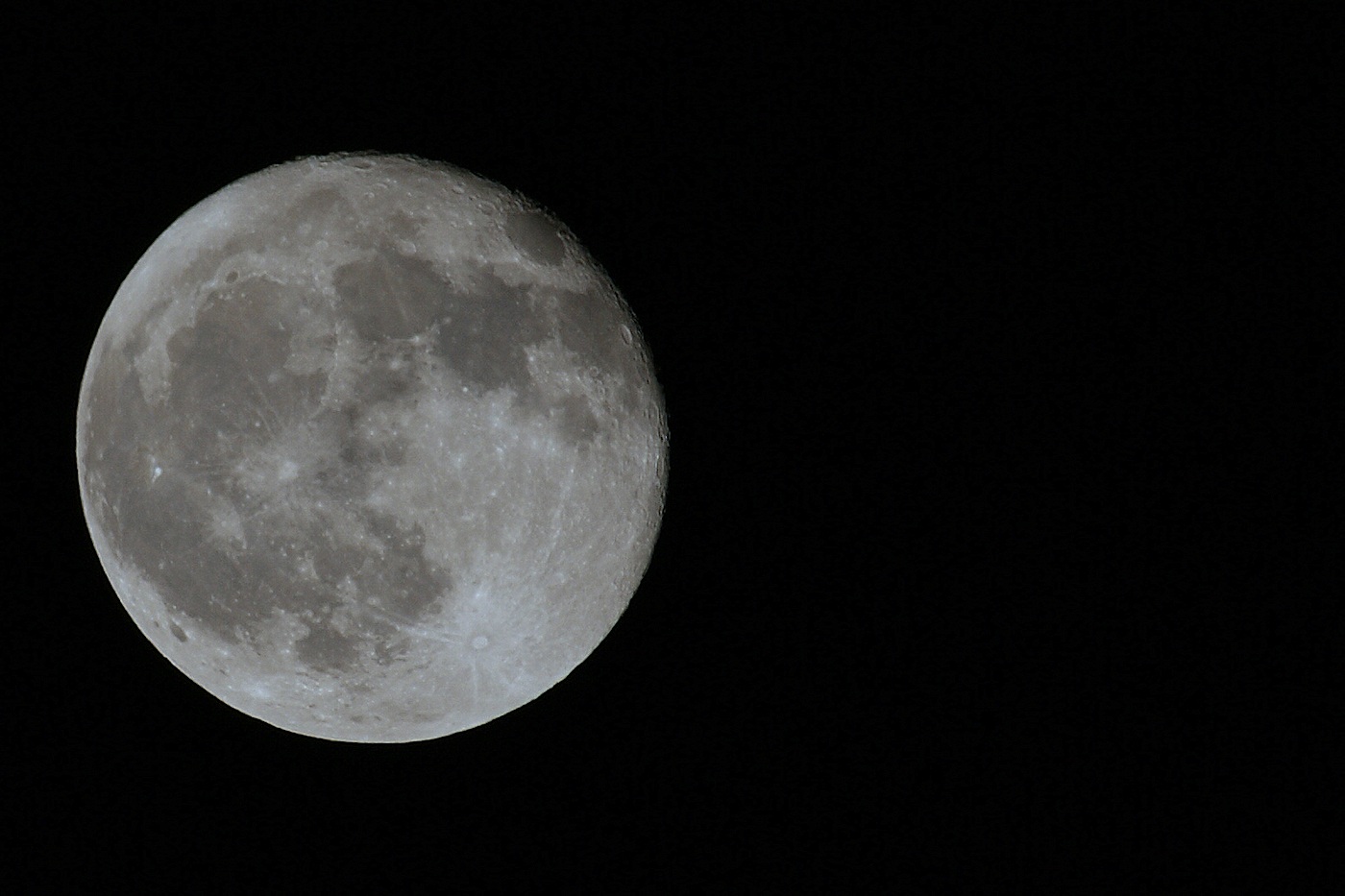
Everyone else thanks for the help. The pictures are exactly what I was trying for so now I have an idea as to what I want my exposure to be.
 
My first moon shot that ever worked. LOL I wish I had locked up the mirror and used a remote though...I think it may have been sharper... Next time.

raw-IMG_6535.jpg
 
OK...I've never taken a decent moon pic... always glowy white blobs ina grainy sky. Thank you thank you! Seriously, I just read this thread... took my camera outside, following your advice...and took this....

701681414_C28fG-L.jpg


ISO 100 f/11 1/160 210mm.... I did crop the photo in to see what I had got. Its midnite here..so the moon is very high up!

Since this was a quick experiment... I took it handheld...and didn't dig out my tripod

Paula
 
I thought of this post when I took the photo in my sig line :goodvibes

Thanks for the OP and the answers!!

:worship:

My details (on a tripod)

Camera: Canon EOS 40D
Exposure: 0.002 sec (1/500)
Aperture: f/5.6
Focal Length: 300 mm
ISO Speed: 100
Exposure Bias: 0 EV
Flash: Off, Did not fire

I'll tell you the same thing that everyone told me when I had the EXACT same problem; you're right. We see the night as really dark so we try to slow down the shutter speed and open up the aperture for moon shots, but actually we need to do the opposite. Since the moon is actually reflecting the sun's light off of it, try shooting in your daytime settings. Maybe stop the aperture down to around f/12 or so and not quite so long on the shutter speed. I'm sure several people on here will come along with a better (more acurate) technical explanation but that's my .02! :thumbsup2


Disney Vacation Planning. Free. Done for You.
Our Authorized Disney Vacation Planners are here to provide personalized, expert advice, answer every question, and uncover the best discounts. Let Dreams Unlimited Travel take care of all the details, so you can sit back, relax, and enjoy a stress-free vacation.
Start Your Disney Vacation
Disney EarMarked Producer

New Posts


DIS Facebook DIS youtube DIS Instagram DIS Pinterest DIS Tiktok DIS Twitter

Add as a preferred source on Google

Back
Top Bottom