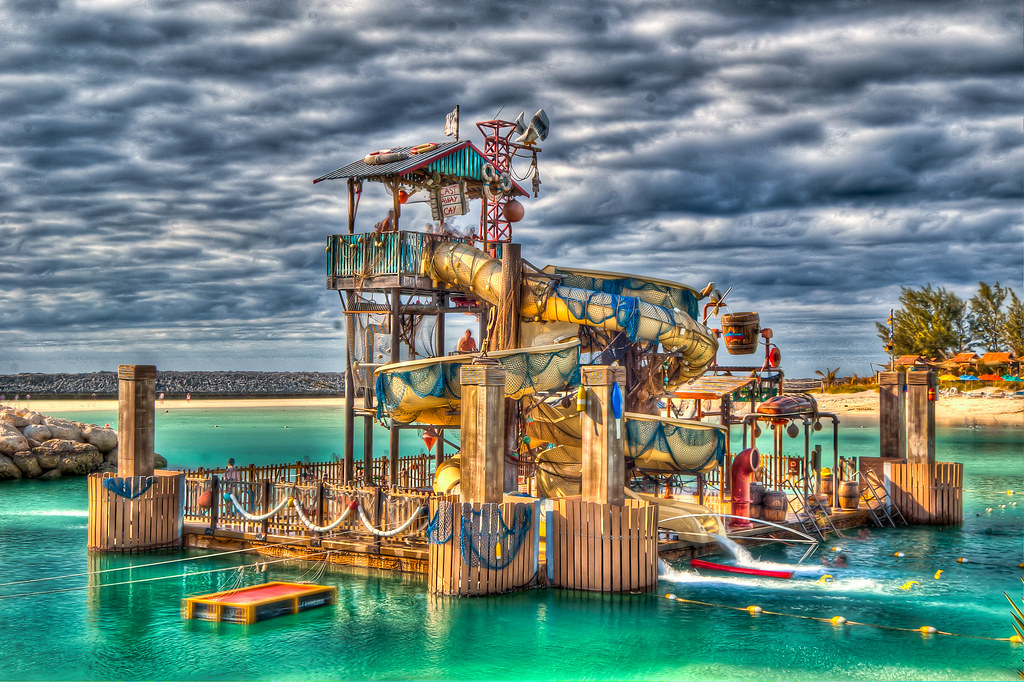
What Is HDR?

disneyfanUSA

DIS Veteran
Joined
Mar 29, 2007
Messages
1,914
Hi, I was just wondering what HDR editing is? How do you do it? Is it hard to do? Does it take a long time to edit one photo? Do you have to shoot in RAW? What program do you use? Sorry I asked so many questions! Any help is appreciated! :goodvibes
 
High Dynamic Range photography. This is the process of taking 3+ shots of the same subject with different camera settings. Using various software, these photos are combined by some crazy technology and the result is a photo that is supposed to have more dynamic range than any individual photo could ever produce. It makes the photos look more like what the human eye sees in terms of lightness and shadows, BUT (and this is a big but in my eyes) it tends to make the photo look a bit (sometimes very) fake. Wikipedia has an entry for HDR here:

http://en.wikipedia.org/wiki/High-dynamic-range_imaging
 

Thanks for the link Bob! This brings me one step closer to adding the HDR tool to my tool box. I've been trying to use Photoshop CS4 but it's so clunky with my current 6 year old computer that it was a no go. Over the years I've increased memory and changed out video cards but the old gray mare just ain't what she used to be, especially with resource pigs like Photoshop.

My new 'puter is LATE! as of this date and I'm wondering if CS4 would do better on a newer machine. I'm also thinking that I might be better off just ditching CS4 and going with an HDR devoted software program. Who knows....

Thanks again for the heads up! :hug:

Marlton Mom
 

Note too there are many levels of HDR, many methods of achieving it, and many degrees to which you may apply it. Some HDR can be done right in some cameras, with no more effort than simply clicking the shutter button once...the camera will snap 3 shots, align them, and merge them, and deliver a single JPG HDR photo. Or it can be done with half-a-dozen or more photos taken manually and extensively processed to tone-map and merge and blend to the artist's desire. How 'real' or 'fake' it looks is not only in the eye of the beholder, but also dependent on how much it has been blended and processed - it's up to each artist themselves to decide what they want to show with their photo, and how mild or wild to make their HDR.
 
I'll leave the technical aspect to those who are much better equipped to answer it, but I just did want to add that not all HDR is necessarily over-the-top kind of shots (all though those are the ones that usually get the most attention). From what little experimenting I have done with it, I have found that it can also be used to help get a much better picture in certain light conditions (pictures with more range that would be otherwise found).

Here is a simple example I did when I first started experimenting with HDR.

Picture 1 - a "normal" shot that is pretty flat:

DSC_0858.jpg


Picture 2 - an HDR merged shot of the same scene:

14b.jpg


As you can see in the second shot there is a lot more range and depth to it (yet I don't think this would be considered over-blown or over-the-top).

I know that there are other ways to get this kind of shot as well, and hopefully as I progress I'll be better at knowing what settings to use, but HDR can be used to help get shots that would be either impossible or much more difficult than would be otherwise.
 
Here is my first attempt at HDR. It was really easy. I just snapped random pictures so i could try it. It only took like 10 minutes to take the pictures and process them. :thumbsup2 I have not bought Photomatix yet so there are watermarks on the pictures.


HDR6.jpg


HDR5.jpg


HDR7.jpg


HDR2.jpg


hdr1.jpg


Any comments or suggestions are appreciated!
 
Thanks for the link Bob! This brings me one step closer to adding the HDR tool to my tool box. I've been trying to use Photoshop CS4 but it's so clunky with my current 6 year old computer that it was a no go. Over the years I've increased memory and changed out video cards but the old gray mare just ain't what she used to be, especially with resource pigs like Photoshop.

This brings up something I was going to write about, processing power. My old PC was no slouch but processing HDR was taking too much time.
I recently upgraded my PC to an Intel i5-2500K and CS5 HDR now takes little more than a few seconds! Photomatix runs so fast that half the time I think it must have crashed and didn't really process the image. This was a motherboard, CPU, and RAM upgrade along with a solid state drive for the operating system (Windows 7), under $500.

The best part, the "K" version CPU (when paired with a H67 motherboard) does not even require a video card yet the graphics are plenty powerful enough for CS5. I highly recommend something like this if you are serious about HDR and heavy processing in general. It saves a *lot* of time!
 
Flame me if you wish, but I find the highly processed HDR look unappealing. Its an effect that is overused and requires no talent. However, HDR, when used properly to balance lights and darks, (as shown by Goofster) is a nice function of either your camera, plug-in, or Photoshop.
 
I'm an amatuer. HDR has both helped me to better understand photography (exposure, aperture/depth-of-field) AND get more out of my inexpensive equipment (i.e. a CanonS90 point&shoot).

I highly recommend that ANY photo amatuers learn/apply some HDR techniques if for no other reason, to learn/understand why/how it works.

I understand that the "pros" often don't like HDR; HDR is like a "parlor trick" that lets us amateurs get results that untrained eyes (and that's most of them) are amazed by.

Here are a couple of my HDRs from a Disney trip last year, I tried not to "overdo" them.

1764_HDR.jpg


1898_HDR2.jpg
 

New Posts


Disney Vacation Planning. Free. Done for You.
Our Authorized Disney Vacation Planners are here to provide personalized, expert advice, answer every question, and uncover the best discounts. Let Dreams Unlimited Travel take care of all the details, so you can sit back, relax, and enjoy a stress-free vacation.
Start Your Disney Vacation
Disney EarMarked Producer

New Posts


DIS Facebook DIS youtube DIS Instagram DIS Pinterest DIS Tiktok DIS Twitter

Add as a preferred source on Google

Back
Top Bottom