This week I'm working on... (now with a page 1 directory)

This week I want to try and work on the Active D-Lighting feature of my camera.

From what I understand, it's kind of like a quick exposure bracketing feature to help adjust for contrast in certain hard lighting scenes, just without the over dramatic changes that EB gives you. I also understand that different cameras (at least Nikon cameras) give you different amounts of ADL settings. I have the D5000, and it gives me 5 different ADL settings:
Low, normal, high, extra high, and auto. Other cameras give either 3 settings, or a simple on and off setting.

So today I went outside and took about a dozen different set of shots using all the different ADL settings. I suppose that because it is sort of an over-cast day, without much direct sunlight, but most of my examples came out without much to show for it. I really didn't see much difference in any of the examples that I took. About the only setting that showed even just a little bit of a difference was the ADL auto settings. I would post some examples, but honestly there wasn't enough of a difference to bother posting them.

I want to try some more shots, but I think I'll wait for a sunnier day to try it out.

If anybody has some good examples of ADL, or even some good advice as to when to use it, I would love to hear it. I'm really not any closer to getting a good understanding of ADL then I was before I started testing it.
 
I don't have ADL on my old D70. Ken Rockwell has a write up on ADL at his website. Just search for it.

One last panning shot before I let you go. I took this during the Lights, Motors, Action! Extreme Stunt Show. So, it does come in handy at WDW.

810029133_FmGzg-M.jpg
 
I borrowed a friend's 55-250mm f/3.5-5.6 IS lens for my trip to Louisiana this weekend. Using it further solidifies that I need to purchase a telephoto lens. I haven't had the chance to process most of the pictures yet (we got back last night) but here are the two I managed to put up.


Thanks for this thread.. I'm unpacking my D5000 today!!! Look forward to learning TONS from this thread!!!
 

Thanks for this thread.. I'm unpacking my D5000 today!!! Look forward to learning TONS from this thread!!!

Welcome to the home of the Newbies!!!

The only thing that I would ask is that you please feel free to post, comment, ask and learn right along with the rest of us. Don't ever feel like you have a silly question, or that it isn't worth posting something that you've just learned about your camera (especially any shots you take). Many of us are in the same boat, and what you learn could very easily help some of us learn the same thing.
I've been through my camera's manual quite a few times, but honestly I've learned so much more from the various threads on this board, and the advice of so many of these great photographers than I have by reading the manual (not that you shouldn't spend time with the manual, but the manual can't respond back to you when you have a question.)

So welcome aboard, and we look forward to seeing many of the great shots that you are going to take. :thumbsup2
 
One last panning shot before I let you go. I took this during the Lights, Motors, Action! Extreme Stunt Show. So, it does come in handy at WDW.

810029133_FmGzg-M.jpg

Scott,

the clarity of this picture is amazing (I don't see any blur at all in any of the 3 bikers, even though they are spread apart a bit). Where did you focus in on (the middle of the 3 bikers? the lead biker?)
If you don't mind, what is the EXIF info on this shot? (I tried looking at it, but it only came up blank).
 
Scott,
the clarity of this picture is amazing (I don't see any blur at all in any of the 3 bikers, even though they are spread apart a bit). Where did you focus in on (the middle of the 3 bikers? the lead biker?)
If you don't mind, what is the EXIF info on this shot? (I tried looking at it, but it only came up blank).

Smugmug does strip the Exif data when it creates all the different sizes and I forgot to add it. Here it is...(remember how bright Florida can be even when overcast): Nikon D70/18-200VR, 1/60s, f/16, ISO 200, EV +0.3, 200mm focal length. The photo was also cropped for composition which is usually needed for moving subjects.

I was focusing on the Hero bike, the one in the middle. The reason why all the bikes are in focus is the f/16 aperture which gave a large field of focus. I was using Shutter Priority mode to control motion blur.
 
Welcome to the home of the Newbies!!!

The only thing that I would ask is that you please feel free to post, comment, ask and learn right along with the rest of us. Don't ever feel like you have a silly question, or that it isn't worth posting something that you've just learned about your camera (especially any shots you take). Many of us are in the same boat, and what you learn could very easily help some of us learn the same thing.
I've been through my camera's manual quite a few times, but honestly I've learned so much more from the various threads on this board, and the advice of so many of these great photographers than I have by reading the manual (not that you shouldn't spend time with the manual, but the manual can't respond back to you when you have a question.)

So welcome aboard, and we look forward to seeing many of the great shots that you are going to take. :thumbsup2

Thanks Goofster :goodvibes I will, thanks!

 
Well, I had planned to do a lot of experimenting with the Advanced D-lighting feature of my camera this week, but since the weather is so overcast I just can't seem to get enough difference in my shots to see what's happening.
So I think I'll hold off on that procedure until we get some sunnier weather, and instead I tried my hand at some Monochrome (Black and White) shots today.

I know that there really isn't a right or wrong time to go with B&W, and that it can be used in most situations (portraits, landscapes, sports, etc...) but I just wanted to get a feel for it by shooting some shots around my house. I want to learn to "see" when a shot might look better in B&W than it would in color.

I have seen so many great B&W shots that just wouldn't have looked all that special in color. So today I did just a little bit of testing with this format.
BTW, if you have a Nikon D5000, and you want to set your camera to shoot in B&W, simply go to the menu, and go to the "shooting menu" options. Under that go to the "Set Picture Control" option, then push to the right and you'll see a set of other options (Standard, Neutral, Vivid, Monochrome, Portrait, and Landscape). Simply select the Monochrome option, and you're good to go. (Just don't forget to set your camera back afterwards!).

Anyway, here are probably the best results I got form my B&W shots today:

I don't know if it would work as well with different colored flowers, but when you are shooting white flowers, I almost like the B&W look better:
bw11.jpg


bw10.jpg


bw06.jpg


This shot was pretty much black and white to begin with, so shooting it in monochrome seemed to work better than trying to get what few colors there are:
bw14.jpg


I would love to see some more shtos that some of you have taken in B&W to help give me a better idea when to use it, and what it works well with.
 
I don't set my camera to shoot B&W; if the mood strikes me I'll try it out in Lightroom. I find it works well to bring out details in a shot.


I know I've posted this before but it's my favorite B&W shot.

 
Scott,
I think you bring up an interesting question - Is there any difference / advantage to shooting in monochrome, and / or using an editing program to change the shot to monochrome after?
I've used my editing programs quite often to do this, but I don't know if there is any more detail or advantage of actually shooting in B&W in the first place.

If there really isn't a difference or advantage, than I guess the only reason why a camera would even offer that shooting mode would be to either see your shot in B&W right away (even though my camera does give me the option of changing any shot into B&W very quickly in a post processing feature) or for those who don't have an editing program and don't want to use the camera's post processing features.

I would be interested to know if there is a difference one way or the other.

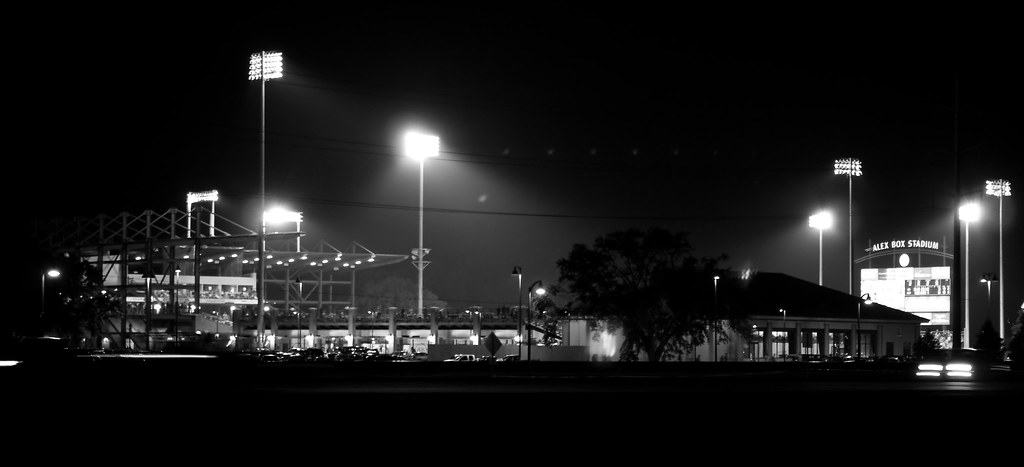
BTW, I love that b&w stadium shot. It just gives an atmosphere that a color shot doesn't seem to have.
 
Scott,
I think you bring up an interesting question - Is there any difference / advantage to shooting in monochrome, and / or using an editing program to change the shot to monochrome after?
I've used my editing programs quite often to do this, but I don't know if there is any more detail or advantage of actually shooting in B&W in the first place.

If there really isn't a difference or advantage, than I guess the only reason why a camera would even offer that shooting mode would be to either see your shot in B&W right away (even though my camera does give me the option of changing any shot into B&W very quickly in a post processing feature) or for those who don't have an editing program and don't want to use the camera's post processing features.

I would be interested to know if there is a difference one way or the other.

I'm not 100% sure of this (so someone correct me if I'm wrong), but I believe setting the camera to monochrome discards all the color data in the camera. So if you ever wanted to have a color version of a photo shot in monochrome, you wouldn't be able to recover the color.
 
Here are some from me, here in the state that seems to be gloomy for months now. lol
IMG_1593.jpg


And in B&W which looks much better I think, because they were cream to began with.
IMG_1593-2.jpg


I started playing with the filter on my free Google Picasa and made them Yellow

IMG_1582-1.jpg

IMG_1573.jpg
 
If you get into black and white there are only about 100 different ways to get there and they all can have different and amazing looks. Go to Scott Kelby Training and go to this instructor. Katrin Her second class is on B&W and it is an eye opening class. You can see the first class I think for free.

So as you will see as you expand your horrizons with photography. for every level you expose yourself to you find there are ten additional levels below that if you want to go there.

That is what is so great about photography. It can be enjoyed at many levels by many talent and skill sets!
 
Last night I decided to do a few nighttime shots. I went with a 10 second shutter speed, and used a 2 second delay (I still haven't gotten a chance to get my wireless remote yet).
These are my favorites from the shots I took:

night05-1.jpg


night11a.jpg


That thing above the building that looks like a curved ladder was actually a plane that decided to crash my shot:
night16.jpg
 
Opened up my D5K last night, charged up the battery.. and just had time to shoot a few portrait shots of the family all on auto everything as I have no clue about anything else yet.. My wife was impressed with the first few pics..

Question- Does photoshop elements 7 have the HDRstuff with it or do I need to buy another photo software program to take advantage of it?

Going to try and snap some shots this afternoon on full "M" mode.. and see what I can come up with.. I am terrified of posting any of my shots on this thread...
 
Opened up my D5K last night, charged up the battery.. and just had time to shoot a few portrait shots of the family all on auto everything as I have no clue about anything else yet.. My wife was impressed with the first few pics..

Question- Does photoshop elements 7 have the HDRstuff with it or do I need to buy another photo software program to take advantage of it?

Going to try and snap some shots this afternoon on full "M" mode.. and see what I can come up with.. I am terrified of posting any of my shots on this thread...

Having your wife enjoy the shots is very important - that way when you decide you need new equipment it might be easier to talk her into it! :thumbsup2

I'm not sure about Photoshop E 7 having HDR merge (I imagine it probably does, but I don't use Photoshop, so I really can't say, but I'm sure there are others who will be able to tell you).

"M" mode is a good way to learn about setting both the aperture and the shutter speed, although you might want to consider first working with both the "A" (aperture) mode and "S" (shutter) mode first. That way you only need to concentrate on learning one mode at a time, while the camera helps set the best setting for the other mode.
For example, try working with the shutter mode to get some action shots, and let the camera determine the best aperture. Then, when you see what the camera sets, you will have a better idea for future reference what a good aperture setting would be.

Don't be afraid to post pictures here. We would love to see what you are doing, and if you have any questions about your shots, we might even be able to offer a little help as well.
 
Last night I decided to do a few nighttime shots. I went with a 10 second shutter speed, and used a 2 second delay (I still haven't gotten a chance to get my wireless remote yet).
These are my favorites from the shots I took:

Very nice, they turned out so much better than my first attempts.:banana:
 
Having your wife enjoy the shots is very important - that way when you decide you need new equipment it might be easier to talk her into it! :thumbsup2

I'm not sure about Photoshop E 7 having HDR merge (I imagine it probably does, but I don't use Photoshop, so I really can't say, but I'm sure there are others who will be able to tell you).

"M" mode is a good way to learn about setting both the aperture and the shutter speed, although you might want to consider first working with both the "A" (aperture) mode and "S" (shutter) mode first. That way you only need to concentrate on learning one mode at a time, while the camera helps set the best setting for the other mode.
For example, try working with the shutter mode to get some action shots, and let the camera determine the best aperture. Then, when you see what the camera sets, you will have a better idea for future reference what a good aperture setting would be.

Don't be afraid to post pictures here. We would love to see what you are doing, and if you have any questions about your shots, we might even be able to offer a little help as well.

Thanks for the advice!!!


Disney Vacation Planning. Free. Done for You.
Our Authorized Disney Vacation Planners are here to provide personalized, expert advice, answer every question, and uncover the best discounts. Let Dreams Unlimited Travel take care of all the details, so you can sit back, relax, and enjoy a stress-free vacation.
Start Your Disney Vacation
Disney EarMarked Producer

New Posts


DIS Facebook DIS youtube DIS Instagram DIS Pinterest DIS Tiktok DIS Twitter

Add as a preferred source on Google

Back
Top Bottom