shutter speed help

dumbo_buddy

DIS Veteran
Joined
Jul 23, 2009
Messages
2,228
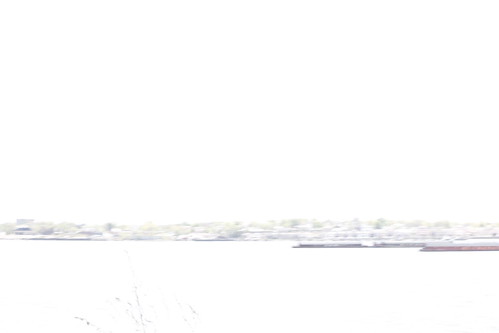
blergh! i'm taking a "how to use your dSLR camera" class and the instructor wanted us to shoot in shutter priority this week. i went around the corner to shoot some pictures of the gorgeous view of manhattan. i tried setting it at different shutter speeds and they all came out like this:
4531993012_848a59b51e.jpg


yuck! what's going on? is it just too bright out? the camera tried to adjust the aperture but obviously it didn't work at all.

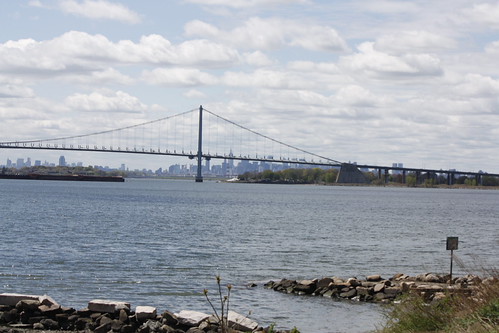
when i sped it up to 1/400 sec it worked out better:
4531955300_c4b2cc76a8.jpg


i was hoping that if i could set the speed slower i could get the fuzzy water effect. but it didn't work.

anyone have suggestions? critiques?

can't wait to take this camera to disney. i just need to keep practicing before though!
 
Many are more expert here than I am... but I'll try...

When you are in shutter priority, you set the shutter speed and the camera will pick the best aperture for the shutter speed and ISO you have chosen (or it will choose for you too if you select auto ISO). Choose a long shutter speed during the bright daylight, and it will try to close down the aperture as much as possible to balance out all that light coming in. But it can only go so far, and if the speed is too slow, all you get is an overexposed photo.

Make sense?
 
Many are more expert here than I am... but I'll try...

When you are in shutter priority, you set the shutter speed and the camera will pick the best aperture for the shutter speed and ISO you have chosen (or it will choose for you too if you select auto ISO). Choose a long shutter speed during the bright daylight, and it will try to close down the aperture as much as possible to balance out all that light coming in. But it can only go so far, and if the speed is too slow, all you get is an overexposed photo.

Make sense?

yes, and i believe that's exactly what happened. the f-stop was adjusted all the way to 22 or something and i had the ISO on auto which made it pretty low. even still, it was too bright. oh well. the second picture worked out better and i kinda like it.

thanks for the info!!:hug:
 
What camera are you using? It is definitely possible to set a shutter speed to slow for the amount of light you have.

There are several ways to know if this is happening. In my camera, I would see that the exposure meter reads too high. I would also see the aperture flashing, indicating that it had adjusted as much as it could.

One way to see what your useable shutter speed range is in a given set of conditions is to switch to aperture priority mode and look at the range of shutter speeds as you adjust your aperture from widest to narrowest. If your lens cannot stop down any smaller than f/22, then the shutter speed at f/22 is the slowest you'll be able to get (assuming a constant ISO).
 

I tried to look at your EXIF data (which would include all the camera settings, like shutter speed, aperture, ISO, etc), but looks like all that EXIF data was stripped out of your photo.

Do you happen to know those particular settings for the above 2 photos?

mom2rtk is probably right. I have a feeling you chose a very very slow shutter speed during bright daylight, especially since you said you were trying to get that "fuzzy water" effect.

Slow shutter speed makes the exposure brighter (which is what you *don't* want during bright daylight). To compensate for this, your camera tried to darken the exposure by using the smallest aperture (larger f-number) and smallest ISO.

Despite an aperture of f/22 (smallest aperture) and ISO 100 (smallest ISO), it probably wasn't enough to compensate for the slow shutter speed.

This is where you'd need a neutral density filter (ND filter) for your lens. An ND filter is a dark filter that darkens the scene and allows you to use slower shutter speeds, especially during the day.
 
thank you.

the first pic was taken at f/22 and 1/2 sec. the second (and much better one) was taken at f/8 and 1/400 sec. both were ISO 100. i'm using a canon XSi. i actually haven't gotten to the chapter on metering (lol!) so i don't know how to deal with that.

if i stood in the shade vs. in the sun and took the picture of that view, would it have been different??
 
thank you.

the first pic was taken at f/22 and 1/2 sec. the second (and much better one) was taken at f/8 and 1/400 sec. both were ISO 100. i'm using a canon XSi. i actually haven't gotten to the chapter on metering (lol!) so i don't know how to deal with that.

if i stood in the shade vs. in the sun and took the picture of that view, would it have been different??

It shouldn't matter where you stand. What matters is what the camera "sees" and how much light it's letting in.
 
thank you.

the first pic was taken at f/22 and 1/2 sec. the second (and much better one) was taken at f/8 and 1/400 sec. both were ISO 100. i'm using a canon XSi. i actually haven't gotten to the chapter on metering (lol!) so i don't know how to deal with that.

if i stood in the shade vs. in the sun and took the picture of that view, would it have been different??


Most likely not.....your meter reads the light reflecting from the scene. Even if you are standing in the shade it would still be metering off of that bright sunny scene.

However if you subject was in shade then yes, a slower shutter speed would probably have worked.
 
the first pic was taken at f/22 and 1/2 sec. the second (and much better one) was taken at f/8 and 1/400 sec. both were ISO 100. i'm using a canon XSi. i actually haven't gotten to the chapter on metering (lol!) so i don't know how to deal with that.

if i stood in the shade vs. in the sun and took the picture of that view, would it have been different??

Sounds like your camera did exactly what we all described. The 1/2 second shutter speed is too slow for broad daylight photos. This is where an ND filter would help.

It doesn't matter where you stand to take the photo. Your subject (the water & the bridge) are in bright sunlight. So, whether you yourself stood in the sunlight or in the shade, the camera settings would have been exactly the same. The only difference is that you, the photographer, would feel cooler & more comfy in the shade. :cool2:

If, however, you could place your subject in the shade, the camera exposure settings would be completely different (ie. the exposure settings would be different on a bright sunny day vs. an overcast cloudy day).

How do you know if your camera got the correct exposure? When you look in the viewfinder, you should see the exposure level indicator, which is a bunch of bars (-2...-1...0...+1...+2) in the middle and bottom of the viewfinder. Here's a picture I stole from dpreview.com:

viewfinderviewdiag.jpg

Your job as the photographer is to point the arrow to the middle of those bars. When the arrow is on the right side of the bars, your picture will be over-exposed (too bright). When the arrow is on the left side of the bars, your picture will be under-exposed (too dark). As you change your shutter speed, your aperture, and your ISO, the arrow will move up or down those bars.

For the first photo, you might have noticed that the arrow was WAY on the right side of the exposure level indicator, which would have told you that the picture was going to be super over-exposed.

For the second photo, the arrow was probably right in the middle of the exposure level indicator.

Hope that helps. :)
 
Are you allowed to shoot anything, or just certain subjects??? A good way to show the effects of different shutter speeds would be to take pictures of moving cars. You could show how a faster speed stops the motion, while a slower shutter speed causes motion blur (might help to shoot during the later part of the day for this though.... less light). Have fun; and good luck!!!! :thumbsup2
 
This was the same homework I had a couple of months ago. I used a waterfall for my fast shutter, and a carousel for my slow shutter. I found it next to impossible to use my slow shutter speed without a tri-pod. I hope this helps you some, some people also did things like moving trains:thumbsup
.
IMG_0879.jpg


IMG_0980-1.jpg
 
thank you.

the first pic was taken at f/22 and 1/2 sec. the second (and much better one) was taken at f/8 and 1/400 sec. both were ISO 100. i'm using a canon XSi. i actually haven't gotten to the chapter on metering (lol!) so i don't know how to deal with that.

if i stood in the shade vs. in the sun and took the picture of that view, would it have been different??

Given that we know the correct exposure was f/8, 1/400, and ISO 100, we can calculate the longest possible exposure with that lens. Every time that you close down your aperture by a full stop, your shutter speed should double. The full stops are f/1, f/1.4, f/2, f/2.8, f/4, f/5.6, f/8, f/11, f/16, f/22, f/32, f/45. If the smallest aperture on your lens is f/22, you could stop down 3 stops from f/8. That means that your shutter speed would double three times - 1/400 to 1/200, 1/200 to 1/100, and 1/100 to 1/50. So for anything longer than 1/50, you would have needed a neutral density filter.
 
this is all amazing information. thank you all for helping me be a better photographer.

we can take a picture of anything and i should probably find something moving. or, perhaps photograph that view (it's nice, right?) at night with a slow shutter?

i didn't know about the algebraic inverse relationship between f-stops and shutter speed. very interesting.

i wish there was a carousel around here! i'd get a great grade with that photo!!
 
This was the same homework I had a couple of months ago. I used a waterfall for my fast shutter, and a carousel for my slow shutter. I found it next to impossible to use my slow shutter speed without a tri-pod.
We need to break this assignment into three sub-assignments:
1. Use of the shutter speed priority feature and observing what happens when the camera is unable to adjust the aperture to match the shutter speed and scene lighting conditions. (Some cameras dishonor your shutter speed selection when the lens won't adjust far enough.)
2. Adjusting shutter speed to minimize blur of moving subjects and blur from less than steady camera holding (waterfall, sports).
3. Motion blur as an artistic addition to the picture (carousel, fireworks).
 
this is all amazing information. thank you all for helping me be a better photographer.

we can take a picture of anything and i should probably find something moving. or, perhaps photograph that view (it's nice, right?) at night with a slow shutter?

Yes, it's a nice view. ;)

And a night visit can also show the advantages of using slower shutter speeds. A fast shutter speed would hardly let any good amount of light to hit your sensor. And a looooooooonng shutter speed would definitely help to show the lights and details of your subject.
 
The over exposed images are also part of the point of the assignment. As are under exposed images that some students probably got. It's easy to think of shutter speed as you did, to stop action or show motion and not account for how it affects exposure.


Disney Vacation Planning. Free. Done for You.
Our Authorized Disney Vacation Planners are here to provide personalized, expert advice, answer every question, and uncover the best discounts. Let Dreams Unlimited Travel take care of all the details, so you can sit back, relax, and enjoy a stress-free vacation.
Start Your Disney Vacation
Disney EarMarked Producer

New Posts


DIS Facebook DIS youtube DIS Instagram DIS Pinterest DIS Tiktok DIS Twitter

Add as a preferred source on Google

Back
Top Bottom