Ride Photos

davidmolliesmum

i must resist chocolate... i must resist chocolate
Joined
Apr 4, 2008
Messages
658
i'd love to get some fab ride photos... non blurry!!
some of you on here have some stunning photos where the motions is there but theres something in perfect focus such as the castle in the background or your childs expression....
HOW CAN I ACHEIVE THIS?!?!?
any tips appreciated, i'm new to DSLR (pentax Kr)

please share similar pics too.....
 
Gettting motion blur in one part and sharp focus in another needs a couple of things. Things moving at different speeds (or one not moving at all), the right shutter speed and in some cases panning. And sometimes you need a tripod to get the shot.

Like on the Mad Tea Party, I use a fast enough shutter speed to freeze my kids who are moving with me in the cup, but slow enough to blur what's outside the cup.
 
The settings you use depend on the effect you want. Normally to avoid motion blur, you need to go as high as you can with the shutter speed. I decided to go for a different effect on these.

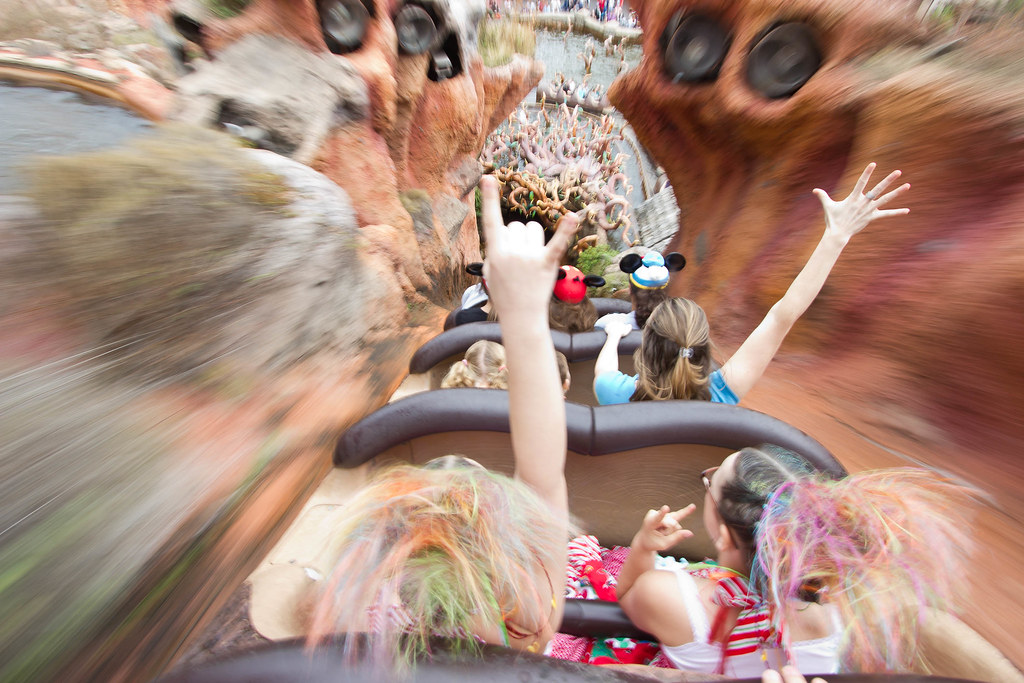
This was shot at 1/30 shutter speed to provide some motion blur:


Crazy Hair Day at Splash Mountain by mom2rtk, on Flickr


I shot this one also at 1/30 but moved the camera slightly for a panning effect:


IMG_6528 by mom2rtk, on Flickr
 
As noted, the key to capturing motion blur is a slower shutter speed. You can achieve this in a few different modes, but the one setting to watch is shutter - the faster the movement, the faster the shutter can be and still blur the scene - slower moving subjects would require much slower shutter speeds to be able to get the blur or streak effect. The thing that you want to be sharp and non-blurred essentially needs to be either moving at the exact same speed as you, or you need to be moving the camera at the exact same speed as it. For example, onboard a ride, a slower shutter speed might allow you to catch a person sitting in front of you perfectly clear and unblurred (provided they don't move around) while the background streaks past and becomes blurred. Or for another example, you're standing on the ground and want to shoot the Monorail as it goes by...you want the monorail sharp but the background blurred - so you use a slower shutter speed, and as the monorail is passing, you follow it in the viewfinder, trying to keep it exactly in the frame in the same spot and moving along with it as it moves.

Mostly, it comes down to practice and technique. If you want a fairly easy ride to practice on, there's nothing better than the Peoplemover (TTA) in Magic Kingdom. It's relatively slow, and you can sit with people opposite you in the same car. Or you can just try it out on the ride cars themselves. Simply put your camera in a slower shutter (S or Tv mode) of about 1 second. Hold as steady as you can - brace the camera on a surface if you can - tell your subject to sit perfectly still until you say otherwise, then gently press the shutter button and hold perfectly still until the camera is done. The subject that's riding along with you should remain nice and sharp and unblurred, while the surrounding scenery will be streaked and blurred as it goes by.

There are many other ways to do it too - using a zoom lens to 'zoom' during a long exposure can create a type of motion blur. Having a subject stand still for a bit, then quickly move out of frame during an exposure can create a type of motion blur. But the one constant is the shutter speed - it needs to be longer to allow the camera to pick up the movement.
 

Here are a few different examples...

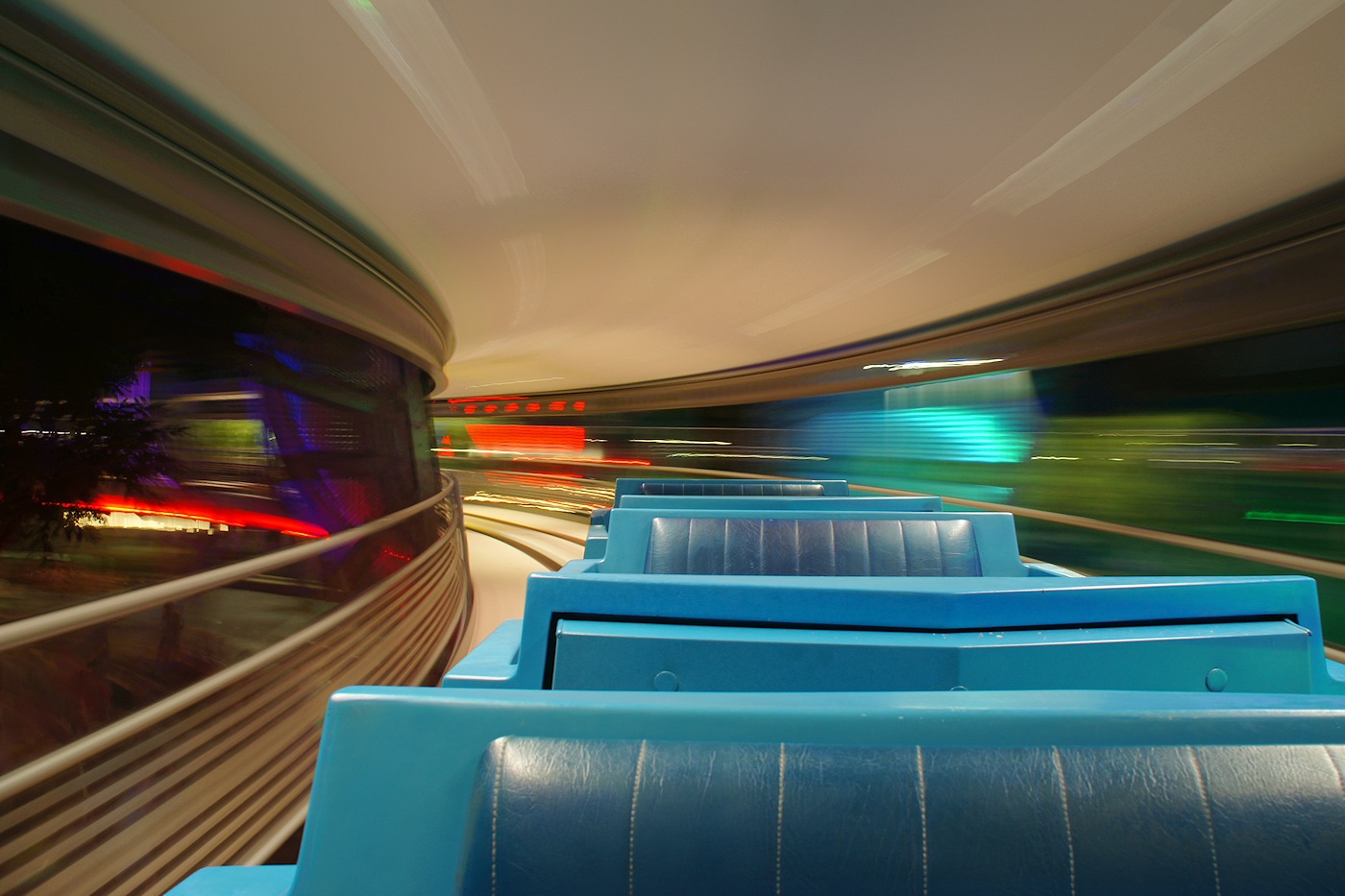
In this one, the ride cars and I are moving together at the same speed, while the background is streaking past:
original.jpg


In this one, the only thing moving is the zoom lens, which I'm manually zooming during a 1 second exposure while the camera is on a tripod:
original.jpg


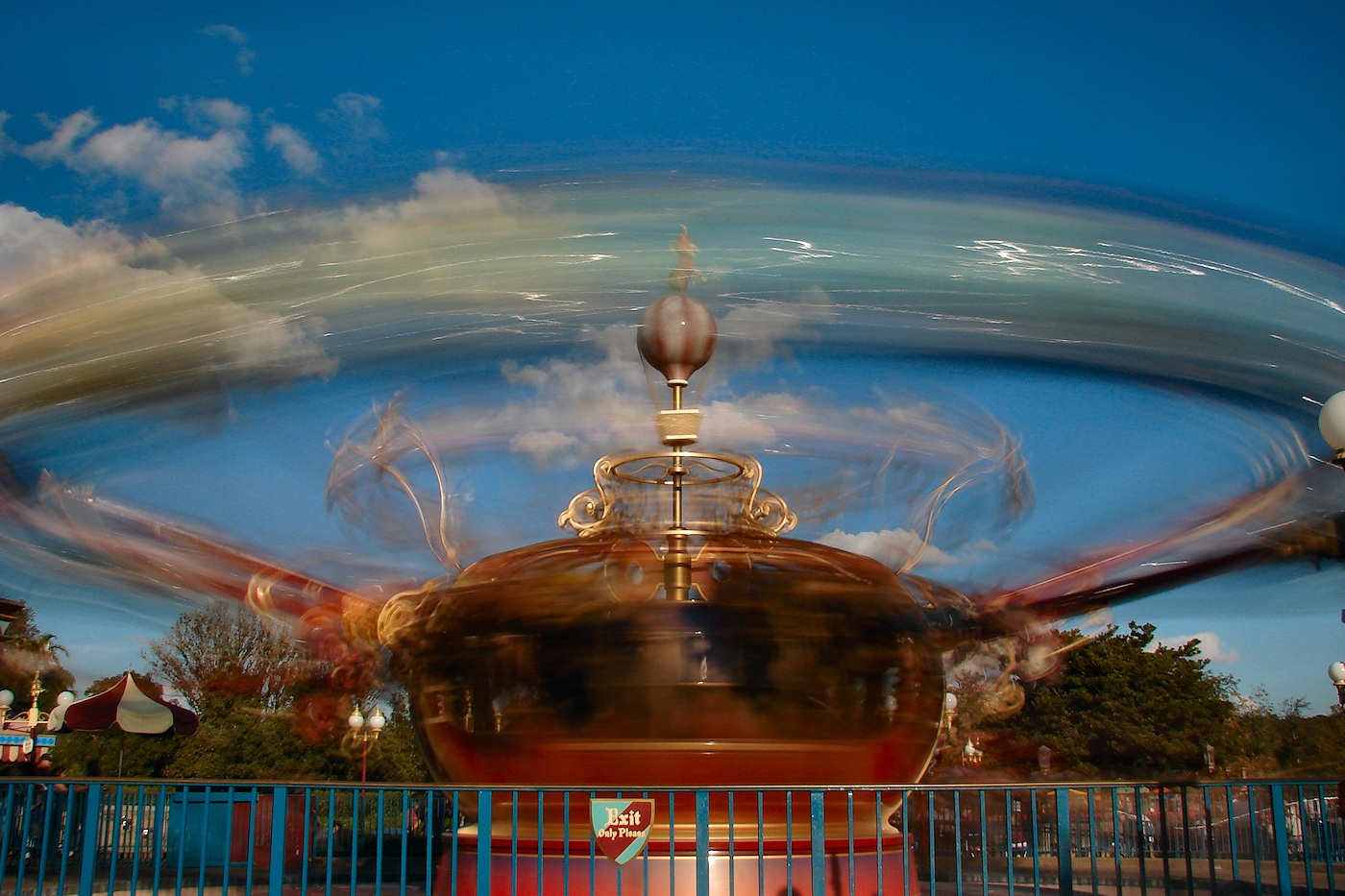
In this one, only the ride cars are moving and the rest of the scene and myself stay still:
original.jpg


In this one, the background and scenery all stay still, and I have the camera on a tripod and am perfectly still too, so only the people are moving:
original.jpg


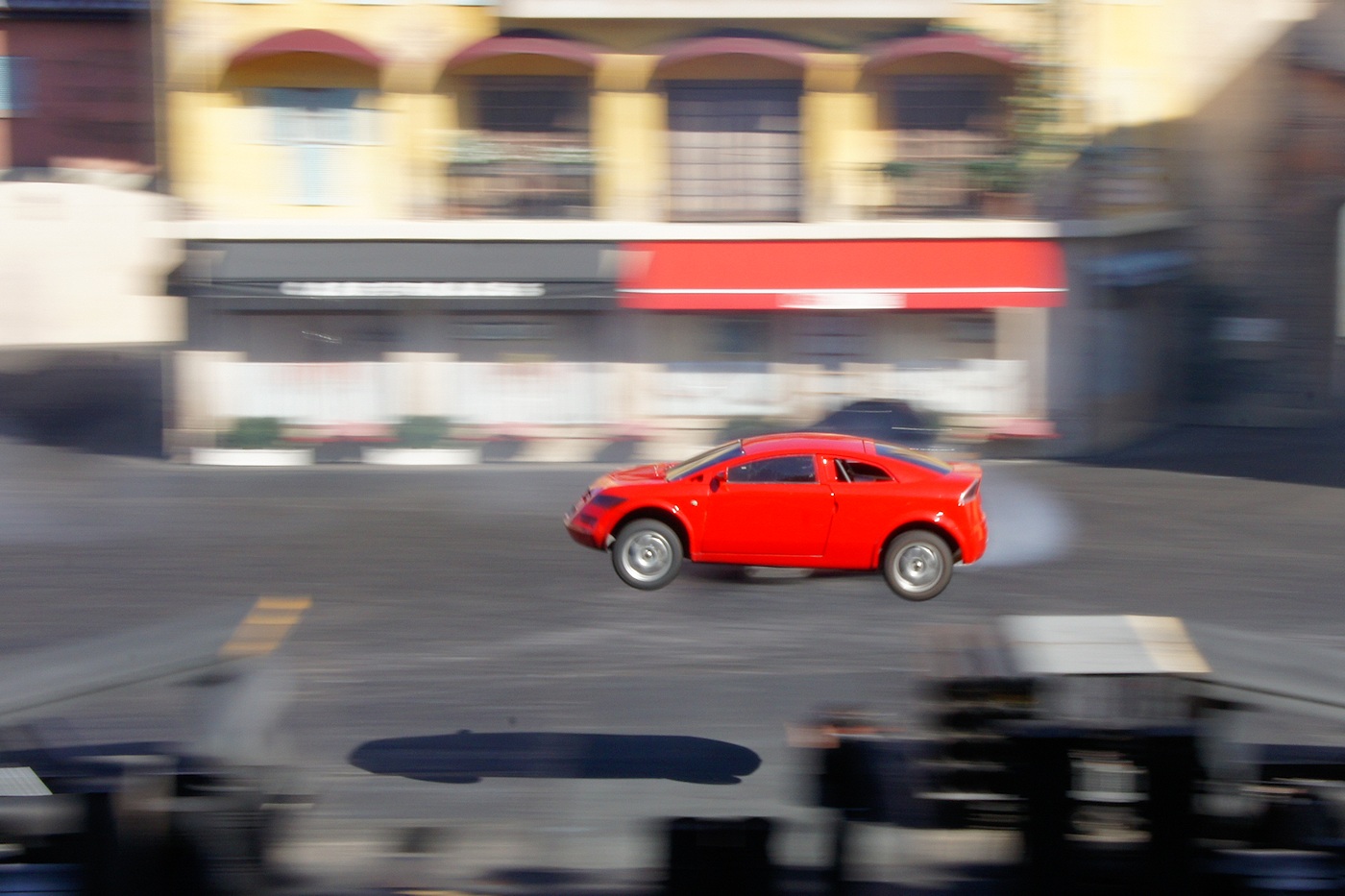
In this one, I am panning the camera - following the car as it moves at the same speed, so that the car stays clear and the background blurs:
original.jpg


Here, I tried handholding the camera and moving myself from right to left at the same speed as the monorail while also zooming the lens out as the monorail came closer to me:
original.jpg
 
thanks you zackiedawg these are exactly the kind of photos and advice i am looking for!! your explanations are so clear, i will certainly try these techniques out!!:worship:
 
mom2rtk... LOVE the crazy hair pic!!! i want one like that too!!!!:rotfl2:
 
If you want blurry photos, any camera can work! If you want sharp photos of fast action in a dark place, spend about $10K on a full frame camera and collection of fast glass lenses. Don't worry, you can still take blurry photos with expensive camera, too.

Using a tripod or panning are good techniques to combine blur & sharp detail, but there's another thing that can help - flash. The blast from your flash can freeze subjects because it's shorter than your shutter speed.
 
To those of you who posted pics (great pics by the way - all of them :thumbsup2) do you prefer to use shutter priority or do you go full manual mode? I'm not sure I have the confidence for full manual if I'm taking shots where I don't have a definite chance for a "do over" if I completely mess it up.

The blast from your flash can freeze subjects because it's shorter than your shutter speed.

Although that makes sense to me in theory, how would you determine when a good time is to use the flash with a slow shutter speed? I guess it's a case of just playing around and finding what works and what doesn't (?)

For example, I tend to use the flash a lot outdoors to help with issues with shadows. But say , for instance the Splash Mountain photo Mom2rtk posted - I would have thought that using a flash would have allowed too much light in and risked blowing out parts of the picture ... No? I'm not challenging your statement and hope it doesn't look that way. I am genuinely clueless!
 
i'm a purely manual mode - no flash at all kinda person....

mom2rtk... i love the pic, the hair kinda sets it off too!!

i'm going to try for some pics of my kids on the rides with the motion in the background... and also love the main st pic of the hustle n bustle of people with the castle & street in focus.
i'm off to a local "theme park" next month so plan to try then, its kinda difficult trying it out when you're not in a similar situation to disney... where to get a good 'motion' shot.....?!:scratchin
 
i'm a purely manual mode - no flash at all kinda person....

mom2rtk... i love the pic, the hair kinda sets it off too!!

i'm going to try for some pics of my kids on the rides with the motion in the background... and also love the main st pic of the hustle n bustle of people with the castle & street in focus.
i'm off to a local "theme park" next month so plan to try then, its kinda difficult trying it out when you're not in a similar situation to disney... where to get a good 'motion' shot.....?!:scratchin

I'm also not a fan of flash, but I almost always have my flash attached to my camera in the daytime as I find it really helps reduce problems with shadows in bright sunlight.

I see you have a 6 year old :) I'm thinking TEACUPS :cool1:
 
I use manual mode, or Aperture Priority most of the time for these types of shots. It's usually easier I find to set the shutter and aperture, and if the result needs a tweak, shoot it again after adjusting settings a bit. Sometimes Aperture Priority is useful when I want to set the depth of field for a particular lens. But I still 'control' my shutter - I watch the camera's chosen shutter speed, and adjust it with the EV control to where I want it to be, or bump the aperture or ISO if I need to.
 
I use manual mode, or Aperture Priority most of the time for these types of shots. It's usually easier I find to set the shutter and aperture, and if the result needs a tweak, shoot it again after adjusting settings a bit. Sometimes Aperture Priority is useful when I want to set the depth of field for a particular lens. But I still 'control' my shutter - I watch the camera's chosen shutter speed, and adjust it with the EV control to where I want it to be, or bump the aperture or ISO if I need to.

Thank you :goodvibes

I am going to try find somewhere to play around with this and test it out. I don't have the confidence for manual but I'm quite happy with A and S priority so this suits me great! I just found your picture gallery through the link in your signature and I'm busy admiring your beautiful shots!! :thumbsup2
 
Sorry, I'm being a nuisance here and it's not even my thread :guilty:

What do you folk do with your White Balance settings for the night shots like the one on the TTA for example?
 
Mom2rtk - in your crazy hair pic (which I love, btw) did you just put the camera away very quickly after the pic? Or do you have a waterproof housing on your camera?

Thanks to all for the tips. I am just learning what I can do with my camera and taking it out of P mode. I need all the help I can get! :thumbsup2

Zackiedawg - thanks for sharing in such detail. That's really, really helpful. Time to practice!
 
What do you folk do with your White Balance settings for the night shots like the one on the TTA for example?

Best way to deal with white balance until you get the hang of it, is to just look at it! Take a shot, see how it comes out (or view it on the LCD in a live-view based camera). Look too red? Too blue? Change the settings, and try again. Auto White Balance often works, but can be confused by manmade lighting at night...and some AWB systems need a half-press of the shutter to 'check out' the lighting, and make an adjustment - so if you just press the shutter right away, you get more errors from AWB than if you half-press and delay a bit to let the system adjust itself. When shooting around flourescent or sodium vapor night lighting, often a 'tungsten' or 'incandescent' white balance setting will deliver a nice look at night...so you can try those. Or if your camera has a manual white balance setting mode, try finding something white to point the camera at, and run the manual adjustment.

Remember too that 'correct' white balance isn't always the best white balance...some photographers get all involved with trying to get everything to be technically perfect - but white balance being overly warm or overly cool might actually help deliver just the 'look' you want, or a better memory of how the scene looked to the eye. Main Street can be a good example - if you stand there and look at it, the lights of Main Street look a bit yellowish, which lend it a classic look...but if you were to take a photo and adjust the white balance to be 'technically' correct, the lights would be perfectly white - losing the yellow glow that most people's eyes actually perceive. So if you wanted to catch Main Street in the way it actually looked, and were looking for that warmer yellowish lighting, 'correct' white balance would eliminate it and give you a colder, more clinical look.

For me, white balance isn't always about a technical measurement, but about the feel or atmosphere of the scene and how I want to capture it. So I sometimes let my white balance be a little overly warm, or cool. In the TTA shot, it's on Incandescent, and still leans a bit towards warm - which I liked for those colored lights streaking. Let white balance be what you want it to be - pay attention to it for sure, and understand it, but don't always try to make it a technical or scientific measurement of what's right. Think about what makes sunset such a gorgeous time of day - everything takes on a warm, orange-yellow glow...white things don't look white, they look yellow/orange. If you were to take a 'corrected white balance' sunset shot, it wouldn't look like a sunset anymore!
 
Here's a pic I took a few years ago that I fell in love with... It was me experimenting with shutter priority...

4084879712_0283c6f751_b.jpg
 
What do you folk do with your White Balance settings for the night shots like the one on the TTA for example?

Shoot in RAW and white balance is not an issue, it can be adjusted later.
 

New Posts


Disney Vacation Planning. Free. Done for You.
Our Authorized Disney Vacation Planners are here to provide personalized, expert advice, answer every question, and uncover the best discounts. Let Dreams Unlimited Travel take care of all the details, so you can sit back, relax, and enjoy a stress-free vacation.
Start Your Disney Vacation
Disney EarMarked Producer

New Posts


DIS Facebook DIS youtube DIS Instagram DIS Pinterest DIS Tiktok DIS Twitter
Add as a preferred source on Google

Back
Top Bottom