Please give me comments on these...

jtimmons

Mouseketeer
Joined
Jun 14, 2006
Messages
208
I am looking to put the barn picture in my livingroom, probably poster size.
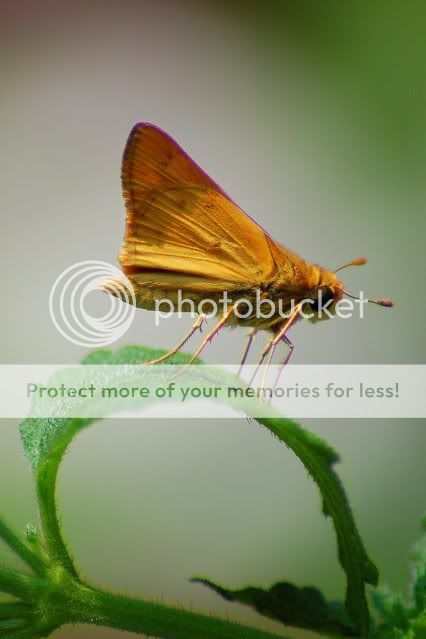
Also, I am just wondering what people think about the moth.....

So....Let me know!!!:goodvibes

SelectiveBarn.jpg


MothLeaf.jpg
 
Cool shots! :thumbsup2

I think the first one needs more contrast. Not really a fan of selective coloring either.

The second one needs something. Maybe more sharpening? and bump up the saturation and contrast.
 
Nice photos but agree with previous. The fence should be white and it looks gray on my monitor. If you use PS, add a curves adjustment layer, find the white eyedropper on the bottom of the screen, select it, click on the fence and I think you will see a huge difference.

The moth - wish it was looking at us but bumping up the contrast/ saturation will make it look really nice. A good tool to use for sharpening is the high pass filter. Make a new layer from all your other layers combined, change the mode to overlay. It will look really bad at first, but then select filter/other/high pass and adjust the pixels until you get nice sharp edges. Then, select okay. The good thing about this method is it just sharpens the edges and if you go too far, you can adjust the opacity of the layer to lessen the effect.
 
Nice shots ... I love the composition of the barn but like the above, I'm not a big fan of the selective coloring. I'd love to see it in full color, too....

I like the moth the way it is.
 

well i agree( are you tired of hearing that?;) ) personally while i like a tiny amount of selective coloring very occasionally( i saw one from someone with a bride bouquet very softly colored) i think i'd like this one better b&w...maybe if you can bump up the contrast more? or maybe muted colors, like an old photo...to me the coloring here while well done( i always seem to get something color i don't want:rotfl2: ) doesn't really add a lot to the photo

for the moth, if you have a fill light you might be able to show the eye better..... it's on the adobe raw converters i know but don't know what you use. other than that i think it's fine

one thing i have seen and am meaning to do someday is mat some smaller photos in large mats..ie a mat that has probably 6" or so of space around it.. i've seen that look and it's very dramatic imo...course i'd have to be able to make a decent mat first....
 
I'm definitely no expert, but I personally like the selective coloring on the first photo. The red is a nice contrast to the black and white.

I really like the second photo too! Nice job!
 
Thanks for the comments so far (don't stop just because I replied back)

I appreciate the critique and the help. I did play around with the color, brightness, contrast, etc of the barn, but I liked it just a little on the unsaturated side of things. I think I was going for the "old & weathered" photograph look. Something you might have seen done by film in the 20's or 30's, but with the modern day selective coloring.

I really tried to get the moth sharp but I couldn't get my camera to focus on the whole "scene". I will try the hi-pass technique on it and see what that does.

Again, thanks to all who commented.

Jonathan
 
I think the moth is super cool.

I'd love to see the first one done with an antique look. Desat and add some texture.
 
I like the shot of the moth. It is a great shot. However, I think what would make it better would be if it wasnt so centered. I find myself looking for something more to the pic. The leaf helps this a bit though. I once had a pic of a great blue heron that was like this. Perfectly centered standing on nice green grass. Nice focus, nice everything. My photography teacher at the time said "Nice photo. It would look great in a field guide but terrible on the wall". I was pretty darned proud of the photo but realized that he was correct as it was just too plain. Perfect in every way, but the compostion didn't leave anything to the imagination. That, I guess is how I see the moth photo here. I think it is awesome technically speaking but the composition is just too centered. Did you perhaps crop this from something larger that you could re-crop it differently?

BTW, I'm no expert by any means so you should take my comments lightly. Others on here are much better at "seeing" what is right or wrong with a pic.

I do like the barn pic although personally I'm not a big fan of barn pics so I'm not going to get into that one. I have no problem with the selective coloring of it though. I think it works well with it.
 
Nice shot of the skipper! Great detail for a 300mm shot! The barn shot is nice too, the first one without the grain added is better IMO.
 
I'll through my 2 cents into this ring. I like the selective coloring on the barn, but I agree that desaturating the red would look nice. Take away the film grain, maybe a soft focus? Or a um... what the heck is it called.... ah-ha! Diffuse glow - that was it. I just played with it in PE (sorry if I overstepped my bounds) but I like it desaturated then add a diffuse glow - grain 3, glow 4, clear amount 13. It gives you texture, some color, and it softens the edges.

D4D
 
I think what I did was use the professional retro action and adjust to color where I wanted it. http://www.atncentral.com/download.htm (Looks like the sites down right now, but there's where I got it, and it's free)

The texture, I have no idea. I have a ton of them. Maybe the old canvas in aly's vintage, also from action central. http://www.textureking.com/ has a lot of free textures, and http://www.deviantart.com/ is a great place to look for brushes, textures, and other photoshop stuff.
 
SelectiveBarncopy.jpg

i did this like the pin hole camera but for some reason can't get the vignette to work right so it's not darkish around the edges like it should be but still light in the middle...not sure if maybe it's cause of what was already done or what...i

f you want to play around with that and have photoshop or pse5 you go to select, modify enter 1 ok then select feather and enter 250 ok, repeat second step then go to hue/saturation and go left on the lightness tab till it's dark on the corners/edges but still light inside...then i put a yellowish/tan fill layer at about 30-50% opaque to make it look well, yellowish

....figure you probably can't get much "older" than pinhole esque;).

to get the blur you go to filter blur radial blur, enter 3 and zoom, best ok then go back to blur radial blur enter spin best and 1 ok
 
I think what I did was use the professional retro action and adjust to color where I wanted it. http://www.atncentral.com/download.htm (Looks like the sites down right now, but there's where I got it, and it's free)

The texture, I have no idea. I have a ton of them. Maybe the old canvas in aly's vintage, also from action central. http://www.textureking.com/ has a lot of free textures, and http://www.deviantart.com/ is a great place to look for brushes, textures, and other photoshop stuff.

Thanks! I'll look into these.


Disney Vacation Planning. Free. Done for You.

Our Authorized Disney Vacation Planners are here to provide personalized, expert advice, answer every question, and uncover the best discounts. Let Dreams Unlimited Travel take care of all the details, so you can sit back, relax, and enjoy a stress-free vacation.
Start Your Disney Vacation
Disney EarMarked Producer


DIS Facebook DIS youtube DIS Instagram DIS Pinterest DIS Tiktok DIS Twitter

Back
Top Bottom