
eticketplease
DIS Veteran
- Joined
- Aug 24, 2021
- Messages
- 7,467
You earned Rewards Dollars based on your purchase not on your statement total. Rewards Points will show as pending but they will not be useable until the statement closes in which you made the purchases. Think of this as depositing a large check to your account, as that deposit is pending until it clears. In the case of reward dollars they do not clear until the statement closes.@eticketplease The way I understand how this works is that you receive rewards based on your statement total each month. I buy $500 but then have a credit of $200 from applying my rewards my net statement balance is $300 therefore I earn $3.
For simplicity sakes we will see say that your statement closes on the 1st of each month and your payment is due on the 25th of each month.
So your statement closed and on January 1st and then your rewards dollars for that statement are added and available to spend starting on January 2nd.
We will say that you put down a $250 down payment on a Disney Vacation Package to pay it off at 0% interest for 6 months and that purchase was placed on 11/28/2025 which is 50 days ago.
We will say your Rewards Dollar balance is at $200.
We will say that your credit card balance is $0.
From your example above of spending $500 between 1/2/2026 and 2/1/2026, we will assume that all purchases are in the 1% categories.
That $500 in spend earns you a total of $5 in Disney Rewards Dollars and you will be able to see it as pending online by clicking "Redeem" next to your Rewards dollar amount and then "See details"
Since it is less than 90 days if we go into to Pay Yourself Back we can apply any amount of Rewards Dollars that we have to the $250 purchase one time.
Since is is 1/17/2026 we have up to $200 to apply if we wish.
If we do so today this does the following things.
1. It will remove the $250 Vacation Package as something to select from to apply Disney Dollars to.
2. It will deplete our available Rewards Dollar balance to $0.
3. It will issue you a statement credit in a few days for $200
4. On 2/2/26 It will generate a new statement with the amount due of $300 ($500 spending - $200 credit) and payment will be due on 2/25/26.
5. Also on 2/2/26 Your available Rewards Dollar balance will increase from $0 to $5 from your $500 spent at 1% earned during the statement period.
If we wait until 2/2/2026 to use Pay Yourself back though the following will happen.
1. Your Statement balance of $500 owed due on 2/25/26
2. $5 is added to your Rewards Dollar available balance bringing your available Rewards balance to $205.
3. It will remove the $250 Vacation Package as something to select from to apply Disney Dollars to.
4. It will deplete our available Rewards Dollar balance to $0.
5. It will issue you a statement credit in a few days for $205
6. You will now owe the remaining $295 ($500 balance - $205 Credit) on 2/25/26.
If we wait until 2/27/2026 to do Pay Yourself back
1. Your Statement posted stating you owed $500 by 2/25/26.
2. Your Available Rewards Dollar balance increased by $5 bringing your available Rewards dollars to $205.
3. You paid your bill on 2/25/2026 and since you didn't have any other charges your balance will be $0 on the 3/2/2026 Statement.
4. You discover the $250 Deposit is gone and you can't apply any rewards dollars as 2/27/2026 is 91 days ago.
5. This means your Disney Rewards available balance will remain at $205 with the 3/2/2026 Statement.
It is important to note that the Pay Yourself Back credit is treated the same as you writing a check to Chase to apply to your account.
The credit is different from you buying a sweater from the Gap in which your earn points but then later decide it is not for you and return it and then you lose those points.
If I expand a Pay Yourself Back Credit you can see there are no Rewards Dollars taken away as you are simply writing a check to come out of your available disney dollar rewards balance and then the rewards balance is immediately deducted that amount.

This is very similar to a Chase Offer which is essentially a rebate.

I just don't use this card very much unless there is a bonus so for the gap example for returning something and getting a $ credit and taking away your disney dollars, the only example I could find was when my flight dropped in price and I received money back from Southwest but they also took away Disney Rewards dollars of $1.30
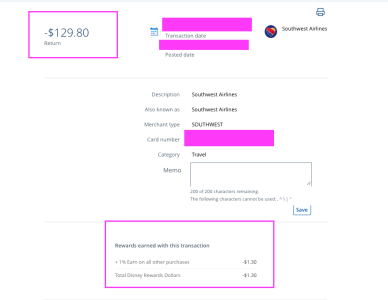
When you go in to your account, you can click on each transaction and it will show you the amount earned for each transaction like I have shown above. If it doesn't mentions Rewards then the transaction has no affect on the rewards, which to my knowledge are Payments, Pay Yourself Back Statement Credits and Chase Offers.
I'm not sure I can explain it any other way so hopefully this answers your question @disneychrista
Last edited:



 Wow..... I sure opened a can of worms!!











