Pay Yourself Back with Disney Visa vs. using a Rewards Card

@eticketplease The way I understand how this works is that you receive rewards based on your statement total each month. I buy $500 but then have a credit of $200 from applying my rewards my net statement balance is $300 therefore I earn $3.
You earned Rewards Dollars based on your purchase not on your statement total. Rewards Points will show as pending but they will not be useable until the statement closes in which you made the purchases. Think of this as depositing a large check to your account, as that deposit is pending until it clears. In the case of reward dollars they do not clear until the statement closes.

For simplicity sakes we will see say that your statement closes on the 1st of each month and your payment is due on the 25th of each month.
So your statement closed and on January 1st and then your rewards dollars for that statement are added and available to spend starting on January 2nd.
We will say that you put down a $250 down payment on a Disney Vacation Package to pay it off at 0% interest for 6 months and that purchase was placed on 11/28/2025 which is 50 days ago.
We will say your Rewards Dollar balance is at $200.
We will say that your credit card balance is $0.

From your example above of spending $500 between 1/2/2026 and 2/1/2026, we will assume that all purchases are in the 1% categories.
That $500 in spend earns you a total of $5 in Disney Rewards Dollars and you will be able to see it as pending online by clicking "Redeem" next to your Rewards dollar amount and then "See details"

Since it is less than 90 days if we go into to Pay Yourself Back we can apply any amount of Rewards Dollars that we have to the $250 purchase one time.
Since is is 1/17/2026 we have up to $200 to apply if we wish.
If we do so today this does the following things.

1. It will remove the $250 Vacation Package as something to select from to apply Disney Dollars to.
2. It will deplete our available Rewards Dollar balance to $0.
3. It will issue you a statement credit in a few days for $200
4. On 2/2/26 It will generate a new statement with the amount due of $300 ($500 spending - $200 credit) and payment will be due on 2/25/26.
5. Also on 2/2/26 Your available Rewards Dollar balance will increase from $0 to $5 from your $500 spent at 1% earned during the statement period.

If we wait until 2/2/2026 to use Pay Yourself back though the following will happen.
1. Your Statement balance of $500 owed due on 2/25/26
2. $5 is added to your Rewards Dollar available balance bringing your available Rewards balance to $205.
3. It will remove the $250 Vacation Package as something to select from to apply Disney Dollars to.
4. It will deplete our available Rewards Dollar balance to $0.
5. It will issue you a statement credit in a few days for $205
6. You will now owe the remaining $295 ($500 balance - $205 Credit) on 2/25/26.

If we wait until 2/27/2026 to do Pay Yourself back
1. Your Statement posted stating you owed $500 by 2/25/26.
2. Your Available Rewards Dollar balance increased by $5 bringing your available Rewards dollars to $205.
3. You paid your bill on 2/25/2026 and since you didn't have any other charges your balance will be $0 on the 3/2/2026 Statement.
4. You discover the $250 Deposit is gone and you can't apply any rewards dollars as 2/27/2026 is 91 days ago.
5. This means your Disney Rewards available balance will remain at $205 with the 3/2/2026 Statement.

It is important to note that the Pay Yourself Back credit is treated the same as you writing a check to Chase to apply to your account.
The credit is different from you buying a sweater from the Gap in which your earn points but then later decide it is not for you and return it and then you lose those points.

If I expand a Pay Yourself Back Credit you can see there are no Rewards Dollars taken away as you are simply writing a check to come out of your available disney dollar rewards balance and then the rewards balance is immediately deducted that amount.

1768675703099.png


This is very similar to a Chase Offer which is essentially a rebate.

1768676378400.png

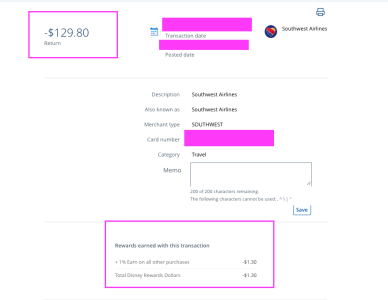
I just don't use this card very much unless there is a bonus so for the gap example for returning something and getting a $ credit and taking away your disney dollars, the only example I could find was when my flight dropped in price and I received money back from Southwest but they also took away Disney Rewards dollars of $1.30
1768676096064.png

When you go in to your account, you can click on each transaction and it will show you the amount earned for each transaction like I have shown above. If it doesn't mentions Rewards then the transaction has no affect on the rewards, which to my knowledge are Payments, Pay Yourself Back Statement Credits and Chase Offers.

I'm not sure I can explain it any other way so hopefully this answers your question @disneychrista
 
Last edited:
Disclaimer as @VGCgroupie will attest if you go through the Disney call center or online some agents will not know what you are talking about. If you have to pay 1 full night as a deposit then it will not be 0% it should be only $200
Question here: I have often read on the Resorts board that the deposit for a room-only reservation is the cost of one night, while the deposit for a package is $200. I have also read that it seems some of the online agents will book a “ticketless package” instead of the room-only that the guest asks for, and the way to tell is that the deposit was only $200 instead of the cost of the first night. (Also, the deadline for full payment is different.)

It sounds like if you want the Disney Visa 0% for six months, then you should ask to book a “ticketless package” because a room-only reservation would not be eligible due to not being a “package.”

Do I have that right?
 
Question here: I have often read on the Resorts board that the deposit for a room-only reservation is the cost of one night, while the deposit for a package is $200. I have also read that it seems some of the online agents will book a “ticketless package” instead of the room-only that the guest asks for, and the way to tell is that the deposit was only $200 instead of the cost of the first night. (Also, the deadline for full payment is different.)

It sounds like if you want the Disney Visa 0% for six months, then you should ask to book a “ticketless package” because a room-only reservation would not be eligible due to not being a “package.”

Do I have that right?
Yes that is correct as packages qualify for 0% but the rooms don't.

They have the ticketless packages for those that have AP's but anyone can get them.

The way to know if if it was booked correctly is as you stated one night vs $200. The package will always be $200 so if you are charged more than it will not be 0% and there isn't anything Chase can do about it unfortunately. Of course as long as it is within the cancellation policy you could get it cancelled and refunded and then try again.

We do this for when we are out of points.
 
Yep. I had an agent booking my room tell me my room only booking qualified but she booked it wrong and it was not a “package” so I didn’t get the 0%.

Calling chase was zero help. So I just paid it all off when I got my statement. The best I could do was get them to give me back my annual fee and that was a fight to get.
 

Also, the deadline for full payment is different.
For Room only the balance of your stay - your one night deposit is paid at Check-in
For Packages they are required to be paid in Full 30 days before check-in so the balance - the $200 deposit.

Of course with the packages it then really gives you an extra 5 months to pay compared to the room since the 0% starts at that 30 day mark.
 
By this logic, I could buy a $500 TV Walmart. And then after my statement period ends, take it back and still get that $5 in rewards.
Correct you would have $5 in rewards after the statement closes after purchasing the TV. Then the next statement the $5 would be removed unless you closed your account first and then you would have made $5 off of chase. Certainly not worth the effort in my book. Also this has no effect on what the original post was about and that is that you DO earn additional Disney Rewards Dollars by using Pay Yourself Back vs transferring to a rewards card.
 
Correct you would have $5 in rewards after the statement closes after purchasing the TV. Then the next statement the $5 would be removed unless you closed your account first and then you would have made $5 off of chase. Certainly not worth the effort in my book. Also this has no effect on what the original post was about and that is that you DO earn additional Disney Rewards Dollars by using Pay Yourself Back vs transferring to a rewards card.
Wrong
1768705458650.jpeg
 
I’m not wrong continue reading parts that you didn’t highlight. You earn rewards on the purchases you make which I have stated. I also stated they post at the end of your billing cycle.

You can click on each of your transactions and it will show you the rewards you earned per transaction. If you have a return, you can see the amount of rewards that were taken away from you.

I came here to help and I think I accomplished that unfortunately I don’t think there’s any helping you
 
I’m not wrong continue reading parts that you didn’t highlight. You earn rewards on the purchases you make which I have stated. I also stated they post at the end of your billing cycle.

You can click on each of your transactions and it will show you the rewards you earned per transaction. If you have a return, you can see the amount of rewards that were taken away from you.

I came here to help and I think I accomplished that unfortunately I don’t think there’s any helping you
That is exactly what I am saying. You spend $1000 and return $500 you get $5 in rewards. I have always understood it to be your net purchase. What you charge minus any statement credits ( rewards, refunds, returns etc ). Therefore if you apply your rewards to you balance you will no longer receive the reward for those dollars.


Disney Vacation Planning. Free. Done for You.
Our Authorized Disney Vacation Planners are here to provide personalized, expert advice, answer every question, and uncover the best discounts. Let Dreams Unlimited Travel take care of all the details, so you can sit back, relax, and enjoy a stress-free vacation.
Start Your Disney Vacation
Disney EarMarked Producer


DIS Facebook DIS youtube DIS Instagram DIS Pinterest DIS Tiktok DIS Twitter
Add as a preferred source on Google

Back
Top Bottom

