Fix MB without trip to front desk

bookbabe626

DIS Veteran
Joined
Aug 25, 2006
Messages
2,169
OMG. Am I the only person who didn’t know about this?

Thanks to a video that popped up on FB, and which sadly I can’t find again so I can post the link since it had good full instructions, I was able to avoid having to trek to the front desk to link our MBs when we arrived last night.

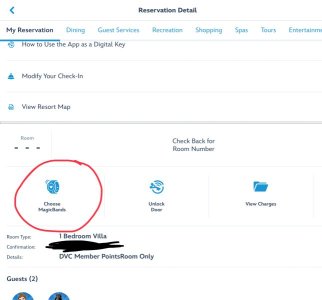
So, if you do online checkin, and you get to the room and your MB don’t work to open the door, go into your reservation on the MDE app and there’s a button to click that will walk you through scanning your MBs with your phone via Bluetooth to link them properly to that reservation, same as the front desk would do if you walked there like I’m used to doing. Yeah, I know you can use your phone to open the door, but for kids or people who don’t want to have to drag their phone out to open the door every time, this is huge. Worked with my MB+ and DH’s older MB.

Was really useful for us since we’re in Tokelo at Poly and it was raining. ;-)
 

Attachments

  • IMG_5403.jpeg
    IMG_5403.jpeg
    61.4 KB · Views: 48
I saw that video . Yes, great info. Now I hope I remember it in 5 months. It's a rare trip that we don't have issues. I've had it that my band works but not DH.
 

Thanks-sounds like very useful info. Now, off to youtube to try to find it!
 
This is awesome info! On our last trip, I hauled down a pile of like 15 MB+’s to get them linked.
 
Does that show up in anyone else’s MDE? So far it doesn’t show in mine. Or is it like the bus info, that will only show after you’re actually checked in? I haven’t done on line check in yet.
 
I’m glad WDW is improving ways guests can help themselves instead of needing CM assistance.

Another recent change is being able to fix duplicated names or accounts in MDE. Used to require a call to IT.

New options were added to the Friends and Family list making it possible to fix ourselves.
 
Does that show up in anyone else’s MDE? So far it doesn’t show in mine. Or is it like the bus info, that will only show after you’re actually checked in? I haven’t done on line check in yet.

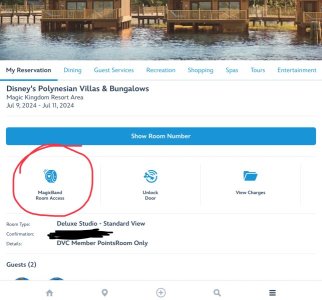
I looked in my various future reservations, some with online checkin completed and some without, and what’s in that spot is the Choose MagicBands link. So, I’m guessing that button only shows up after arrival, or at least after a room number appears.
 

Attachments

  • IMG_5404.jpeg
    IMG_5404.jpeg
    37.6 KB · Views: 23
Thanks! Thats all I was seeing too.

Yeah, it’s handy that I’m here right now in addition to having multiple trips booked. Easy to compare what links appear under the various reservations in the app. No difference between the reservations that have done online checkin and those that haven’t, it’s only there under my current stay.

Definitely seems like the MagicBand Room Access button will appear on the reservation page in MDE after arrival, similar to the Bus Times button.
 
This is very good information. On our visit last August to BRV, our MBs wouldn’t open our door. We were stuck in the hallway and the Internet connection was pretty poor. We had had a very early morning flight and had already spent way too much time at MCO on arrival to report a lost bag (it was delivered the next day). My nerves were a bit frazzled by then. A kind couple contacted the front desk for us and a CM quickly appeared. He was courteous and efficient and gave us key cards in the event the bands malfunctioned again (they did).


Disney Vacation Planning. Free. Done for You.
Our Authorized Disney Vacation Planners are here to provide personalized, expert advice, answer every question, and uncover the best discounts. Let Dreams Unlimited Travel take care of all the details, so you can sit back, relax, and enjoy a stress-free vacation.
Start Your Disney Vacation
Disney EarMarked Producer


DIS Facebook DIS youtube DIS Instagram DIS Pinterest DIS Tiktok DIS Twitter

Back
Top Bottom