DCL scrapbook Pages??

I know it's in here somewhere, but how do you post pictures on this thread? I have some traditional scrapbook pages I would like to post, but I'm not exactly a wizard on the computer!! If someone could give me instructions, i could maybe get some pages posted! Thanks, Lisa
 
Thank you!

Drea, I hope you and others *DO* run with this idea! You won't regret using that space for a 12x12 instead of a couple more graphic door magnets!

Sarah, you better come over and sign a page when we meet on the WB TA! I'll do thee same for you if you want to do this as well!

I definitely want to do this - it's a brilliant idea! Can't wait to meet you on the WBTA! In real life instead of on the :surfweb:

Thanks to everyone for posting their pages - I hope to do a scrapbook at some time in the near future.
 
Those ideas are totally great. I can't wait to do them on my TA. I figure I will have enough time to get them designed. Not so sure about the upcoming cruises in September. I could do a try run I suppose. I am totally addicted to scrapbook and have accumulated tons of cruise paper and embellishments. Now to couple them with the Disney theme. I would post too if I knew how to put up pictures.:confused3

Thanks everyone for sharing.:cheer2:
 

wow - what a fantastic thread.

i do photo books but these are wonderful ideas to make for frames
 
OK....To Post Pictures you will first have to load your photos in a free photo hosting site like photobucket dot com... that is the one I use, so that is the one I will teach you. I'll try to explain it as best as I can... I hope I don't totally confuse anyone.

Assuming you already have your pictures in Photobucket dot com...
While on the DIS and you want to post a picture in your reply post...
1. Open a new window and go to photobucket dot com...
you will need to keep both the DIS page and the Photobucket dot com page open
2. Find the picture you want to post...
3. Scroll your mouse over the picture you want to post ....
a little box of "link options" will pop open...
chose the DIRECT LINK option...
4. Left click the address box of the DIRECT LINK...
it will hi-light the address of your picture...
5. Right click the hi-lighted address box ...
a new little window pops up...
6. Left click on the word "copy" ......
you are now ready to go back to your DIS page...

ON THE DIS PAGE... where you are posting your message ..

7. At the top of the Message posting window, there is a picture symbol...
it is third from the end... it is the little yellow square that looks like it has triangle shaped mountains ..
LEFT click that.
It opens an new little window that says... PLEASE ENTER THE URL OF YOUR IMAGE...
8. There is an address box with http:// already hi-lighted...
hit your space bar so that it disappears... you do not want that in the box...
9. NOW... RIGHT CLICK the empty box and click PASTE from the new little window that popped open....
your picture address will paste into the box...
10. Click OK and TAA-DAA... your picture will appear in your message....
 
My friend started an internet scrapbook supply company because she couldn't find trip scrapbook stuff, and she has a huge Disney assortment available. I didnt' look through all of it, but you might want to check it out -- vacationscrapbooksupply.com. I know she's got a pets division now, and something else, but not sure what. I don't really scrapbook, but I've bought a few things from her, and they seem very reasonably priced.

Erin
 
039.jpg


040.jpg


041.jpg


042.jpg


043.jpg


044.jpg


These are my first few pages- I'm not doing them in order, just doing whatever strikes my mood. I have an all day crop coming up so I plan to get a lot done on that day and I can post some more.
This is my first attempt posting pictures, I hope it works!
 
Thanks for posting the pages. They are totally cute. I only have adults in my pictures as my boyz are all grown up. Sharing gives us all ideas how to incorporate our pics into layouts. So thanks again for sharing and looking forward to more. I am in Oahu now on a long weekend due to California's furlough Friday program. I will attempt to post when I return home. It is still quite techno for me; I need to enlist the help of my computer whiz sons.
Aloha.
 
I purchased the 2007 Disney Cruise Line scrapbook while on a cruise along with extra pages that came with extra stickers, never used them, they are still sitting in a box waiting for me. LOL I just cant get into it. I envy those of you who are so talented and create such nice memory's in your scrap books.
 
Hi!

Here are a few of my digital pages:

Margaritaville2pagesmall.jpg


Sketchbook & Kristen ITC fonts. Used Margaritaville Mini Kit by Angi Jones. Also used graphics from Jane's Salty Margarita by Jane Davies. Chipboard action by Atomic Cupcake was used to make titles.

PirateNight2page.jpg


Elements from Mouse in the House kit by Britt-ish Designs, backgrounds and elements from Shiver Me Timbers kit by Britt-ish Designs. Elements from Pirate Princess Kit by Britt-ish Desings. Elements from On Vacation Volume 15 by Sophia Sarducci.

SnowWhite2pagesmall.jpg


Background paper from On Vacation Volume 8 by Sophia Sarducci. Lavendar paper from Who Needs a Fairy Godmother kit by Britt-ish Designs. Tied ribbons by Ellie Lash. Journalling square from Skipping School kit by Jan Hosford. Doodled flowers by Andreia Menegassi. Used Quigley Wiggly font.

:)
 
Hi!

Here are a few of my digital pages:

Margaritaville2pagesmall.jpg


Sketchbook & Kristen ITC fonts. Used Margaritaville Mini Kit by Angi Jones. Also used graphics from Jane's Salty Margarita by Jane Davies. Chipboard action by Atomic Cupcake was used to make titles.

PirateNight2page.jpg


Elements from Mouse in the House kit by Britt-ish Designs, backgrounds and elements from Shiver Me Timbers kit by Britt-ish Designs. Elements from Pirate Princess Kit by Britt-ish Desings. Elements from On Vacation Volume 15 by Sophia Sarducci.

SnowWhite2pagesmall.jpg


Background paper from On Vacation Volume 8 by Sophia Sarducci. Lavendar paper from Who Needs a Fairy Godmother kit by Britt-ish Designs. Tied ribbons by Ellie Lash. Journalling square from Skipping School kit by Jan Hosford. Doodled flowers by Andreia Menegassi. Used Quigley Wiggly font.

:)

I LOVE your pages:thumbsup2
 
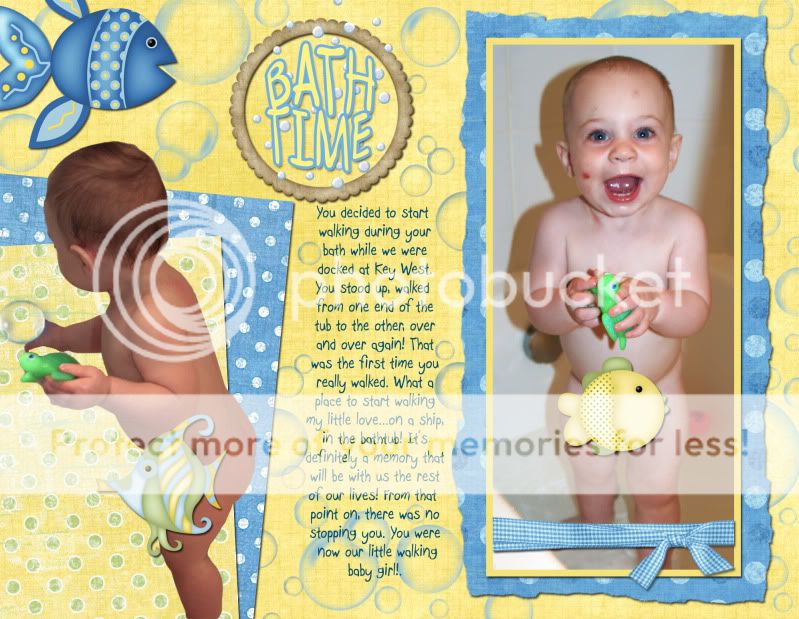
Hey guys...after taking a very long break to scrapbook my daughter's first year album, I have finally started back in on my DCL 2007 SB :woohoo:

Now, I had started it awhile back and posted the first 7 layouts but I had to redo a few of them (size changed for printing purposes) so I thought I would just repost the lot of them. I plan on finishing this book in the next month so I will post new layouts as I do them :goodvibes

Some info...

I do all my layouts in Photoshop. I was doing a lot of my own stuff in Photoshop but lately I just don't have time with a 2 year old going through the terrible two's so I have started to buy some digital stuff online. Sorry, I don't have time to give credits for each individual layout but I only buy stuff from three places...Peppermint Creative, Digital Freebies and Scrapbook-bytes (downloaded the freebies) so all the stuff in my layouts were bought there or created by me in Photoshop.

I post these to inspire others to either start scrapping or to get back into it. I know I've had dry spells where I wouldn't scrap for months and months and then I see layouts posted on the DIS and it inspires me to start back up.

It also gives others ideas about what photos they want to take on their next cruise.


So here are the first 19...

1-jpg.jpg


2-jpg.jpg


3-jpg.jpg


4-jpg.jpg


5-jpg.jpg


6-jpg.jpg


7-jpg.jpg


8-jpg.jpg


.

Now this is the layout that I lost...I only have the small web jpg version so I can't print it.


9-jpg-web.jpg


.


So I had to redo the layout and ended up with this one....


9-jpg.jpg


10-jpg.jpg


11-jpg.jpg


12-jpg.jpg


13-jpg.jpg


14-jpg.jpg


15-jpg.jpg


16-jpg.jpg


17-jpg.jpg


18-jpg.jpg


19-jpg.jpg


Hope to post more next Sunday night :thumbsup2
 

GET UP TO A $1000 SHIPBOARD CREDIT AND AN EXCLUSIVE GIFT!

If you make your Disney Cruise Line reservation with Dreams Unlimited Travel you’ll receive these incredible shipboard credits to spend on your cruise!


New Posts


DIS Facebook DIS youtube DIS Instagram DIS Pinterest DIS Tiktok DIS Twitter

Add as a preferred source on Google

Back
Top Bottom