That Unpopulated View of the Castle

seashoreCM

All around nice guy.
Joined
Aug 25, 2001
Messages
23,486
Just a reminder, you might be able to use Photoshop or similar software to get a view of Cinderella Castle or other scene without people in view, by taking multiple pictures of the same scene and then cut-and-pasting small portions to cover up people. You may also be able to get rid of fixed objects such as poles and fences by taking some of the multiple pictures from slightly different angles.

Suggest copying the original pictures as BMP format first, then doing all the edits, then save what you got, then resize and crop, then, if desired, convert back to JPG format.

Even simple software like MS Paint can be used if you don't need to lighten or darken the picture fragments being cut-and-pasted to compensate for times of day hours apart when the pictures were taken.

The sample below was not done that well since we did not have the foresight to take the multiple pictures.
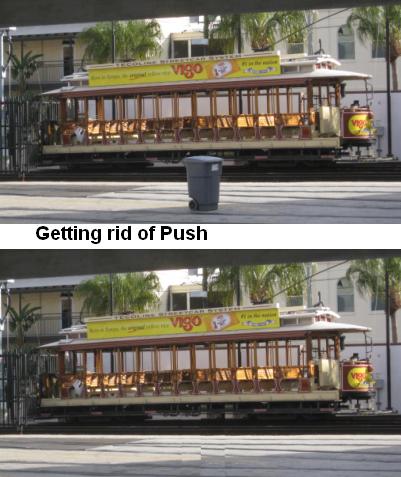

push2.jpg
 
A TIFF or PSD would be a much better working format than a BMP. And Photoshop CS5's content aware fill works wonders for things like this if you have the software. I'm constantly amazed by it. Also, content aware scale is helpful too.
 
It's a good point to raise for people who might not be aware of this. I actually use this technique at Disney every once in a while, taking a photo of something where there is a tendency for people to get in the frame constantly. By taking 2 or 3 shots from the exact same spot, same focal length, same settings...if possible even better if using a tripod but still doable without...you can stack the multiple exposures in Photoshop or Paint Shop or other similar program. Let's say you have one shot of the Mexico pyramid in Epcot, where someone was walking up the stairs on the right side...the next shot, noone was on the right side, but the left side had someone coming down the stairs...the third shot had 3 people posing for a photo right in the middle, but the left was clear. Between the 3 shots, you have at least 1 shot with a clear left, clear center, and clear right side. By simply stacking the layers one over the other, and erasing away the section of the layer with the people, you can reveal the empty stairs from the frame below. If the exposures match and you didn't move, you won't even know anything's been edited. If you were doing it handheld, you might need to make small alignment adjustments to the shot.

Here's one I had to fire 4 shots to get, because there is literally a constant stream of people moving through and around this building:
original.jpg


One frame had someone popping in from the left, another had someone on the right, another had someone coming out of the doorway, and another had someone lingering just inside the doorway. Between the 4 quick frames, which I fired handheld within 5-10 seconds, I was able to piece together the building with noone in the shot. It's nothing to win awards with, but I like the architecture and style of the Nepalese buildings around the Everest ride, and just wanted to get one with noone in the shot - after waiting for 5-10 minutes I finally gave up and shot multiple frames to layer together later!
 

A TIFF or PSD would be a much better working format than a BMP. And Photoshop CS5's content aware fill works wonders for things like this if you have the software. I'm constantly amazed by it. Also, content aware scale is helpful too.

I put content aware fill to work today to clear the beach at castaway cay for a composite door magnet. It saved me at least an hour worth of work.
 
Geez! I feel like such a doofus! I've been using Photoshop (and Photostyler before that) for close to 20 years and not once did that occur to me. Simple yet elegant solution. :thumbsup2


Disney Vacation Planning. Free. Done for You.
Our Authorized Disney Vacation Planners are here to provide personalized, expert advice, answer every question, and uncover the best discounts. Let Dreams Unlimited Travel take care of all the details, so you can sit back, relax, and enjoy a stress-free vacation.
Start Your Disney Vacation
Disney EarMarked Producer


DIS Facebook DIS youtube DIS Instagram DIS Pinterest DIS Tiktok DIS Twitter

Add as a preferred source on Google

Back
Top Bottom