Shutter Priority Question

DoleWhipDVC

Mouseketeer
Joined
Jul 17, 2010
Messages
210
So I thought I had this figured out. I'm taking a sunset shot of Animal Kingdom rooftops. I want to extend my exposure time because of the darker dusk light conditions. I'm shooting with a Canon 70-300 zoom all the way out to 300, on a Canon 40D body, 1600 ISO. I set the dial to "TV" mode, dial in about 1"6' or so and shoot. The apeture opens and shuts way faster than the setting. In fact, I find that regardless of the "TV" seting, the actual shutter speed is way too fast. In frustration I set the shutter speed at 8 seconds just to see if it would slow down - no dice, still way too fast. Do I have to go to bulb to get the shutter to stay open as long as I think is needed to get the sunset shot? Is it the lens? Should I go to manual? What am I doing wrong? Please help. I'm clueless :confused3
 
It could be too much light for the shutter speed. If we set a shutter speed that results in the exposure requiring a smaller aperture than the lens can go to then the actual shutter speed will be shorter than what we have set. A lower ISO would allow a longer shutter speed in this case.

Setting the mode to manual would force the camera to the shutter speed you selected but it would result in overexposure (or at least overexposure in the "mind" of the meter).
 
So I can try it again with a lower ISO and that will allow me to get a longer exposure at the apeture I want. I'll give that a try. Thanks for the info! :thumbsup2
 
Try setting your ISO at 100 or 200. When I shoot sunset shots on manual, I usually meter the shot to be underexposed slightly to saturate the colors.

You might try starting with these manual settings and adjust from there for your sunset shots: ISO 100 or 200, 5.6 F-stop, 1/200 Shutter Speed.

A professional shared these settings with me for sunsets and they worked great.

Good luck!
 

Since you want longer exposure without overexposing the scene, you ideally want a lower ISO and possibly a slightly stopped down aperture. Really, shutter priority wouldn't be the ideal way to take such a shot, in my opinion. Shutter priority tends to be for when the shutter speed itself is crucial that it not stray from the set number, most often when trying to force a faster shutter...when you want a slower shutter, you're probably better setting the ISO and the aperture that you want and let the camera choose the shutter speed appropriate to get the proper exposure. F8 or so, combined with ISO100 or 200 (whatever your native low ISO is) would be my goal...if F8 was far too small and causing the shutter speed to extend too long, I'd adjust it to F6.3 or so, and only raise the ISO a smidge if I had to (for example if I was handholding and had no tripod, to where I needed the shutter speed to be faster to avoid blur). Ideally, a tripod or a steady surface to place the camera on would be best, so you could let the shutter speed be as long as it need be and keep the aperture smaller (for better detail and depth of field) and the ISO lower (for better color saturation, detail, and lower noise).
 
Try setting your ISO at 100 or 200. When I shoot sunset shots on manual, I usually meter the shot to be underexposed slightly to saturate the colors.

You might try starting with these manual settings and adjust from there for your sunset shots: ISO 100 or 200, 5.6 F-stop, 1/200 Shutter Speed.

A professional shared these settings with me for sunsets and they worked great.

Good luck!

Thanks for the info. This makes sense to me! :goodvibes
 
Since you want longer exposure without overexposing the scene, you ideally want a lower ISO and possibly a slightly stopped down aperture. Really, shutter priority wouldn't be the ideal way to take such a shot, in my opinion. Shutter priority tends to be for when the shutter speed itself is crucial that it not stray from the set number, most often when trying to force a faster shutter...when you want a slower shutter, you're probably better setting the ISO and the aperture that you want and let the camera choose the shutter speed appropriate to get the proper exposure. F8 or so, combined with ISO100 or 200 (whatever your native low ISO is) would be my goal...if F8 was far too small and causing the shutter speed to extend too long, I'd adjust it to F6.3 or so, and only raise the ISO a smidge if I had to (for example if I was handholding and had no tripod, to where I needed the shutter speed to be faster to avoid blur). Ideally, a tripod or a steady surface to place the camera on would be best, so you could let the shutter speed be as long as it need be and keep the aperture smaller (for better detail and depth of field) and the ISO lower (for better color saturation, detail, and lower noise).

Got it. Thanks for your insight, I always appreciate your opinion and get good advice from your responses. I'll try it again tonight! :thumbsup2
 
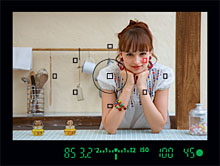
You should also have a meter in your view finder that shows if your over exposing, under exposing or right on. I use that a lot, especially when shooting in manual. Using the other setting it works too.

light-meter-canon-40d.jpg


it also shows up if you use the screen on the back:
3inch.jpg


This one shows the light meter giving a properly exposed shot based on settings:
1185505292_d58c4050bf_o.jpg


Disney Vacation Planning. Free. Done for You.
Our Authorized Disney Vacation Planners are here to provide personalized, expert advice, answer every question, and uncover the best discounts. Let Dreams Unlimited Travel take care of all the details, so you can sit back, relax, and enjoy a stress-free vacation.
Start Your Disney Vacation
Disney EarMarked Producer


DIS Facebook DIS youtube DIS Instagram DIS Pinterest DIS Tiktok DIS Twitter
Add as a preferred source on Google

Back
Top Bottom