

Lachesis00
<img src=http://www.wdwinfo.com/photopost/data/500
- Joined
- Mar 25, 2003
- Messages
- 3,258
Old member who forgets to check in here 
I am using an external flash... and the colors look dark to me. Can someone tell me what the color temp is suppose to be?
I also have been using the largest/fine jpeg as the babies lost 2 of my cards (which I found, I just haven't changed my settings). I am on auto settings... but something seems off to me 'brightness' or too much saturation... something. And it is every photo, no matter how close (unless it is like less then 2' away with the flash) or far away.
Is Jann still on the photography boards?
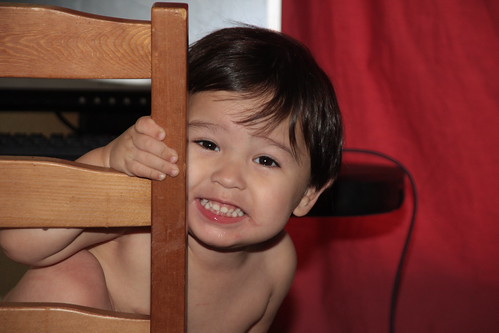
Edited:

Any suggestions on settings would be appreciated. This is my new camera, same old flash as I used on my 20d. I don't mind editing, but I'm kind of lazy  , and if I can get them right w/o editing...
~~~~~~~~~~~~~~~~~~~~~~~~~~~~~~~~~~~~~~~~~~~~~~~
Camera: Canon EOS 40D
Exposure: 0.017 sec (1/60)
Aperture: f/5.6
Focal Length: 125 mm
ISO Speed: 400
Exposure Bias: -1/3 EV
Flash: On, Fired
File Size: 3.1 MB
File Type: JPEG
MIME Type: image/jpeg
Image Width: 3888
Image Height: 2592
Encoding Process: Baseline DCT, Huffman coding
Bits Per Sample: 8
Color Components: 3
Orientation: Horizontal (normal)
X-Resolution: 72 dpi
Y-Resolution: 72 dpi
Date and Time (Modified): 2009:10:14 10:23:54
YCbCr Positioning: Co-sited
Exposure Program: Program AE
Date and Time (Original): 2009:10:14 10:23:54
Date and Time (Digitized): 2009:10:14 10:23:54
Metering Mode: Multi-segment
Sub Sec Time: 90
Sub Sec Time Original: 90
Sub Sec Time Digitized: 90
Color Space: sRGB
Focal Plane X-Resolution: 4438.356164 dpi
Focal Plane Y-Resolution: 4445.969125 dpi
Custom Rendered: Normal
Exposure Mode: Auto
White Balance: Auto
Scene Capture Type: Standard
Macro Mode: Normal
Self Timer: Off
Quality: Fine
Canon Flash Mode: External flash
Continuous Drive: Single
Focus Mode: AI Focus AF
Record Mode: JPEG
Canon Image Size: Large
Easy Mode: Manual
Digital Zoom: None
Contrast: Normal
Saturation: Normal
Metering Mode: Evaluative
Focus Range: Not Known
Canon Exposure Mode: Program AE
Lens Type: Canon EF 28-70mm f/3.5-4.5 or Sigma or Tokina Lens
Long Focal: 125 mm
Short Focal: 18 mm
Focal Units: 1
Max Aperture: 5.7
Min Aperture: 36
Flash Activity: 139
Flash Bits: E-TTL, External
Zoom Source Width: 0
Zoom Target Width: 0
Manual Flash Output: n/a
Color Tone: Normal
Auto ISO: 100
Base ISO: 400
Measured EV: -0.75
Target Aperture: 5.7
Target Exposure Time: 1/64
White Balance: Auto
Slow Shutter: None
Sequence Number: 0
Optical Zoom Code: n/a
Flash Exposure Comp: 0
Auto Exposure Bracketing: Off
AEBBracket Value: 0
Control Mode: Camera Local Control
Bulb Duration: 0
Camera Type: EOS High-end
NDFilter: Unknown (-1)
Flash Output: 0
Canon Firmware Version: Firmware Version 1.0.8
Serial Number: 1220707772
Camera Temperature: 18 C
Camera Orientation: Horizontal (normal)
Focus Distance Upper: 0
Focus Distance Lower: 0
Color Temperature: 5200
Firmware Version: 1.0.8
File Index: 9836
Directory Index: 100
Lens Model: 18-125mm
Canon Model ID: EOS 40D
AFMode: Single-point AF
Num AFPoints: 9
Valid AFPoints: 9
AFArea Widths: 97 97 97 97 97 97 97 97 97
AFArea Heights: 98 98 98 98 98 98 98 98 98
AFPoints Selected: 4
Original Decision Data Offset: 0
Bracket Mode: Off
Bracket Value: 0
Bracket Shot Number: 0
Raw Jpg Size: Large
WBBracket Mode: Off
WBBracket Value AB: 0
WBBracket Value GM: 0
Live View Shooting: Off
Internal Serial Number: J0734896
Dust Removal Data: (Binary data 1024 bytes, use -b option to extract)
Tone Curve: Standard
Sharpness: 3
Sharpness Frequency: n/a
Sensor Red Level: 0
Sensor Blue Level: 0
White Balance Red: 0
White Balance Blue: 0
Picture Style: Faithful
Digital Gain: 0
WBShift AB: 0
WBShift GM: 0
Color Space: sRGB
VRDOffset: 0
Sensor Width: 3944 (40-3927 used)
Sensor Height: 2622 (23-2614 used)
Black Mask Left Border: 0
Black Mask Top Border: 0
Black Mask Right Border: 0
Black Mask Bottom Border: 0
White Balance RGGB Levels: 2491 1024 1024 1228
Color Temperature: 6568
WB_ RGGBLevels Measured: 2488 1023 1024 1227
Color Temp Measured: 6568
Exposure Level Increments: 1/3 Stop
ISOSpeed Increments: 1/3 Stop
ISOExpansion: Off
AEBAuto Cancel: On
AEBSequence: 0,-,+
Safety Shift: Disable
Flash Sync Speed Av: Auto
Long Exposure Noise Reduction: Off
High ISONoise Reduction: Off
Highlight Tone Priority: Disable
Lens Drive No AF: Focus search on
Lens AFStop Button: AF stop
AFPoint Selection Method: Normal
Superimposed Display: On
AFAssist Beam: Emits
AFDuring Live View: Disable
Mirror Lockup: Disable
Shutter Button AFOn Button: Metering + AF start
AFOn AELock Button Switch: Disable
Set Button When Shooting: Normal (disabled)
Dial Direction Tv Av: Normal
Focusing Screen: Ef-A
Add Original Decision Data: Off
Live View Exposure Simulation: Disable (LCD auto adjust)
Add Aspect Ratio Info: Off
GPSVersion ID: 2.2.0.0
Compression: JPEG (old-style)
I am using an external flash... and the colors look dark to me. Can someone tell me what the color temp is suppose to be?
I also have been using the largest/fine jpeg as the babies lost 2 of my cards (which I found, I just haven't changed my settings). I am on auto settings... but something seems off to me 'brightness' or too much saturation... something. And it is every photo, no matter how close (unless it is like less then 2' away with the flash) or far away.
Is Jann still on the photography boards?
Edited:
Any suggestions on settings would be appreciated.
This is my new camera, same old flash as I used on my 20d. I don't mind editing, but I'm kind of lazy , and if I can get them right w/o editing... ~~~~~~~~~~~~~~~~~~~~~~~~~~~~~~~~~~~~~~~~~~~~~~~
Camera: Canon EOS 40D
Exposure: 0.017 sec (1/60)
Aperture: f/5.6
Focal Length: 125 mm
ISO Speed: 400
Exposure Bias: -1/3 EV
Flash: On, Fired
File Size: 3.1 MB
File Type: JPEG
MIME Type: image/jpeg
Image Width: 3888
Image Height: 2592
Encoding Process: Baseline DCT, Huffman coding
Bits Per Sample: 8
Color Components: 3
Orientation: Horizontal (normal)
X-Resolution: 72 dpi
Y-Resolution: 72 dpi
Date and Time (Modified): 2009:10:14 10:23:54
YCbCr Positioning: Co-sited
Exposure Program: Program AE
Date and Time (Original): 2009:10:14 10:23:54
Date and Time (Digitized): 2009:10:14 10:23:54
Metering Mode: Multi-segment
Sub Sec Time: 90
Sub Sec Time Original: 90
Sub Sec Time Digitized: 90
Color Space: sRGB
Focal Plane X-Resolution: 4438.356164 dpi
Focal Plane Y-Resolution: 4445.969125 dpi
Custom Rendered: Normal
Exposure Mode: Auto
White Balance: Auto
Scene Capture Type: Standard
Macro Mode: Normal
Self Timer: Off
Quality: Fine
Canon Flash Mode: External flash
Continuous Drive: Single
Focus Mode: AI Focus AF
Record Mode: JPEG
Canon Image Size: Large
Easy Mode: Manual
Digital Zoom: None
Contrast: Normal
Saturation: Normal
Metering Mode: Evaluative
Focus Range: Not Known
Canon Exposure Mode: Program AE
Lens Type: Canon EF 28-70mm f/3.5-4.5 or Sigma or Tokina Lens
Long Focal: 125 mm
Short Focal: 18 mm
Focal Units: 1
Max Aperture: 5.7
Min Aperture: 36
Flash Activity: 139
Flash Bits: E-TTL, External
Zoom Source Width: 0
Zoom Target Width: 0
Manual Flash Output: n/a
Color Tone: Normal
Auto ISO: 100
Base ISO: 400
Measured EV: -0.75
Target Aperture: 5.7
Target Exposure Time: 1/64
White Balance: Auto
Slow Shutter: None
Sequence Number: 0
Optical Zoom Code: n/a
Flash Exposure Comp: 0
Auto Exposure Bracketing: Off
AEBBracket Value: 0
Control Mode: Camera Local Control
Bulb Duration: 0
Camera Type: EOS High-end
NDFilter: Unknown (-1)
Flash Output: 0
Canon Firmware Version: Firmware Version 1.0.8
Serial Number: 1220707772
Camera Temperature: 18 C
Camera Orientation: Horizontal (normal)
Focus Distance Upper: 0
Focus Distance Lower: 0
Color Temperature: 5200
Firmware Version: 1.0.8
File Index: 9836
Directory Index: 100
Lens Model: 18-125mm
Canon Model ID: EOS 40D
AFMode: Single-point AF
Num AFPoints: 9
Valid AFPoints: 9
AFArea Widths: 97 97 97 97 97 97 97 97 97
AFArea Heights: 98 98 98 98 98 98 98 98 98
AFPoints Selected: 4
Original Decision Data Offset: 0
Bracket Mode: Off
Bracket Value: 0
Bracket Shot Number: 0
Raw Jpg Size: Large
WBBracket Mode: Off
WBBracket Value AB: 0
WBBracket Value GM: 0
Live View Shooting: Off
Internal Serial Number: J0734896
Dust Removal Data: (Binary data 1024 bytes, use -b option to extract)
Tone Curve: Standard
Sharpness: 3
Sharpness Frequency: n/a
Sensor Red Level: 0
Sensor Blue Level: 0
White Balance Red: 0
White Balance Blue: 0
Picture Style: Faithful
Digital Gain: 0
WBShift AB: 0
WBShift GM: 0
Color Space: sRGB
VRDOffset: 0
Sensor Width: 3944 (40-3927 used)
Sensor Height: 2622 (23-2614 used)
Black Mask Left Border: 0
Black Mask Top Border: 0
Black Mask Right Border: 0
Black Mask Bottom Border: 0
White Balance RGGB Levels: 2491 1024 1024 1228
Color Temperature: 6568
WB_ RGGBLevels Measured: 2488 1023 1024 1227
Color Temp Measured: 6568
Exposure Level Increments: 1/3 Stop
ISOSpeed Increments: 1/3 Stop
ISOExpansion: Off
AEBAuto Cancel: On
AEBSequence: 0,-,+
Safety Shift: Disable
Flash Sync Speed Av: Auto
Long Exposure Noise Reduction: Off
High ISONoise Reduction: Off
Highlight Tone Priority: Disable
Lens Drive No AF: Focus search on
Lens AFStop Button: AF stop
AFPoint Selection Method: Normal
Superimposed Display: On
AFAssist Beam: Emits
AFDuring Live View: Disable
Mirror Lockup: Disable
Shutter Button AFOn Button: Metering + AF start
AFOn AELock Button Switch: Disable
Set Button When Shooting: Normal (disabled)
Dial Direction Tv Av: Normal
Focusing Screen: Ef-A
Add Original Decision Data: Off
Live View Exposure Simulation: Disable (LCD auto adjust)
Add Aspect Ratio Info: Off
GPSVersion ID: 2.2.0.0
Compression: JPEG (old-style)
 I will bump it back up and try again. I will have to check the flash exposure. I am pretty sure it was set at zero. My battery is almost dead... so I need to recharge.



 .. (after they went through all this trouble testing it, the one woman in CS even took it home and used it for a week
 ) or if as usual, i got another lemon, i'll be returning this one as well





