Portrait photography

Great article! That's a keeper. Next time, I'll shoot RAW and see if that works better. Thanks a lot.
 
Thank you.

I would go with a red filter simply because it lightens the eyes more than another would.. but thats just me.

thomas998
 
imo one thing that makes your pup portrait a little dull is he doesn't have much in the way of catch lights in his eyes...this looks involved the way it's written but it's not hard in the least http://www.photokaboom.com/photogra...ouching/catch_lights/2_catch_lights_steps.htm

i am using lightroom beta 2 so not sure what is in 1 but it has a preset for high contrast b&w, you can still adjust individually in the greyscale slider section but it converts to b&w with a strong contrast in one step. (it also has a strong curve tone and a low contrast B&w) you still can adjust everything ie normal exposure etc but it does the initial conversion for you. camera raw doesn't have the presets as far as i recall. definitely easier than desaturation etc you used to have to do to convert. the only problem i have found with usng the strong contrast is you have to make sure you have enough room with the highlights...like the one puppy here, the forehead is edging really close to blown out...although you could darken that area a little by itself with the brush tool but sometimes that leaves a weird demarcation area if it's too off.( at least when i do it, which could be user error)
 
quick edit using paint shop pro b&w filters..


dog-vi.jpg
 

Every year I take the kids for portraits for Christmas. This year I'm just not going to be able to swing it. I thought of going super cheap but I think with your help I can do better then that.
What I have: D90, SB400 w/cap diffuser, 18-105mm VR lens.

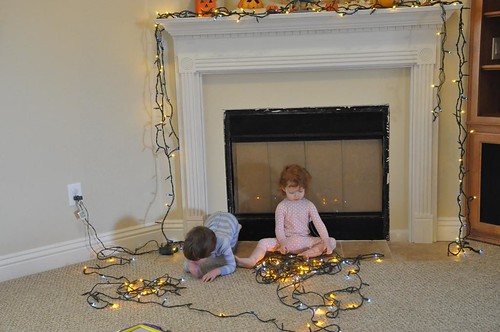
Details of my location: Fireplace decorated for Christmas (including mini lights), to the right a window and sliding door that gets south light. A 12yr old that can be bribed to be good and two almost 3yr olds that can't.:lmao:

What I *think* I know: Use a tripod w/remote (turn off the VR), shoot in aperture priority at least 5.6 to get all three kids in focus and sharp. My best light in this situation I'm thinking would be mid-AM. Can't see it happening without the flash.

I have read, I think it was Kyle about using garage work lights for lighting. Where would I place these?

Should I buy some white foam core for reflecting? If so, should I try to reflect the window light or the work lights or both?

My flash, I can't bounce it, I have vaulted ceilings and I wouldn't want to point it straight at them, so your advice for that.

Do I have a chance in heck of getting the lights and still getting the proper exposure on the kids?:confused3 I know if I want a 'star' effect I should close my aperture a bit which will slow things down, is it worth it to try?

Anyone want to come do this for me?
 
There are others that can give much better advice than me, so I'll leave that to them. But, I did want to point out that a south window can create shadows and mid morning, the shadows could be pretty harsh. You may need to hang a white sheet or something over the window to diffuse the light. Try a few practice shots on the cooperative child! Natural light in combination with a reflector and a touch of flash for fill could give you some nice lighting.
 
I would go with f/8 or f/11. f/5.6 is pushing it for more than one person.

Also you can use just about any kind of light and a reflector (foam core board) Try a few trail runs and see how your light from the window, and the reflector works. You could also bounce your flash off the reflector.

Maybe set up a few stuffed animals at the time of day you are planning on taking your photos and try some different lighting set ups and see what works best for your situation.
 
Thank you ladies, I will give your suggestions a try. DH says it's a West window. What can I say, I'm directionally challenged.:rolleyes1 I just know my best pics in this particular room come out best in the mid-am.
 
I have read, I think it was Kyle about using garage work lights for lighting. Where would I place these?


Anyone want to come do this for me?

if you are talking about halogen worklights.... i recommend not using them


I'll come do it for you
 
if you are talking about halogen worklights.... i recommend not using them


I'll come do it for you
Oooh YAY!!!! When can I expect you?

What would you recommend I use? (that I can afford?)
edited to add:The ones I picked up are not halogen, they are incandescent. I bought some reveal 60watt soft light bulbs for them.
 
Oooh YAY!!!! When can I expect you?

What would you recommend I use? (that I can afford?)
edited to add:The ones I picked up are not halogen, they are incandescent. I bought some reveal 60watt soft light bulbs for them.

ummm if I knew where you are I could better answer the first question


any artificial lighting including flash.. is going to wipe out your mini lights..

I'd use a tripod, and shoot by available light, if you need to add light on the kids, maybe a string of lights onthe floor in front of them...
 
What would you recommend I use? (that I can afford?)
edited to add:The ones I picked up are not halogen, they are incandescent. I bought some reveal 60watt soft light bulbs for them.

This is what I use for my lights. I have 2 (1 10" and 1 8") clamp lights that are $11 and $9 at Home Depot and I use the 60 Watt reveal soft light bulbs. I clamp each light to a tripod. I point one more towards the background and one more towards the face of the subject. I also use my SB-600 flash with diffuser, but I do bounce it. Since you can't bounce the SB-400 in the portrait orientation you might want to experiment with some negative flash compensation depending on your results.

I've been using this light setup for a little more than a year. I've probably taken a quite a few dozen portraits of the kids. I'm no pro and this is far from a pro setup, but it works great for my needs.

As for settings: I would go with what Jen said and start at f/8. I also use ISO400 and 1/60th. In my experience I find this works well for what I want especially where there is more than one person in the photo. The extra ISO helps with the slightly smaller f/stop. f/8 on that particular lens will also probably be a little sharper than f/5.6.

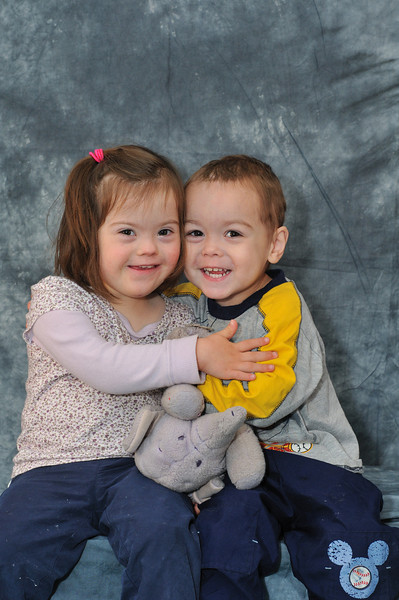
Here is a photo of the setup after my last shoot. I recently bought a backdrop stand and backdrop. I also use just the mural behind the backdrop, but I'm doing some portraits away from home this month and next month. The 2 tripods that the lights are clamped to are my older cheep tripods. I have much sturdier Manfrotto tripod w/ball head for the camera.

415290552_NjSME-L.jpg
 
Can we see some example shots handicap??

This shot was taken just before I took the shot in my previous post:

410696244_Qxxeo-L.jpg


Here are a few other portraits with the same lighting setup just a different background:
341938395_eVKMW-L.jpg


DSC_90558x10.jpg


This was one of the first times I used this lighting setup (last year). A little harsh on the shadows. Also this was with f/5, you can see that DD is slightly out of focus.
DSC_9223-1.jpg


If things go well this holiday season I may take the next lighting step and get one of those beginner lighting kits for $200 or so sometime next year. They typically come with 2 250-1000 watt lights, umbrella's and stands.
 
ummm if I knew where you are I could better answer the first question


any artificial lighting including flash.. is going to wipe out your mini lights..

I'd use a tripod, and shoot by available light, if you need to add light on the kids, maybe a string of lights onthe floor in front of them...
I'm in Vegas, come on by!

Ah, I see about the lights. I can give a try without flash or light but I don't know if it'll work with my lens. Wouldn't I have to up the ISO quite a bit?
 
Kyle, your kids are so ADORABLE. They make me smile every time I see them. Thanks for showing me your set up. The lights I bought are the ones you'd hang working on a car. DH has some mike stands I could use to hang them on.

Okay, so F.8 and ISO400.

Going to try all ways suggested so far. I've got a couple of weeks to work on it and figure out what will work best. This house is such a cavern. I miss my old kitchen, two windows and french doors. Awesome natural light.
 
either shoot when the daylight isn't too bright, or filter the window light with a white sheet, maybe a cloudy day, that way it won't be too bright, nor too dark, and you should be able to shoot with available light, get decent exposure on the kids and see your xmas lights..

f8 1/60
 
Thanks again for the advice. Going to try some practice shots in the next couple of days and will post an update.
 
I hope this does not sound too off the wall, pardon the pun, but borrow or rent a SB600 or 800 and get a Gary Fong lightsphere. that should solve a lot of your problems. Just make sure the dome is on the the Gary Fong your high ceiling is not a problem.
 
First, that had to be the most frustrating experience ever. My kids had me near tears pulling on the lights and pushing the cycle buttons.:scared:
I could not pull off a decent shot on manual f.8, 1/60. Not even halfway decent.
On shutter priority to get 1/60 it would drop my aperture down to f4. Same when I gave P mode and sport mode a try (I figured why not?) The best exposure I got was aperture priority f8 1/25 IS0 3200 and it was still underexposed (but looks fixable)Straight out the camera(you should be able to see the full EXIF):

So where do you suggest I go from here? I don't know that 1/25 is going to work for me since I have moving targets as you can see.


Disney Vacation Planning. Free. Done for You.

Our Authorized Disney Vacation Planners are here to provide personalized, expert advice, answer every question, and uncover the best discounts. Let Dreams Unlimited Travel take care of all the details, so you can sit back, relax, and enjoy a stress-free vacation.
Start Your Disney Vacation
Disney EarMarked Producer

New Posts


DIS Facebook DIS youtube DIS Instagram DIS Pinterest DIS Tiktok DIS Twitter

Add as a preferred source on Google

Back
Top Bottom