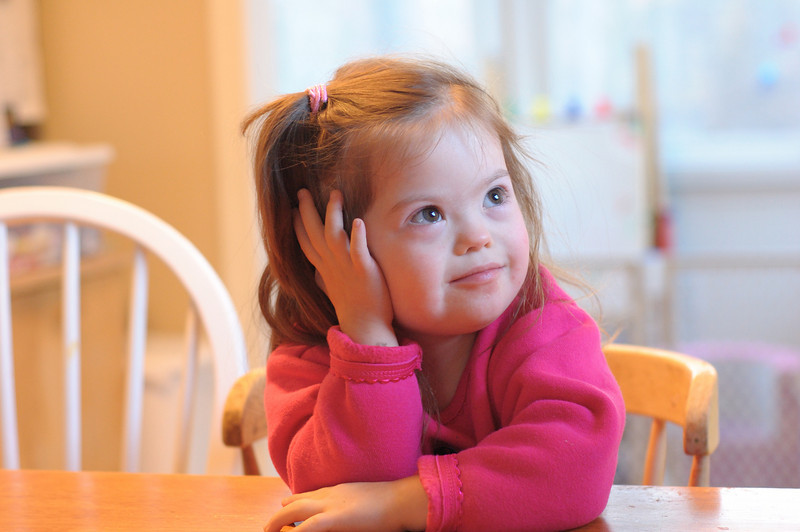
Portrait photography

I have the Sigma version of the 24-70mm f/2.8 for my Nikon D50 and I am very happy with it. Here are a few examples:

p467897243-4.jpg


p172880031-4.jpg


p194241971-4.jpg


p722524897-4.jpg


p625798622-4.jpg


p341733700-4.jpg


p229986690-4.jpg


p128077423-4.jpg
 
I think you ment the 50 mm f/1.8, the 1.4 is around $300 :) I have the 1.8 version as well, and don't use is nearly as much as I should.
Actually I was thinking of a used 1.4... I've seen them sold that low once in a while on Ebay, not all the time sometimes closer to $200... but yes new it would be closer to $300.
 
For natural light portraits I like using my Nikkor 50mm f/1.8. Great price and when used from f/2.8 to f/11 it is sharp as a tack.

DSC_2090.jpg


294190647_dVrVq-L.jpg


DSC_2105bw.jpg


DSC_2761.jpg
 
I feel everyones pain with the price of the Nikkor lenses.....an acquaintance of mine bought some Sigma lenses for his D300 and D70. Especially the 24-70 f2.8 and the 18- 200 f3.8-6.3 zoom... Both lenses work with both bodies well, no problems..the only complaint I have is the focus seems a bit noisier then the Nikkor lenses, but for about 1/2 to 1/3 the price...duhhh. The corresponding Nikkor lenses are a bit faster as well. Some web sites found the Sigma lenses to be a bit softer focus then the Nikkors but at the normal print levels 5x6 and 8x10 I did not see any appreciable difference.

Now if you want a good fast small portrait lens - really good in low light that you might have to manual focus with - the 50mm f.14 . Right now on Ebay there is an auction for a bunch of them...some under $100 ...
 

I have been holding off on this looking for the book with my people photos in it but I cant seen to find it since the move.

I like my 70-210 f/4 zoom for taking pictures of people in natural light, I dont want alot of background I want just the people. I have some cool shots of interesting people on the streets I met all around the country and all were done with that one lens. Granted it was not always the easiest but I was able to get in really close without being all on top of the person.
I used the 70-210 with 400 speed film even in broad daylight to try and compensate some for the speed and never had issues with grainyness or the likes.
When it came to film I read alot about what was out there and tried all I could get my hands on till I found the one for me.
 
I feel everyones pain with the price of the Nikkor lenses.....an acquaintance of mine bought some Sigma lenses for his D300 and D70. Especially the 24-70 f2.8 and the 18- 200 f3.8-6.3 zoom... Both lenses work with both bodies well, no problems..the only complaint I have is the focus seems a bit noisier then the Nikkor lenses, but for about 1/2 to 1/3 the price...duhhh. The corresponding Nikkor lenses are a bit faster as well. Some web sites found the Sigma lenses to be a bit softer focus then the Nikkors but at the normal print levels 5x6 and 8x10 I did not see any appreciable difference.

Now if you want a good fast small portrait lens - really good in low light that you might have to manual focus with - the 50mm f.14 . Right now on Ebay there is an auction for a bunch of them...some under $100 ...

The one's on ebay that I saw under $100 are AI or AI-S lenses. These are manual focus not auto focus. Just an FYI.
 
I paid right around $100 for my 50 1.8 in good used condition. If someone wants to sell me a 50 1.4 AF for that money please send me an PM. I haven't seen one decent AF 50 1.4 for anything below $250 on ebay unless it was broken. I believe they are close to $400 new and $300 to $325 used.

Pat.
 
I just bought the Nikon 85mm 1.8. I LOVE IT!! :lovestruc It is great for people pictures...beautiful, creamy skintones, great bokeh, tack sharp. Both of these were shot at 1.8 using only availble light...
2576157045_39c6a07ed8_b.jpg

2576156029_961403d22d_b.jpg

Heidi
 
Is there something better?

The BEST lens for Natural Light Portrait is the AF NIKKOR 85mm f/1.4D IF

This ultra-fast, incredibly sharp f/1.4 lens is perfect for low-light portraits and general photography where a shallow depth of field is desired.

You will FLIP over this lens ... trust me.

About 900 at B & H

Enjoy !!
 
I took this one of Grace with the 50 mm 1.8 at first light this morning (happy with the lens--what a great buy!). There's something that's just not quite right yet. I'd like to shoot B&W right out of the camera, but that seems daunting. Would surely welcome your ideas.
MorninglightBW.jpg
 
I have the same problem. I have tried a few methods that are more than jsut "desaturate". and they just don't pop like I have seen with others. Maybe more practice, for me... hehehehee

Mikeeee
 
problem with shooting b&w out of camera, is you can't add back the color if you should decide you'd like a photo in full color, I always recomend shooting color and converting to b&w for that reason....

paint shop pro photo x2 has some awesome filters for b&w conversion
 
That's what this is missing--pop!! LOL. I need some pop, but I don't know how to get it.
 
First, if you are shooting digital, always shoot in color. There is no advantage to shooting in B&W. There is a huge advantage, even though you want B&W as your final output, to shooting in color. When you do your greyscale conversion, you can adjust the brightness levels of the color channels separately.

Let's take the example of a picture of a brown barn in a green field with red flowers in front of a cloudy blue sky. When you convert to greyscale, the colors all go away and you have to communicate with your viewer through tones (brightness levels) alone. If you started with color, you have more control over the brightness levels. You can darken the blues (making the sky darker and the clouds "pop". You can darken the green a bit and lighten the reds. Now, the flowers that were lost in the original conversion will reappear as light blooms on a darker field of foliage.


The second thing to consider is that, because you are working strictly with tones, shadows are much more important to telling your story. With a typical color portrait, you want soft, faint shadows - just enough to give some depth to the picture but not enough to distract from your subject. With B&W, you need to use the shadows to define your subject. Try using harder lights. Try making the lights more directional. Work with less diffuse light sources to bring out details.
 
Thanks so much for the great advice. I've copied your response into a word document so that I'll be able to keep it.
 
if you shoot in raw you can shoot in B&w mode and still have the color info. that might help you see what you need to adjust before you take the photo.. so for once i disagree with mark, to me that is an advantage and you loose nothing by doing it. ( at least that holds true for canon, i would guess everyone else as well)
as far as pp goes, if you plan on using alot of b&w i'd recommend alienskin exposure for pp...usually i initially pp in lightroom then use alien skin to tweak it... it has a lot of presets but also you can adjust those presets so you get a multitude of options, can add different color( ie browns, blues can look pretty good to for cooler subjects) filters, grain ec...it's about $200 but if you are going to use it a lot it's worth it( may be able to find it cheaper somewhere). it also has some nice cross processing options for color, old color ie kodachrome film presets , infrareds,etc. i use it a lot. now if i could just find a printer i could afford that prints good b&W.....
i find the B&w i am happiest with are those that have a very contrasty subject to start with so you might want to keep that in mind for portraits, maybe select clothes/backcrops to cause that effect, etc. personally even if the image is dark overall ( ie a moody type feel) i like a strong line of very light to contrast , other wise it just looks washed out/blah...ie backlit dark hair again a dark background might look very nice imo...i have a bunch of b&w in my monochromatic gallery on zenfolio, most of which i used various alienskin presets , older ones were done just with alienskin after camera raw process, newer ones with lightroom then alienskin. you can then decide, after viewing my photos, to totally ignore everything i said ;)
 
Actually... the best part of shooting digital when you want black and white is the fact that once your picture is taken you have a color image of what you wanted... now you can apply filters to simulate what would have happened if you had used an orange, red, yellow or whatever color filter.

I've seen a lot of people that try to shoot black and white not realize that in the old days of film... colored filters were key to getting the right part of picture to pop.
 
All of this is very interesting. So what would folks recommend to tweak the picture of Grace to make it pop? There's already quite a bit of shadow on her face and neck since I photographed her in a sunbeam. I noticed also in Photoshop that when I selected Portrait setting, it actually darkened the image, which makes no sense. Since she's a yellow Lab, what color filter would really make this look good? Red? Blue? Here's the color original, lightened just a bit. Thanks again.
Morninglight3.jpg
 
If you look at the article here, I have found this simple method, although not detailed enough for my liking, to be one of great help if you use LR or Photoshop. I used the method outlined to play with you photo. I feel it gave it great mood. Also, there is alot of room in the method to adjust it to better suit your style.

Note that working in RAW would probably allow more flexibility that I could get here. I might have been able to get the eyes to pop more.

Morninglight3.jpg
 
I would go with a red filter simply because it lightens the eyes more than another would.. but thats just me.

thomas998


Disney Vacation Planning. Free. Done for You.
Our Authorized Disney Vacation Planners are here to provide personalized, expert advice, answer every question, and uncover the best discounts. Let Dreams Unlimited Travel take care of all the details, so you can sit back, relax, and enjoy a stress-free vacation.
Start Your Disney Vacation
Disney EarMarked Producer

New Posts


DIS Facebook DIS youtube DIS Instagram DIS Pinterest DIS Tiktok DIS Twitter

Add as a preferred source on Google

Back
Top Bottom