Keeping track of Park Reservations?

poohj80

Got Hunny?
Joined
Jul 16, 2001
Messages
6,323
Hey all! WDW vet here planning a DL trip next month. I purchased tix, linked them and made park reservations but now I cannot find a confirmation of my park reservations online. The DL app does not work like the WDW app that shows the park reservation in My Plans. I have also looked on the DL web site with no luck.

Where can I see the park reservations I have made to make sure I remember which days are which park? Thanks!
 
They should show up in My Plans. If they don't, there's an issue with your park reservations.
 
Hey all! WDW vet here planning a DL trip next month. I purchased tix, linked them and made park reservations but now I cannot find a confirmation of my park reservations online. The DL app does not work like the WDW app that shows the park reservation in My Plans. I have also looked on the DL web site with no luck.

Where can I see the park reservations I have made to make sure I remember which days are which park? Thanks!
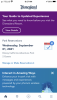
I can see my Park Reservations on my DL app. They show on the Home Screen with a link to 'Manage or Make Reservations'. If I click on that link it takes me to the website.

Edited to add I also got email confirmations when I made my park reservations.

CF498787-60F3-4260-A53E-C0F4D4750FAA.png
 
They do not show up under My Plans for DLR. You have to just go to the main/home page of the app. There will be a section that says "park reservations" and it will show whatever your next upcoming reservation is (you won't see the others). To see the rest, you'll need to click "manage or make park reservations" and this will take you to the website where you can see all your park reservations. From there you can either cancel or have the QR code emailed to you again for each day.
 

Just another tip -- which I struggled with until I figured it out...

If you have multiple tickets and park reservations, it's important to know which tickets are linked to which reservation. Just look at your reservation, and there will be four numbers after each name. Those are the last four numbers of the linked ticket. AND...on park day, to quickly keep track of which ticket you are using in the parks with the app -- check the ticket number and then remember the ticket color. They are all different colors. Makes it easy to remember.
 
They should show up in My Plans. If they don't, there's an issue with your park reservations.

The only thing I see in My Plans is dining reservations, but the post below worked. Thanks for the suggestion!

I can see my Park Reservations on my DL app. They show on the Home Screen with a link to 'Manage or Make Reservations'. If I click on that link it takes me to the website.

Edited to add I also got email confirmations when I made my park reservations.

View attachment 583581
THANK YOU! This link in the app directs to the web site and the site hasn't been loading for me lately. I just tried it again and can see them all. Thanks for the help!
 
THANK YOU! This link in the app directs to the web site and the site hasn't been loading for me lately. I just tried it again and can see them all. Thanks for the help!
I'm glad it worked for you!
 

New Posts


Disney Vacation Planning. Free. Done for You.
Our Authorized Disney Vacation Planners are here to provide personalized, expert advice, answer every question, and uncover the best discounts. Let Dreams Unlimited Travel take care of all the details, so you can sit back, relax, and enjoy a stress-free vacation.
Start Your Disney Vacation
Disney EarMarked Producer


DIS Facebook DIS youtube DIS Instagram DIS Pinterest DIS Tiktok DIS Twitter

Add as a preferred source on Google

Back
Top Bottom
