How to Shoot: SpectroMagic

YEKCIM said:
I'll bet they have a hard time enforcing the flash ban, though, and would guess that most people ignore the ban.~YEKCIM

Whether you can get away with using a flash (if you know it is frowned on) is a personal decision. Flash photography is not allowed on indoor rides as well.

Here is a character shot, no flash:
62440885-L.jpg


Mikeeee
 
JR6ooo4 said:
Whether you can get away with using a flash (if you know it is frowned on) is a personal decision. Flash photography is not allowed on indoor rides as well.

Mikeeee

I did not mean to imply that I would be inclined to ignore the ban, only that I was unaware of it, and that it would be hard to enforce, given the crowds. In the past, I have noted that the crowds fairly "sparkle" with flashes, during the parade. I *was* aware of the ban on flashes on dark rides, as well. I appreciate your pointing out the flash ban on both, for my benefit, as well as others'.

I'll probably be using the camcorder, anyway, but Mrs. YEKCIM will probably use my Fuji S5200, as it goes up to ISO 1600, albeit with some noise; for a $225 camera, though, it ain't bad.

~YEKCIM
 
Tazicket said:
Does the faster ISO speed negate the use of the flash? (Sorry, I'm new to the camera world and still learning the lingo) :) Should we be taking pictures only when they are lit with the colored lights, or will the white ones turn out ok too? Any chance of getting the characters on the floats with no flash?

Lovely pictures, by the way!

The ISO setting is the film's (or digital sensor's) sensitivity to light.
 
Here are a few of the better pictures I took of SpectroMagic on our last trip. I took quite a few pics, and got maybe a dozen or so that were not blurry. All pictures I took were hand-held, no flash.

IMG_1153.jpg

IMG_1332-1.jpg

IMG_1325-1.jpg

IMG_1322.jpg
 

Sonno said:
The ISO setting is the film's (or digital sensor's) sensitivity to light.


Ohhhh! Ok! So the higher the ISO setting, the better it can work when there is little light (within reason, of course)?
 
JR6ooo4 said:
Whether you can get away with using a flash (if you know it is frowned on) is a personal decision. Flash photography is not allowed on indoor rides as well.

Here is a character shot, no flash:
62440885-L.jpg


Mikeeee


the difference between not using flash for Spectro, and indoor rides is this....


on indoor rides flash is frowned upon because it temporarily blinds other guests, and illuminates things Disney doesn't really want you to see, ruining the experience for some people,


with Spectro the flash can temporarily blind the float drivers, causing them to run into the crowd, which would really ruin the experience for a lot of people...


point and shoot flashes most likely will cause no harm, they also most likely will do no good for pictures, on the other hand, my flash which would light up the castle from 100 feet away, could cause harm, and although it would provide plenty of light for float pictures.. it would ruin the effect of the lights on the float,

if you've ever taken pictures of a christmas tree or outdoor christmas decorations, using a flash you will understand, yes you get a nice picture of the tree, but you lose the effect of the tree lit by all the pretty little lights...
 
YEKCIM said:
I did not mean to imply that I would be inclined to ignore the ban, only that I was unaware of it, and that it would be hard to enforce, given the crowds. In the past, I have noted that the crowds fairly "sparkle" with flashes, during the parade. I *was* aware of the ban on flashes on dark rides, as well. I appreciate your pointing out the flash ban on both, for my benefit, as well as others'.
~YEKCIM

Sorry for any confusion. When I said "you" I should have made it more clear I was refering the general public. Not specificaly you.

I also assumed most those flashes are from people who do not know how to turn the flash off. hehehehee

Mikeeee
 
JR6ooo4 said:
Sorry for any confusion. When I said "you" I should have made it more clear I was refering the general public. Not specificaly you.

I also assumed most those flashes are from people who do not know how to turn the flash off. hehehehee

Mikeeee

Mikeeeeeeee........

I did not take offense at your reply, but added my comments, lest anyone else reading the thread misunderstand my position. I simply had never heard any CM, forum poster, or anyone else mention any flash ban on Spectro. We've been in there, flashing with the rest of the yahoo's, simply b/c we did not know any better. Only good flash shot is one Mrs. YEKCIM got of Pluto when he came over to "slick" my daughter (that's how she used to refer to "lick"). He was, like, three or four feet away, and the flash-illuminated pic was perfectly exposed.

As I said, I generally shoot video of parades, and will let Mrs. YEKCIM try her hand at some high-ISO stills with my S5200. Mickey88's reference to flash pix of a Christmas tree is very appropriate; you do lose the effect of the "onboard" lighting on the floats with flash...when it will reach.

Disney-bound on 7/8/06

~YEKCIM
 
I to have never heard anything about a restriction on flash for Spectromagic. I am *very* careful about using flash where it is not allowed (a pet peeve if you will) and I will listen carefully for the restriction next time.

Yes, a flash can be used for Spectro and Christmas teees to good effect, *if* the flash exposure is limited. I usually set the flash exposure compensation to -2 or so and let the lights do most of the work, the flash just brightens up the parts where the lights don't do much. Av exposure mode can work well here.

Here's an example:

IMG_0098_800.jpg
 
I used ISO 800 on P mode on my digital rebel xt. With no flash they turned out great.
 
I too did not recall hearing the announcement about flash - so thanks for the heads up. I am very careful about not using flash when prohibited -(unlike many folks I was riding near last night on POTC!) - so I have to admit that I used it when I took pics of the parade in April! I feel like the are CONTRABAND now!
IMG_3544.jpg
 
Crank the ISO up as high as you can and open the aperature up as much as possible as well. If you've got an exposure compensation on your camera, play with that as well. Be prepared to do a little processing afterwards to lighten things up if necessary.

This shot was taken with a Canon G3. It had no detail and was really dark before doing some adjusting in Photoshop.

1424283edited9po.jpg
 
Should I use the flash. ...Ive used scene select, picked night, picture to dark. How about Manuel, what settings. please help...thanks
 
despina said:
Should I use the flash. ...Ive used scene select, picked night, picture to dark. How about Manuel, what settings. please help...thanks

Hi,
no flash allowed during spectro. shoot highest ISO.

mikeeee
 
What kind of camera do you have and what settings do you use for pictures of Spectromagic and Wishes?? I have a Kodak DX7590.
 
Shooting fireworks and Spectromagic are very different.

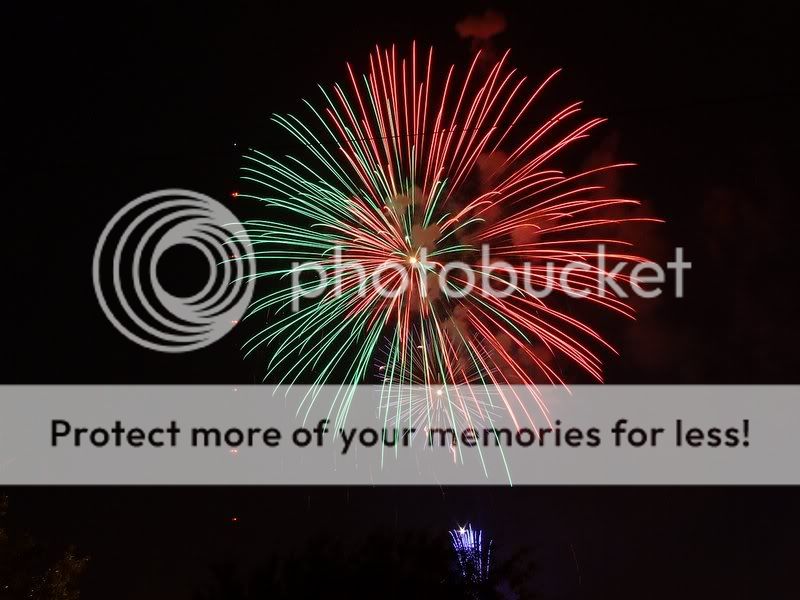
For fireworks, you usually want a longer shutter speed to get the "trails" - to do this, ideally you'll use a tripod to eliminate camera shake. (It won't affect the fireworks trails too much, but the castle will look a mess!) You can get by hand-holding if you don't mind shorter trails but the castle will often be pretty dim. Some cameras have a "fireworks" scene mode that may help.

For Spectromagic... this is extremely, extremely difficult for any camera to capture. You can use a flash, but that kind of eliminates the effect of the lights. The problem is that it's moving so you can't just set up a tripod and take a longer shot - you need a camera that be very sensitive to light without a lot of image noise and one that has a lens that lets in a lot of light. Unfortunately, point-n-shoots generally don't fulfill either of those requirements.

It doesn't mean that you might not get a good shot just by hand-holding your PnS, but you have to have realistic expectations. You will also probably do slightly better by zooming out as far as possible (this will both allow more light in and help hide the blurs from the movement) and setting your camera to the highest ISO level (and be aware that you may get some pretty nasty image noise.) The great thing about digital is that the shots are free, so take a few and see what works, and if you're there long enough, you can try a second time, having learned from your first series of pictures.
 
Last year I couldn't figure out how to get non-blurry Spectromagic pictures. All that I took came out blurry. The same thing happened with fireworks and nighttime castle pictures. I'm hoping to get some better pictures this year and I'm hoping someone here can help!

I am using a Canon Powershot S2 IS camera and don't know a lot about photography. I have been researching a bit since we got back and believe that I need a faster speed but I don't know what's ideal. I was going to set up a manual setting with the proper shutter speed, ISO (I don't even know what this means but it seems to be important), and f number (don't know about this either!).

Any suggestions would be appreciated! Thanks!:yoda:
 
For nighttime parades, you do need a faster shutter speed to deal with subject motion. In order to do that, you'll need to boost your ISO, although I believe the S2-IS is limited to ISO 400, which really is not all that much. Also, I think the ISO 400 images would be relatively noisy, but probably good enough for 4X6's or maybe even 5X7's.

For fireworks, a sturdy support is essential. A tripod is the best solution, but who wants to lug a tripod around all day? I've heard of people who use a small pocketable tripod and just set it on a flat horizontal surface to make the pix. In the middle of a crowd of people, though, I'm not sure how practical that is. I'm no expert on fireworks, but got some decent shots of our local Independence Day show by mounting my camera on a tripod, setting the aperture at f/8, focus on infinity, ISO to 100, and shutter to "bulb". I tried to time the exposures to coincide with the bursts, and shot maybe 25 frames, most of which were not very good, but a few were decent. Here's one:

DSCF1066.jpg


Keep in mind that you don't need a high ISO for fireworks, as the bursts themselves are quite bright, but they are short-lived, so the duration of the burst is somewhat similar to a short shutter speed, even though the actual time the camera's shutter is open may be several seconds. Now, how to shoot a scene with, say, the illluminated castle, with fireworks bursts in the frame, I'm not sure. I would say, offhand, that a tripod would be a must, and some experimentation would be a good idea. Perhaps, if you were able to see the show twice, you could "go to school" on the first show, and use the second to implement what worked best the first go around.

For best results, especially where low-light nighttime shots are concerned, you may want to consider a dSLR down the road.

Maybe someone else with an S2-IS will chime in. I think there may be one or two S2 users who sometimes visit this board...

~YEKCIM
 
You want the shutter speed to be as fast as possible, so that means that the aperture needs to be as wide as possible and the ISO needs to be as high as you are willing to put up with. The aperture is the "f" number. The widest is the smallest number b/c it is actually a fraction and is usually shown as f/2.8 or someting like that. I am pretty sure that f/2.8 is the widest on the S2, but I am not positive. That allows more light in so therefore less time is needed and reducing the risk of blur. The higher ISO numbers mean the sensor is more sensitive to light and less time is needed. The downside is that higher numbers have more image noise and lose detail. You have to determine on your own how much is acceptable. Try those things out at home and then try to re-create the situation to test how quick of a shutter speed you will need.

You might want to consider using shutter priority mode once you determine the correct shutter speed. That along with auto ISO would allow the camera to pick the correct aperture and ISO while assuring that the photo will not be blurred. On complete manual mode, you run the risk of over or under exposing the shot b/c the correct settings can vary from shot to shot.

A tripod or monopod would help so that you can be sure there is no blur from the camera moving. This is the most effective for low light shots of things not moving, but might also help on the low light action shots. The IS can only do so much. If you are going to be doing a tripod shot, you should actually turn off the IS. A monopod would likely be more effective for the parade because you can change the setup much quicker than a tripod. It depends on how well you use a monopod for determining if the IS will help or actually hurt the shot. As a beginner, you probably will not keep one completely still, so IS would probably help.

One last thing, do not use the flash on night shots unless it is a portrait shot, and then use night portrait mode with tripod. IMO it really destroys the illusion when you see the parade float's interior structure due to the flash.

Kevin
 
I've got an S3, but it's similar enough that settings should work out.

I haven't actually photographed Spectromagic (or anything at Disney, yet) since getting my new S3, but I have been practicing my low-light shots. Unfortunately, low-light is tough for a P&S, even a good one like the S2/S3.

You're on the right track with going manual ... you want to take control over the settings to prevent the camera from simply boosting the ISO to it's highest point (which causes lots of noise).

I'm not entirely sure, yet, but because some things are bright and some things are dark in Spectromagic, switching to Center-weighted light metering might help (maybe even Spot). You probably don't need to mess with the White Balance as most of the color is coming directly *from* the lights.

Setting the biggest aperture (lowest number) is one thing ... the bigger the aperture, the more light and the faster the shutter speed can be. You might be able to get a nice "star" effect, though, if you close the aperture to it's smallest (8.0) -- I haven't tried this, yet, and I've been focusing more on getting the most light into the camera.

I'd try keeping the ISO at 200 or less, but you might have to go to 400. If so, you'll need NeatImage/NoiseNinja/Noiseware noise reduction software ... there's just no way around it. A noisy image is still better than no image (usually) ... with the software, you'd be surprised what it can do!

After you've got the aperture and ISO set, try setting the highest shutter speed you can. Keep testing with the half-press to see what the camera thinks of your exposure. There should be a little number displayed in one of the corners of the screen. If it's red, you're way to fast. Negative numbers mean you're underexposed and it will be dark, positive numbers mean overexposed and too light. If you can get within +/- 1 you should be able to get a decent print.

You might also want to set the IS to panning mode for Spectromagic since you'll probably end up following a moving float and you don't want the IS to compensate for you moving with it.

It also helps to practice holding the camera very steady; use the viewfinder instead of the LCD, not jerking the shutter button, etc. I've heard it referred to as being "sniper steady" on other boards ... it's what I've been aspiring to! :thumbsup2 Lay off the caffeine if you're going to be taking night photos with a P&S! :)

Also, shoot a lot! A lot of your pictures will be blurry or otherwise messy, so it helps to have lots of shots to pick the best ones.

We S2/S3 users aren't going to consistently get great shots like the DSLR-crowd, but we can certainly get nice ones.


Disney Vacation Planning. Free. Done for You.
Our Authorized Disney Vacation Planners are here to provide personalized, expert advice, answer every question, and uncover the best discounts. Let Dreams Unlimited Travel take care of all the details, so you can sit back, relax, and enjoy a stress-free vacation.
Start Your Disney Vacation
Disney EarMarked Producer

New Posts


DIS Facebook DIS youtube DIS Instagram DIS Pinterest DIS Tiktok DIS Twitter

Add as a preferred source on Google

Back
Top Bottom