Belle Ella
DIS Legend
- Joined
- Jun 30, 2007
- Messages
- 13,501
I know it took me about 5 years of posting on different message boards before I finally learned how to use the multi-quote feature without having to copy and paste a lot. I recently finished using screen shots to assist a friend in adding photos to her signature and after some recent discussion here on the DIS about the troubles with the multi-quote feature I figured I would try using screen shots to hep here as well. Rather than just post it in the thread where it came up I figured I would post a new thread here in case any one else is still having troubles with it.
 I hope the visuals help!
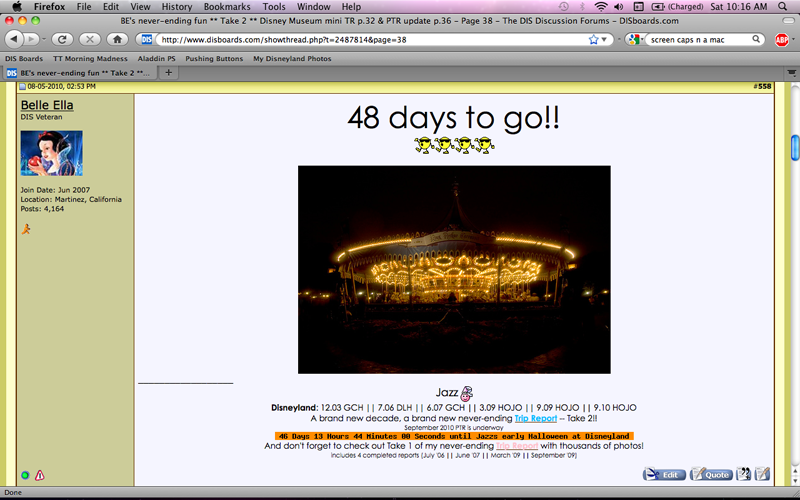
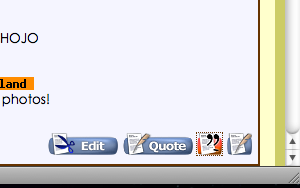
Start with the first post you want to quote. We all know the general set up, but you'll want to look down in the bottom right corner of the post in question. You'll see 3 or 4 little blue buttons with different options depending on who's post you are looking at. From left to right they are: Edit (to edit your own post after you've hit submit), Quote (to quote a singular post), Multi-Quote (what we want to use to quote more than one post), and the Quick Reply (which takes you down to the quick reply text box at the bottom of the page). Here's a closer look:

You'll want to click on the Multi-Quote button and it should highlight to orange to let you know it worked.
You will want to do this for every post that you wish to quote at once, and it wont even matter if they are on multiple pages. And if for some reason there is one post that you would like to de-select, just click on the Multi-Quote button again and it will revert that selected post back to normal.
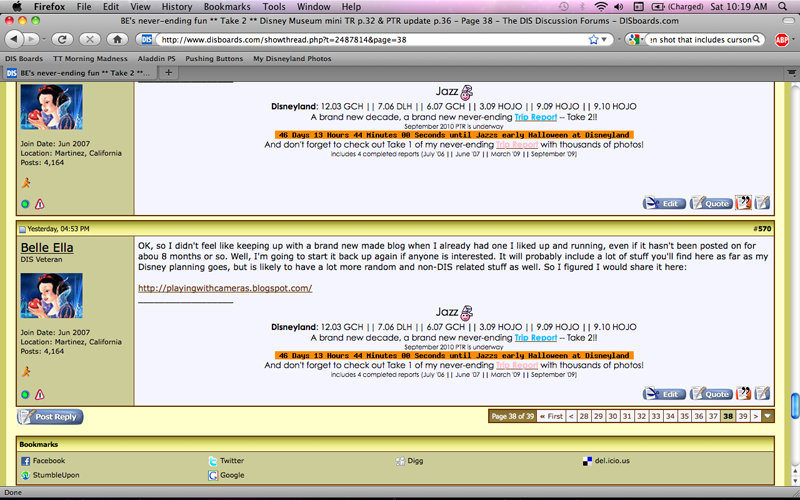
Once you have selected all the posts that you want to quote (and all will stay highlighted with the orange button so you know what you've quoted) simply scroll down to the bottom on the page and click on the Post Reply button.

You will be taken to the "Reply to Thread" page similar to the page you get when you create a new thread. Every post that you selected to quote should appear in the text box in the same way that one will when you only quote one post.

I hope the visuals help!Start with the first post you want to quote. We all know the general set up, but you'll want to look down in the bottom right corner of the post in question. You'll see 3 or 4 little blue buttons with different options depending on who's post you are looking at. From left to right they are: Edit (to edit your own post after you've hit submit), Quote (to quote a singular post), Multi-Quote (what we want to use to quote more than one post), and the Quick Reply (which takes you down to the quick reply text box at the bottom of the page). Here's a closer look:
You'll want to click on the Multi-Quote button and it should highlight to orange to let you know it worked.
You will want to do this for every post that you wish to quote at once, and it wont even matter if they are on multiple pages. And if for some reason there is one post that you would like to de-select, just click on the Multi-Quote button again and it will revert that selected post back to normal.
Once you have selected all the posts that you want to quote (and all will stay highlighted with the orange button so you know what you've quoted) simply scroll down to the bottom on the page and click on the Post Reply button.
You will be taken to the "Reply to Thread" page similar to the page you get when you create a new thread. Every post that you selected to quote should appear in the text box in the same way that one will when you only quote one post.

 I have always wondered how people did this!