What's the purpose of "bracketing" a shot?

DoleWhipDVC

Mouseketeer
Joined
Jul 17, 2010
Messages
210
Hi everyone,
I am trapped on the wide angle lens thread and really loving all the ideas from the amazing shots. I notice that many of you are taking pictures and then "layering" them in post production. But when you shoot, there is alot of talk about doing the capture with multiple exposures?? On page 51 Tom Hurley mentions shooting the back of tower at, "-2, -1, 0, +1, +2" What does that mean, and why does someone do that? I LOVE the shots, can you explain the purpose behind the multiple takes:confused3

Thanks as always - 4 weeks to London, 9 weeks to the World (and the Tamron 10-24 is going along)!!!
 
That is how HDR images are created. Simplistically speaking, you use the multiple images combined to bring out all the highlights using programs like Photomatix to "blend" or "merge" the images into one. There are other things to do also, but that is the basic.
 
'HDR', or High Dynamic Range, photography, is a technique used to handle extreme dynamic range that's beyond the camera's ability to properly expose throughout a scene - Use a dark room with massively bright daylight scenery out the window. If you take 1 shot, and expose for the scene out the window, the outside will look right, but the inside of the room will be a silhouette. If you expose for the interior of the room, the scene out the window will be a blown out mess of white. So how do you expose for BOTH the dark interior AND the bright exterior? By taking more than 1 shot - exposing 1 shot for interior and one for exterior, then stacking them together. By using 3, 4, or 5 shots, you can expose for different layers of the shadows or highlights, rather than just 2.

This type of HDR blending is completely up to the user on how far to take it - you can use it for very mild blending of multiple exposures to try to replicate a scene as the eye saw it, with realism as the goal, or you can experiment with the blending amounts and tone-mapping to alter from reality, bringing in more highlight, brightening shadows even more, darkening highlights more, playing with contrast and saturation, and achieve anything from mild to total fantasy - HDR blend results can look completely undetectable as an HDR, or can look like painted artwork...it's all up to the user.
 
When shooting film, exposure bracketing can be useful to make sure that you get at least one shot with good exposure. It can also be useful for compositing images and for HDR.
 

When you have a camera that will only do 3 bracketed shots, I know you can shift your exposures to the lower end and take 3 more shots, and then shift to the higher end to take 3 more. This will give you a very wide range of exposures. My question is, if you try to do this, how in the world do you keep from jostling your camera? Even the tiniest movement will throw the blend alignment off. Has anyone tried this method and been successful?
 
If you're doing multiple exposures specifically for the sake of HDR, most people like to use a tripod, so they eliminate any possibility of getting misaligned frames. In which case, it doesn't really matter if you use in-camera bracketing, or just adjust the exposure manually for each shot. But if doing handheld HDR, it's usually best to limit oneself to the 3 you get from bracketing, since they fire more quickly together. Doing a separate 3 frames handheld would likely require super-steady stance and hold, and some aligning capability in the HDR software (or a very good eye and processing ability to align yourself).

Because I dislike post processing and avoid it whenever possible, and often think of HDR when I'm shooting handheld with no tripod, this is a primary reason I like having a camera that does automatic HDR blending in camera.
 
When you have a camera that will only do 3 bracketed shots, I know you can shift your exposures to the lower end and take 3 more shots, and then shift to the higher end to take 3 more. This will give you a very wide range of exposures. My question is, if you try to do this, how in the world do you keep from jostling your camera? Even the tiniest movement will throw the blend alignment off. Has anyone tried this method and been successful?
If you're as gentle as possible, it doesn't move that much. Some remotes may have enough functionality to let you make the changes to settings without physically touching the camera body. Maybe the Promote can do that -- not sure as I don't have one. Finally, Software such as Photoshop and Photomatix Pro can re-align the images if they're of by a small amount.

Scott
 
If you're doing multiple exposures specifically for the sake of HDR, most people like to use a tripod, so they eliminate any possibility of getting misaligned frames. In which case, it doesn't really matter if you use in-camera bracketing, or just adjust the exposure manually for each shot. But if doing handheld HDR, it's usually best to limit oneself to the 3 you get from bracketing, since they fire more quickly together. Doing a separate 3 frames handheld would likely require super-steady stance and hold, and some aligning capability in the HDR software (or a very good eye and processing ability to align yourself).

Because I dislike post processing and avoid it whenever possible, and often think of HDR when I'm shooting handheld with no tripod, this is a primary reason I like having a camera that does automatic HDR blending in camera.

Oh sorry, I just assumed you'd realize I would have been using a tripod and was just concerned about camera movement when I had to go into the menu and push a few buttons.
 
If you're as gentle as possible, it doesn't move that much. Some remotes may have enough functionality to let you make the changes to settings without physically touching the camera body. Maybe the Promote can do that -- not sure as I don't have one. Finally, Software such as Photoshop and Photomatix Pro can re-align the images if they're of by a small amount.

Scott

That Promote sounds intriguing. I have a wireless remote but it certainly does not have any special functionality beyond allowing autofocus and shutter release. Thanks for the tip.
 
Hi everyone,
I am trapped on the wide angle lens thread and really loving all the ideas from the amazing shots. I notice that many of you are taking pictures and then "layering" them in post production. But when you shoot, there is alot of talk about doing the capture with multiple exposures?? On page 51 Tom Hurley mentions shooting the back of tower at, "-2, -1, 0, +1, +2" What does that mean, and why does someone do that? I LOVE the shots, can you explain the purpose behind the multiple takes:confused3

Thanks as always - 4 weeks to London, 9 weeks to the World (and the Tamron 10-24 is going along)!!!


Bracketing can be used for hdr, but can also be used to get a range of exposures, in case the first one isn't to your liking. You can set it to bracket and take three shots. Sometimes the underexposed or overexposed one is better. The camera makes a lot of metering decisions and is not always right.
 
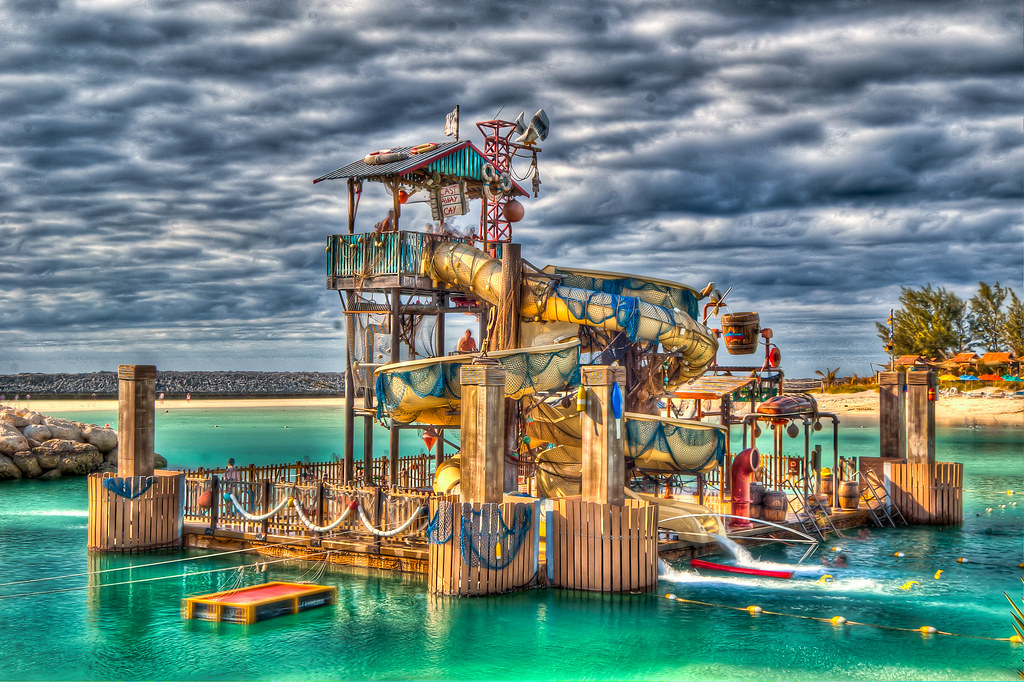
here is an example I put together to show the various exposures used for the final HDR shot.


Pelican Plunge HDR - Shot Sequence by ssanders79, on Flickr


Pelican Plunge HDR by ssanders79, on Flickr

You know Sanders, it's people like you (and ChiSoxKieth, UkCatfan, Zackiedawg, et al...) that make people like me spend way too much money! Every time you folks have been nice enough to answer my wide angle questions, exposure vs. focal length questions, dark ride capture questions, and now bracketing questions, I end up sneaking off to buy either equipment or software! Now I'm going to hunt down a program that allows me to create HDR shots. This picture is truly stunning! I love it. Thanks as always for the info and the example.
 
'HDR', or High Dynamic Range, photography, is a technique used to handle extreme dynamic range that's beyond the camera's ability to properly expose throughout a scene - Use a dark room with massively bright daylight scenery out the window. If you take 1 shot, and expose for the scene out the window, the outside will look right, but the inside of the room will be a silhouette. If you expose for the interior of the room, the scene out the window will be a blown out mess of white. So how do you expose for BOTH the dark interior AND the bright exterior? By taking more than 1 shot - exposing 1 shot for interior and one for exterior, then stacking them together. By using 3, 4, or 5 shots, you can expose for different layers of the shadows or highlights, rather than just 2.

This type of HDR blending is completely up to the user on how far to take it - you can use it for very mild blending of multiple exposures to try to replicate a scene as the eye saw it, with realism as the goal, or you can experiment with the blending amounts and tone-mapping to alter from reality, bringing in more highlight, brightening shadows even more, darkening highlights more, playing with contrast and saturation, and achieve anything from mild to total fantasy - HDR blend results can look completely undetectable as an HDR, or can look like painted artwork...it's all up to the user.

If you're doing multiple exposures specifically for the sake of HDR, most people like to use a tripod, so they eliminate any possibility of getting misaligned frames. In which case, it doesn't really matter if you use in-camera bracketing, or just adjust the exposure manually for each shot. But if doing handheld HDR, it's usually best to limit oneself to the 3 you get from bracketing, since they fire more quickly together. Doing a separate 3 frames handheld would likely require super-steady stance and hold, and some aligning capability in the HDR software (or a very good eye and processing ability to align yourself).

Because I dislike post processing and avoid it whenever possible, and often think of HDR when I'm shooting handheld with no tripod, this is a primary reason I like having a camera that does automatic HDR blending in camera.

So knowing these points, would taking 3 shots be enough for HDR effects in post processing? I have a Canon 40D which lets me take 3 shots with the bracketing function. One other quick question, when people say they, "set their camera to burst" is that another way of saying they are shooting bracketed shots? Or are they generally talking about sport mode when making that comment? Just curious.
 
When you have a camera that will only do 3 bracketed shots, I know you can shift your exposures to the lower end and take 3 more shots, and then shift to the higher end to take 3 more. This will give you a very wide range of exposures. My question is, if you try to do this, how in the world do you keep from jostling your camera? Even the tiniest movement will throw the blend alignment off. Has anyone tried this method and been successful?

Actually, if you've got one of the higher-end dSLRs, those cameras can bracket more than 3 shots at a time! If you've got a Canon 1D (and who *doesn't* have one of these $5000 cameras lying around?), it can bracket anywhere from 2 to 7 shots at a time. The Nikon D2x, D3, D3x, D3s, and D700 (not the D7000) can bracket 2 to 9 shots at a time.

Matt Kloskowski, one of the "Photoshop Guys", describes 2 particular times where he took a 9-shot bracket at St Patrick's Cathedral in NYC using the Nikon D700 (link) and a 9-shot bracket (from -4 EV to +4 EV) at the Notre Dame in France using the Nikon D3 (link). In both cases, he produced a beautiful HDR composite of the interior of the cathedrals. The first story is worth a read...he almost gets caught by the security guards while he's taking these HDR photos!
 
So knowing these points, would taking 3 shots be enough for HDR effects in post processing? I have a Canon 40D which lets me take 3 shots with the bracketing function. One other quick question, when people say they, "set their camera to burst" is that another way of saying they are shooting bracketed shots? Or are they generally talking about sport mode when making that comment? Just curious.

3 shots is generally enough for bracketing for HDR. You take 3 successive photos at -2 EV, 0 EV, and +2 EV. In English, that means you take 3 photos: 1 that is underexposed by 2 stops, one that is "properly exposed", and one that is overexposed by 2 stops.

Because the underexposed photo is dark overall, it brings out details in the bright highlight areas. The overexposed photo is overall very bright, which will bring out details in the shadow areas. The computer will merge the exposures of all 3 photos into a composite HDR photo.

When people say they "set their camera to burst", it usually means a continuous burst mode, like for sports photography. For example, if you're taking pictures of a baseball player swinging her bat, you take pictures in continuous burst mode so that 1 of those photos will be the decisive "winning" photo for Sports Illustrated. (in some circles, this is also known as "spray and pray")

Actually, when I try to take pictures for HDR, I set my camera to continuous "burst" mode AND bracket 3 exposures (-2EV, 0EV, and +2EV). That way, with 1 press of the button, I get all 3 shots boom-boom-boom all at once.

Just remember to take your camera off "exposure bracketing" after you're done with taking photos for HDR.
 
As Disneyboy mentioned above, yes - three shots is sufficient for HDR blending. Actually, even two can be used. Generally, the more shots you use, the more gradations you can use, the more leeway you have in the merging and tone mapping phase to push and pull the results.

And yes, burst mode usually refers to the continuous shooting mode for action/sports/etc. Many cameras have 'bracketing' as one of the drive selections, and it will usually take the 3 consecutive bracketed shots on one push, similar to burst modes, but with the added exposure spread. Some cameras in bracketing mode might require a separate push of the shutter for each, or setting them to continuous burst mode as Disneyboy mentioned.
 
Just remember to take your camera off "exposure bracketing" after you're done with taking photos for HDR.
Seriously! If I had a nickel or every time I've done that -- I'd have at least a couple of extra dollars!

Three exposures is usually enough for HDR. However, when I shoot at WDW at night -- where there is mix of pitch black areas with bright light sources, I often find I need more than three. I usually wind up shooting nine exposures, bracketed in one-stop increments (the most my D300 will allow). About 95 percent of the time, I only use the -4, -2, Base, +2, and +4 in processing. There have been times that I've gone beyond that, just for insurance. In those cases, I shoot my normal nine exposures and then adjust exposure compensation up and/or down and shoot again. I don't always need the extras, but I'd much rather have them and not need them than the other way around.

Scott
 
3 shots is generally enough for bracketing for HDR. You take 3 successive photos at -2 EV, 0 EV, and +2 EV. In English, that means you take 3 photos: 1 that is underexposed by 2 stops, one that is "properly exposed", and one that is overexposed by 2 stops.

Because the underexposed photo is dark overall, it brings out details in the bright highlight areas. The overexposed photo is overall very bright, which will bring out details in the shadow areas. The computer will merge the exposures of all 3 photos into a composite HDR photo.

When people say they "set their camera to burst", it usually means a continuous burst mode, like for sports photography. For example, if you're taking pictures of a baseball player swinging her bat, you take pictures in continuous burst mode so that 1 of those photos will be the decisive "winning" photo for Sports Illustrated. (in some circles, this is also known as "spray and pray")

Actually, when I try to take pictures for HDR, I set my camera to continuous "burst" mode AND bracket 3 exposures (-2EV, 0EV, and +2EV). That way, with 1 press of the button, I get all 3 shots boom-boom-boom all at once.

Just remember to take your camera off "exposure bracketing" after you're done with taking photos for HDR.

Spray and pray?? I love that one!:rotfl2: So I can set the camera to sport mode, then bracket 3 shots to get them really fast. I know from my manual that I can also set the camera in bracketing mode to shoot the 3 shots quickly so that gives me two options. Thanks for the tip.
 
I know from my manual that I can also set the camera in bracketing mode to shoot the 3 shots quickly so that gives me two options. Thanks for the tip.

Yeah, on my camera, if I set the camera *only* on exposure bracketing (without the continuous burst mode), then I have to press the shutter button 3 times: one for each of the exposures -2EV, 0EV, and +2EV.

On the other hand, if I set the camera to *both* exposure bracketing AND continuous burst mode, I only have to hold the shutter button down once to get all 3 exposures.
 

New Posts


Disney Vacation Planning. Free. Done for You.
Our Authorized Disney Vacation Planners are here to provide personalized, expert advice, answer every question, and uncover the best discounts. Let Dreams Unlimited Travel take care of all the details, so you can sit back, relax, and enjoy a stress-free vacation.
Start Your Disney Vacation
Disney EarMarked Producer


DIS Facebook DIS youtube DIS Instagram DIS Pinterest DIS Tiktok DIS Twitter

Add as a preferred source on Google

Back
Top Bottom