WDW - Night Shots

I am not a photographer in any way:confused3 so may compliment all of you & tell you I am in awe of all of you. these pictures are marvelous.:worship::worship::worship::worship::worship:
 
Here's a few of mine:

606979777_iVfqr-L.jpg


606980613_QAba9-L.jpg


606980819_PoKhj-L.jpg


606980415_9Zgbd-L.jpg
 
Ok folks wonder if you all could help me. I have a Canon S3Is camera. Are there any hints you can give me for getting some great shots.
 

Mizzoumom,
You can do fine work with an S3 IS. I'd give you a few key pieces of advice:

Tripod
ISO100
aV or tV mode

If you want to take great night shots with your camera, the most basic advice is to use a very slow shutter speed with very low ISO...as low as you can go. This will help avoid noise in your shots and keep things clean, saturated, and detailed. BUT, when shooting slow shutter shots, the camera must be absolutely still - even your finger pressing the shutter can vibrate it. So set it up on a tripod (or you can use a fence, wall, trashcan, or any other level surface), then use the self-timer feature to take the shot. That way you can press the shutter down and let go of the camera, and let it snap the shot when the timer triggers.

Slow shutters can be achieved easily in Manual mode, Shutter Priority Mode, and Aperture Priority mode. Which you use is up to you - you can also get by temporarily by using the Night Scene mode on your camera until you feel more comfortable. In aperture priority mode, you set the aperture to a lower number (which means bigger aperture) when you want the shutter to not take quite as long - but you can also sometimes narrow your field of focus so something close comes in focus, but something farther may be a bit put of focus. The camera will determine how long it needs to fire the shutter open to get enough light and take the photo. If you set the aperture to a larger number (smaller aperture), the camera may need to take longer to get the proper exposure - you may want this though, because it will not only expand your field of focus, but will also mean longer streaks or trails for any moving objects in your shot, since they are in motion through your shot for a longer period of time.

In Shutter priority, you let the camera choose the aperture, and you just tell it how long you want to expose the shutter for. Usually with night shooting, your shutter speeds will be in the seconds - anywhere from 1 to 30 seconds on your camera.

Manual mode just lets you choose both the aperture and the shutter - so as you grow more confident that you know what the settings will produce, you can start moving to that manual mode.

The only limitation your camera will have is taking handheld snapshots at night - for that, you need a very high ISO (800-1600 minimum) and a very sensitive or 'fast' lens with an aperture of F1.4-1.8 or so...your camera's aperture is only F2.8, and your ISO isn't very usable above 400 or so.

But most people think of those lovely, colorful, sharp night shots of buildings and landscapes and streaky lights...and your camera can do those just fine!
 
All of these night shots are great. Just curious, when were these pictures taken? There is hardly people in a lot of the posted shots; I would like to eventually take pictures without crowds.
 
All of these night shots are great. Just curious, when were these pictures taken? There is hardly people in a lot of the posted shots; I would like to eventually take pictures without crowds.

One thing to remember with slow shutter photography - people walking in front of your camera mean less and less the longer the shutter speed goes. You can actually make people virtually disappear just by using a long shutter - say 30 seconds. What the camera is doing is opening the shutter and leaving it open for all that time - anything still will be captured in sharp detail...anything moving slightly will be blurred, and anything moving continuously through the frame will be but a faint ghost trail or even completely gone. Since the moving person is only in any given spot in your shot for a fraction of a second, the whole rest of the time the camera is exposing there isn't a person there. So the 29 1/2 seconds of the shot with noone there will 'overwrite' the 1/2 second there was a person there.

So many night shots you see look like noone was in the parks, when often people were there, but you only see them show up in the shot if they were standing still for a reasonable period of time.

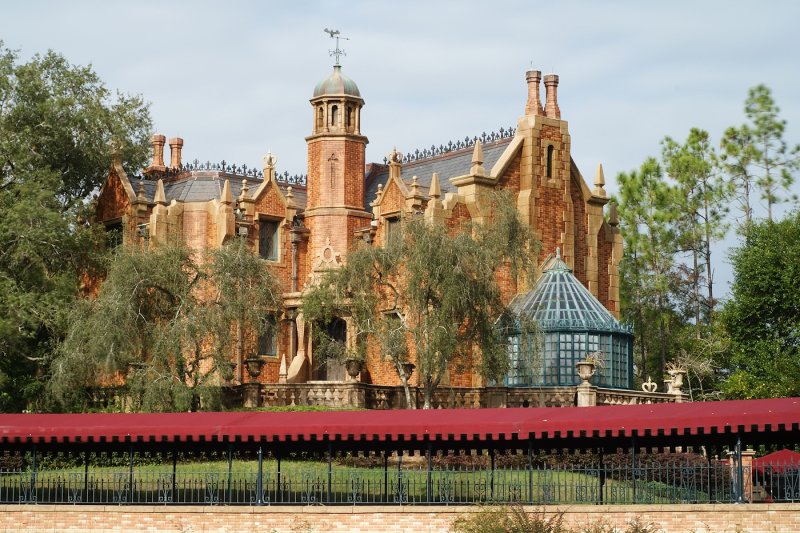
Just to give you an example of how effectively you can blur people out, here's a 13 second exposure of the Haunted Mansion taken during the day...you KNOW there was a line there...but they were moving forward during my exposure, and in the end you basically don't see anyone there:

107208635.jpg


If you look close, you may notice a faint blur or darker area where people would be.

In this one, it's the Liberty Square bridge from the castle hub, in the middle of the afternoon. Hundreds of people walked through this shot, but it was a 30-second exposure, so you can barely notice anyone was there (someone in a red shirt stopped or was moving slow, and picked up a little streak on the left side, and people coming down the castle bypass in white shirts picked up a bit):

107208665.jpg


That principle is what makes night shots often look so quiet and abandoned. They are often there, but you just don't see them because they stayed in motion:

113609269.jpg


(You know that place is never empty at 9:30pm, with the dinner crowds!)

Hope that helps explain it a bit!


Disney Vacation Planning. Free. Done for You.

Our Authorized Disney Vacation Planners are here to provide personalized, expert advice, answer every question, and uncover the best discounts. Let Dreams Unlimited Travel take care of all the details, so you can sit back, relax, and enjoy a stress-free vacation.
Start Your Disney Vacation
Disney EarMarked Producer


DIS Facebook DIS youtube DIS Instagram DIS Pinterest DIS Tiktok DIS Twitter
Add as a preferred source on Google

Back
Top Bottom