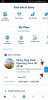
Viewing My FP+ After New MDE Update

armerida

DIS Veteran
Joined
Mar 21, 2018
Messages
1,118
Is everyone else unable to get right to their scheduled FP to modify them under “Get FP+” after the MDE update?

I went in to change a time and instead of seeing all my FP, I came to the “Create a FP+ Party” screen. I can only see my FP selections under “See All Plans”, which is annoying since that screen is cluttered with my ADR’s, scheduled entertainment, etc. I foresee this being very annoying when I’m in the parks trying to move times around...

Thanks for any info or a workaround!
 
I close the app and log back in when that happens. It usually clears up.

MDE has been glitchy for months for me. Reservations I’ve canceled still show up. Fastpasses I’ve canceled show up. It freezes up frequently.

It can be annoying, but it usually works eventually.
 
Is everyone else unable to get right to their scheduled FP to modify them under “Get FP+” after the MDE update?
That’s what I see too. I logged out and then went to FP and saw exactly the same thing.

I checked the menu bars in the lower right and nothing there to view booked FP.

You may have to go in through the browser.
 
I found the same....it seems to skip the page that it used to go to. I too had to view all plans to see them.
 

I had the same thing happen. I finally took the app off my phone then reinstalled it and that took care of the problem.
 
I assume you tried to click the Refresh button first?

What type of phone? If you happen to have an Andriod I'd log out, close the app, go in to the settings and clear out the cache, open the app, sign back in and see if that clears up the issues.
Apple doesn't have a cache to clear but that's what I have and don't have that problem.
I do have issues where I can't see updated plans but typically, signing out, closing the app, opening up and signing back in fixes things.
 
I had the same thing happen. I finally took the app off my phone then reinstalled it and that took care of the problem.
Hmm, I just deleted and reinstalled the app and am still having the same problem - what type of phone do you have? I have an iPhone 7
 
Thanks for finding the filter! Perfect!
Only problem is that if you close the app you'll have to redo it the next time you open the app....I guess just keep it open in the background. Hopefully it changes back to how it used to work.
 
I just realized mine is doing the same thing. It wasn't obvious to me at first since My Plans only show FP because that's all the plans I have (aside from a Resort). We only do same day ADR
Problem is, I'm not sure it's working incorrectly.
This may be the way it's designed to be, if you think about it logically.
I could well be wrong but it wouldn't surprise me if this change was intentional based on Guest feedback. The old way, when you clicked Get FP, it didn't open the Get FP page. You got a page that listed FP and you had to click Get FP or the little +, I forget which now, again. Not as intuitive. Now, when you click Get FP, you actually go to the Get FP page. More intuitive. No idea, just my 2 cents.
 
@AngiTN - I think you are correct on the intuitiveness part of it. The “+” may not have been that noticeable to some.

With the Filter that @JETSDAD found, viewing only FPs for a specific day is possible.
 
When I click the blue arrow and then filter, my only choices are Resort and Dining, not FP. My FP don't show up in My Plans, but there is a Next FP on the home page.

Edit never mind, I don't know what I did, logged out and in, refreshed, messed around, now they are there.
 
Thanks for all the tips, everyone. I guess the new set-up is more intuitive but it adds an extra step to modifying my FP which is a little annoying. Oh well!
 
When I click the blue arrow and then filter, my only choices are Resort and Dining, not FP. My FP don't show up in My Plans, but there is a Next FP on the home page.

Edit never mind, I don't know what I did, logged out and in, refreshed, messed around, now they are there.
My only filter choices are resort hotel, dining reservations, note and dates. My FPs don't show up in My Plans either. I've signed out and back in. Deleted the app and reinstalled it. They still don't show up, but the do show up on the website.

I wonder if this is ticket and/or reservation related. In other words, maybe for non AP holders, FPs won't show up on the app until we've checked in to our hotel? Kind of like the new bus wait time deal; doesn't that require you to be checked in before you can see it on the app?

Curiously, our club level nighttime viewing "reservations" show up in My Plans.
 
My only filter choices are resort hotel, dining reservations, note and dates. My FPs don't show up in My Plans either. I've signed out and back in. Deleted the app and reinstalled it. They still don't show up, but the do show up on the website.

I wonder if this is ticket and/or reservation related. In other words, maybe for non AP holders, FPs won't show up on the app until we've checked in to our hotel? Kind of like the new bus wait time deal; doesn't that require you to be checked in before you can see it on the app?

Curiously, our club level nighttime viewing "reservations" show up in My Plans.

We are not AP and it’s still working for me. Does it show your “Next FP” on the home screen? I think what worked for me was clicking the blue arrow next to that and then pulling the plans screen down long enough to get it to refresh. It will say at the top when you pull down when it was last refreshed so try to get it to refresh to today.
 
It does not show Next FP on my home screen. It just shows my next dining reservation and resort reservation. It's a profound mystery.
 
It does not show Next FP on my home screen. It just shows my next dining reservation and resort reservation. It's a profound mystery.

On the home screen under My Plans, underneath the Get FastPass there is a little link that says Refresh Plans. Have you tried that?


Disney Vacation Planning. Free. Done for You.
Our Authorized Disney Vacation Planners are here to provide personalized, expert advice, answer every question, and uncover the best discounts. Let Dreams Unlimited Travel take care of all the details, so you can sit back, relax, and enjoy a stress-free vacation.
Start Your Disney Vacation
Disney EarMarked Producer


DIS Facebook DIS youtube DIS Instagram DIS Pinterest DIS Tiktok DIS Twitter

Add as a preferred source on Google

Back
Top Bottom