Photo Merging... Baseball

handicap18

<font color=blue>Husband, father of 3, and Disney
Joined
Oct 18, 2005
Messages
4,860
Hi guys

I have a bunch of shots of DS pitching that I want to merge into one image showing the sequence. I've looked on line and found a few tutorials but I can't seem to get it quite right. I know there have been a few images posted here on the photo board and I would like some info on how it was done and if you have done it, please post the final image.

I have Photoshop Elements 9 (got it so I could do edits like this).

Any help is greatly appreciated.
 
Hi guys

I have a bunch of shots of DS pitching that I want to merge into one image showing the sequence. I've looked on line and found a few tutorials but I can't seem to get it quite right. I know there have been a few images posted here on the photo board and I would like some info on how it was done and if you have done it, please post the final image.

I have Photoshop Elements 9 (got it so I could do edits like this).

Any help is greatly appreciated.

The technique involves layering and aligning the shots then masking out each layer to reveal the progression. I am not familiar with Elements so I am not sure if it supports layers and masks like photoshop.
 
It can be fairly easy to do in layers, if you took the sequence of shots on a tripod so there is no alignment needed - that way the only things that changed between each of the shots is the subject's position. If however you were handheld, it gets a little more complex since you need to first align each of the shots so the backgrounds are the same framing and tilt/perspective.

Once you've taken care of alignment, it can be as simple as stacking each image over the last in layers, then setting the opacity of each layer in 'normal' blend mode to something like 30-50%. You get a 'ghost' image of the next position over the last...depending on how many total images you stack, you generally want to leave one of them - either the first position or the last position, with full opacity and no ghosting. Sometimes when stacking the layers with reduced opacity, it helps to mask or erase away the extra landscape around the subject, which can sometimes cause loss of detail or blur - such as grass, or trees, that might shift a bit in a breeze.

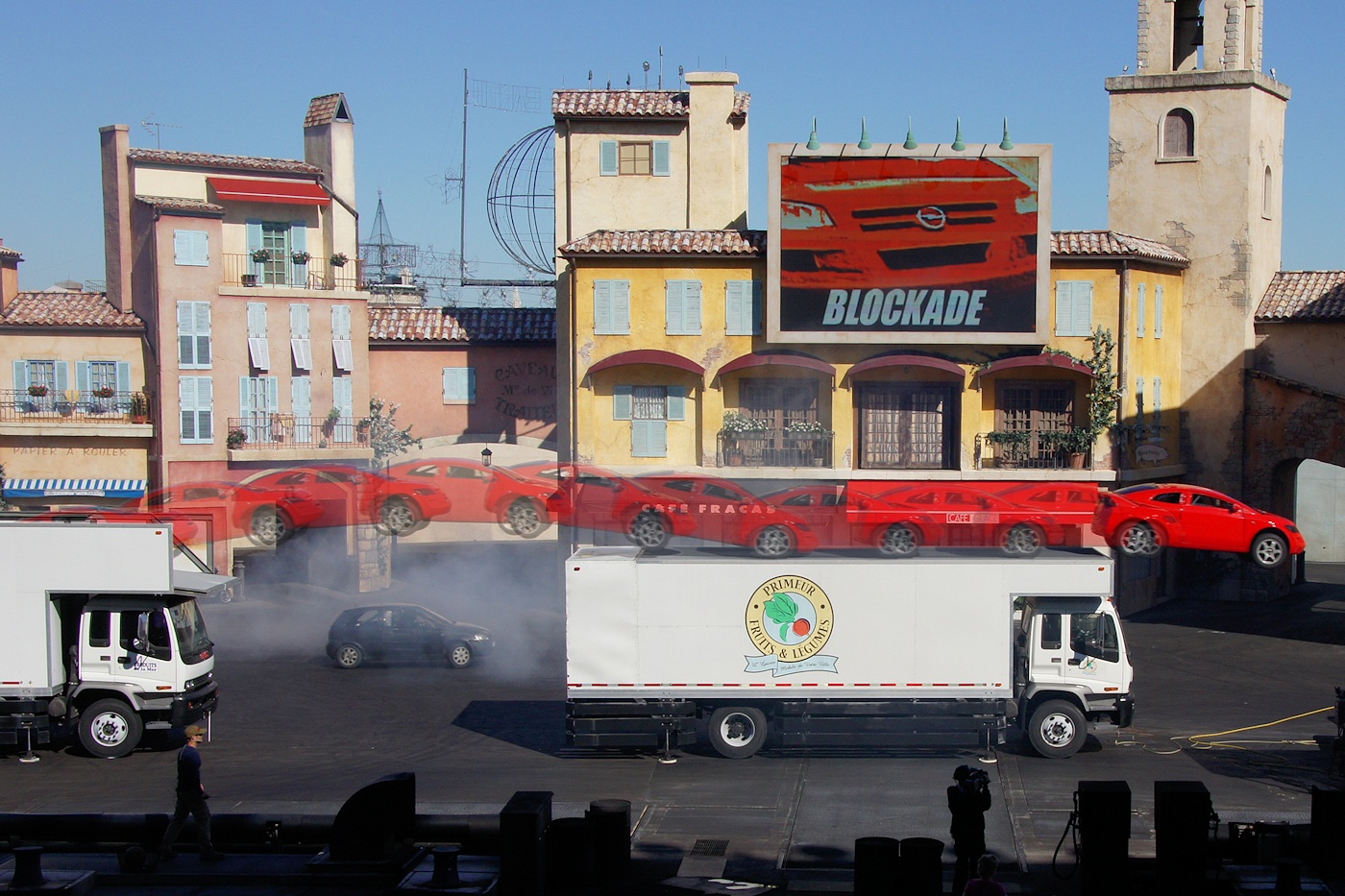
I used the technique described above - with the 10-12 frames taken on a tripod to make sure the backgrounds matched - for this shot at LMA:

original.jpg


That one used the 'ghosting' technique with 30-50% opacity so the jump progression was like a series of ghost images leading up to the car's final position.

I also did another, where I layered each of the 3 frames with 100% opacity, masking out the backgrounds other than where the bike was, so it looked like 3 bikes making the jump instead of 1:

original.jpg


Because I wanted the bike to show through without any ghosting, this required erasing away or masking out the background in two of the shots so it didn't interfere with the image of the bike in each placement.
 
Thanks for the tips. For some reason I can't yet grasp how to do layers in Photoshop. One of these days I'll get myself a hands on tutorial from someone who knows.

Anyway. I figured out another way to do it. There is an option called Photomerge Group Shot. I looked it up on youtube and its a very cool feature. I didn't find any sequence examples, but I tried it out anyway. Got pretty much what I want and it turned out to be pretty easy.

Let me know what you think.

ThomasSequence-L.jpg
 

I really miss shooting baseball. Parents used to love these type of shots.


My boy has graduated High School...
 
I'm glad that you found a method that works for you...but since you asked what we think, here are my idea on how you can improve the image.

There's too much going on that's distracting from what should be the central focus of the image -- the boy.

Erase the head and shadow of the other kid in the background. Lose the fence in the background or at least change the bright yellow of the fence topper to a subdued green and blur the background. Move the ball closer to the boy's line of sight (and maybe add a small streak behind it).

The "middle" composited figure would have the most impact of the three composited figures, because the boy's arm is extended at the peak of action. Unfortunately, his extended arm, from which the ball came, is hidden by the foreground figure. I'd consider making the foreground and background figures transparent so the middle figure shines through (it would also make it clearer that this is a series of the same boy, not triplets standing too close too one another).

Finally, I'd pretty up the image by fixing the color cast, increasing contrast, bringing out more of the green in the grass and colors in the dirt, level the image, and crop for a better composition (pano-style widescreen might work).

Just to give an idea of what I'm talking about, here's a quick & dirtly 5-minute job done in a REALLY old version of Elements 5, on an uncalibrated, old laptop. I didn't have the original images used for the composite, so I couldn't show his arm in the middle figure. I took pieces of his arm, repositioned, and created a portion of a fake arm (no hand) as an idea. I probably would have done things differently if I had the originals. I also failed to take transparency of the figures all the way down the legs (just trying to do this quickly as a demonstration).

ThomasSequence-Lcopy2.jpg
 
Good points. I hadn't really got into editing it. I'm unsure how I like the ghost effect. I had considered getting the 2nd baseman's head out, but hadn't gotten around to it. I also like the idea of blurring the background more.

As I get more into Photoshop I'll definitely incorporate those idea's. Still in the early playing around stages.

Thanks again for the tips.
 
Thought I'd share another technique for showing sequential art. In the example below, using zackiedawg's sample, I've divided the image into panels, but the panels combine to form one scene. In the visual language, space between the panels represent the passing of time, so this isn't an image of three different motorcyclists, but, rather, one cyclist moving through the scene. In this example I played around with the idea of the subject breaking the frame (not sure how I like it). In this example I kept the proportion of the background intact, but if I were to do it again, I'd probably add additional space between the panels. I've also observed this technique used with a stationary subject standing before same the background in each panel, like a baseball pitcher winding up and throwing the ball.

Moto.jpg


Disney Vacation Planning. Free. Done for You.
Our Authorized Disney Vacation Planners are here to provide personalized, expert advice, answer every question, and uncover the best discounts. Let Dreams Unlimited Travel take care of all the details, so you can sit back, relax, and enjoy a stress-free vacation.
Start Your Disney Vacation
Disney EarMarked Producer

New Posts


DIS Facebook DIS youtube DIS Instagram DIS Pinterest DIS Tiktok DIS Twitter

Add as a preferred source on Google

Back
Top Bottom