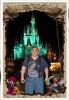
orange hue inside photos

donkortajr

Mouseketeer
Joined
Aug 19, 2004
Messages
155
I have a Canon Digital Rebel with built in flash.
I usually use it in the AE Program mode.
My problem is almost all photos I take indoors come out with and orange hue over the photo. The out door photos are excellant.
Can anyone give me a suggestion on what I may be doing wrong? Indoor photos with my kids Canon Power SHot point & shoot cameras come out great indoors compared to mine.
 
It may help if you could post an example pic but my guess is that the color is due to the lights in the house. Happens all the time. A yellow/orange cast. This shouldn't happen if you shoot with the flash on. Does it? I fix this problem with one of two ways. Either, I use a white piece of paper and take a pic of it in the room that you are taking photos in. Then set that photo as your white balance. There should be instructions on how to do this in your user manual. The other way (and the one I use the most) is to just change the white balance in post processing with lightroom or photoshop or just about any other photo processing program I would imagine. You have to make the white balance more towards the blue (less deg K) end of the spectrum to get rid of that coloring.
 
It may help if you could post an example pic but my guess is that the color is due to the lights in the house. Happens all the time. A yellow/orange cast. This shouldn't happen if you shoot with the flash on. Does it? I fix this problem with one of two ways. Either, I use a white piece of paper and take a pic of it in the room that you are taking photos in. Then set that photo as your white balance. There should be instructions on how to do this in your user manual. The other way (and the one I use the most) is to just change the white balance in post processing with lightroom or photoshop or just about any other photo processing program I would imagine. You have to make the white balance more towards the blue (less deg K) end of the spectrum to get rid of that coloring.

If you do the post processing method, you should shoot in RAW.
 

Since I started shooting RAW I usually just leave the WB on auto when shooting indoors. If I'm using a flash, I'll also gel it depending on the light source.
 
Auto white balance rarely does a good job indoors in my experience. For better results, use the tungsten WB setting. For perfect results, get a grey card and manually calibrate your WB.
 
On a side note, my new K-x has an option to be more aggressive indoors with the WB. So far, it has done great!
 
I assume that you're not using a flash. In which case, the WB should be set to tungsten. Now if you are using a flash, then it's probably an entirely different problem. Shooting in RAW will eliminate this problem though; because you can change the white balance later on.
 

New Posts


Disney Vacation Planning. Free. Done for You.
Our Authorized Disney Vacation Planners are here to provide personalized, expert advice, answer every question, and uncover the best discounts. Let Dreams Unlimited Travel take care of all the details, so you can sit back, relax, and enjoy a stress-free vacation.
Start Your Disney Vacation
Disney EarMarked Producer


DIS Facebook DIS youtube DIS Instagram DIS Pinterest DIS Tiktok DIS Twitter

Add as a preferred source on Google

Back
Top Bottom

