Doh....mine still don't work. All I can get are the ones in the drop down box - when I click on the extras, I just get taken back to my post. Would put a very very sad smilie here, but I can't : (
Doh....mine still don't work. All I can get are the ones in the drop down box - when I click on the extras, I just get taken back to my post. Would put a very very sad smilie here, but I can't : (
Do you have anything on your toolbar at the top that says 'blocked' or '11 blocked' for example.
If you do then just click on it and it should change to 'popups okay'....?
Hope this helps - not sure why I am reading a post about 'smileys' , spoiling my reputation here....
Can't remember what to do but I found the advice on the tech board here
Think it was either to do with my Norton Security or Windows XP security
Just had a look and pop up blocker is in 'tools' ( at the top of the browser) for Windows - turn it off
Our Authorized Disney Vacation Planners are here to provide personalized, expert advice, answer every question, and uncover the best discounts.
Let Dreams Unlimited Travel take care of all the details, so you can sit back, relax, and enjoy a stress-free vacation.




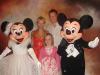


 Have a feeling that this one
  is going to be used quite alot by a certain Mrs. M. Mouse